Building a SOC From Scratch (Part 3) - Designing a Logical & Network Architecture
With threats and risks identified, the next step is to translate that analysis into a concrete design. This stage focuses on defining both the logical and network architecture before implementation begins, allowing us to identify potential gaps, validate assumptions, and address weaknesses early in the design process.
The goal is to ensure the environment is intentionally segmented, monitored, and defensible before any systems are deployed.
Network Architecture Overview
The network architecture is designed to clearly illustrate:
- Infrastructure components and security boundaries
- IP ranges, subnets, VLANs, routing, and firewall placement
- Allowed ports and how traffic flows between systems
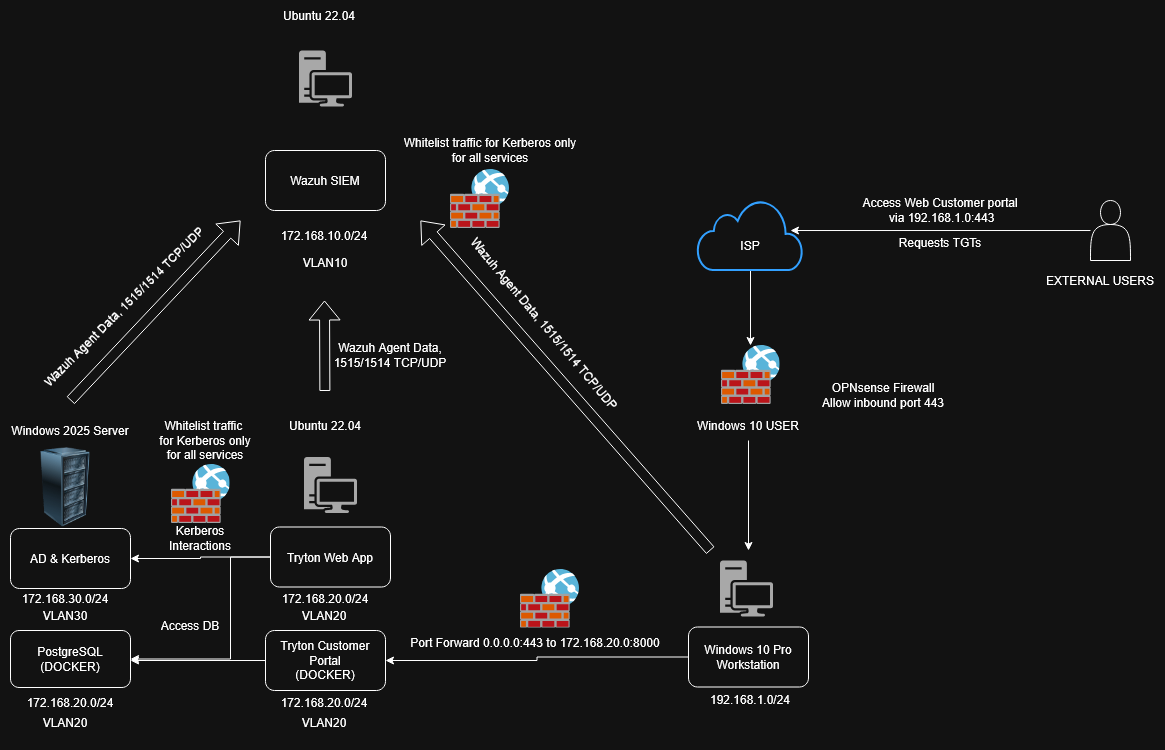
Architecture Breakdown
External users—including customers and partner organizations—access the Tryton customer portal** through an externally exposed Windows 10 workstation. This system acts as a controlled ingress point and only accepts inbound traffic on TCP 443. All other inbound traffic from the internet is explicitly blocked.
Internally, this workstation is permitted limited outbound and inbound communication required for:
- Kerberos authentication
Wazuhagent telemetry- Port 8000 traffic to the
Trytonweb application
Importantly, this system has no access to the Tryton administrative interface, reducing the risk of privilege escalation from an exposed endpoint.
SIEM (Wazuh) Access Model
The SIEM is treated as a critical security asset and is tightly restricted. As a headless Linux server, it does not require RDP access. The only accepted inbound connections are:
- SSH for administrative access
- Wazuh agent traffic from monitored systems
- Kerberos interactions for authentication
All other inbound connections are denied by default.
Application and Database Communication
The Tryton ERP server accepts inbound and outbound traffic only for essential services:
- Ports 443 and 8000 for the customer and administrative portals
- Kerberos authentication traffic
- PostgreSQL (TCP 5432) for database communication
Wazuhagent telemetry
The Windows Server hosting PostgreSQL permits inbound and outbound traffic exclusively for:
- Kerberos authentication
- PostgreSQL database services
Wazuhagent communication
Shared Services
All systems are allowed inbound and outbound connectivity for:
- DNS name resolution
- NTP time synchronization
These services are required for authentication, logging consistency, and overall system stability.
By defining these boundaries and communication paths upfront, the architecture reduces unnecessary exposure, enforces least privilege at the network level, and provides a clear foundation for implementing firewall rules and monitoring controls in the next phase.