GOAD Phase 1 - Detection: Wazuh and Suricata Analysis
The previous post covered the recon phase: the NXC SMB sweep, the full nmap port scan, DC discovery, and getting Kali configured to speak Kerberos. This post flips to the defensive side. What did those scans actually look like in Wazuh and Suricata? What fired, what didn’t, and what would break against a more careful attacker?
This is the kind of analysis a SOC analyst does after an incident: starting from known attacker behavior and working backward to figure out what the tools caught, what they missed, and what detection gaps need to be addressed.
Attacker IP throughout:
192.168.56.137
A Problem I Had to Fix First: No Sysmon
GOAD’s provisioning script doesn’t install Sysmon. That matters because Sysmon is one of the primary sources of process-level telemetry on Windows. Without it, Wazuh’s visibility is limited to what default Windows Event Logging produces, which is a lot less.
I found this out the hard way. After running the initial recon phase, Wazuh had almost nothing useful to show. I had to manually install Sysmon across all five GOAD machines, confirm the logs were flowing into Wazuh, and rerun the entire port scan before there was anything worth analyzing. If your SIEM looks suspiciously quiet after a scan, check Sysmon before assuming you have good coverage.
Detecting the NXC SMB Sweep
When nxc smb 192.168.56.0/24 runs, it initiates an anonymous NTLM negotiation against every SMB host on the subnet. It starts the authentication handshake to pull host metadata (hostname, OS version, domain, signing status) but never completes it. The target machines log this as a network logon from ANONYMOUS LOGON.
The Wazuh query to surface it:
data.win.system.eventID = 4624 AND data.win.eventdata.logonType = 3
Event ID 4624 is a successful logon. Logon type 3 is a network logon, as opposed to interactive (type 2) or service (type 5). Filtering to type 3 narrows the result set to authentication events coming over the network.

All of those hits fired on rule 100105, which I built in an earlier lab to catch Pass-the-Hash by flagging anonymous NTLM network logons. Technically, this is a false positive since no hash was actually passed. But from the target machine’s perspective, the anonymous NTLM knock NXC sends during a sweep looks identical to the first stage of a PTH attempt. The machine sees an anonymous logon, logs it, and the rule fires.
Two things make this alert worth investigating even though the specific technique classification is wrong:
- It fired on all five machines within milliseconds of each other. Legitimate anonymous logons don’t do that.
- The source IP (
192.168.56.137) is consistent across every hit, giving you a clear starting point to pivot from.
This is a useful reminder that rules don’t need to be technically correct about the technique to be operationally valuable. The behavior is suspicious either way.
Detecting Nmap in Wazuh
Nmap’s -sC flag runs default NSE scripts. The SMB enumeration scripts in that set have to supply a workstation name during authentication, and nmap uses the string nmap as that identifier by default.
data.win.eventdata.workstationName = nmap
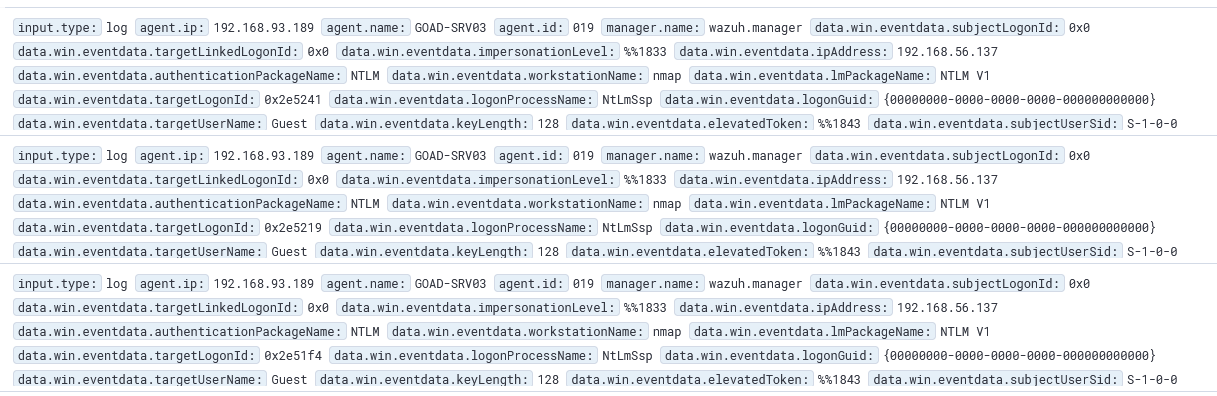
A few things worth pulling out of those logs:
workstationName: nmap- nmap announces itself and doesn’t try to hide itipAddress: 192.168.56.137- consistent with the NXC sweep hits abovetargetUserName: Guest- the account the SMB scripts probe againstlmPackageName: NTLM V1- the older, weaker NTLM variant; worth flagging on its own since modern environments should be enforcing NTLMv2 at minimum
The obvious limitation: this query only works because nmap didn’t bother to change its default workstation name. One flag change (--script-args smbdomain=ANYNAME) and this detection produces zero results. Any attacker who knows nmap defaults will bypass this trivially.
Detecting the Port Scan in Suricata
Wazuh handles authentication event logs well but it’s not the right tool for raw network-level detection. Port scanning belongs in Suricata.
In EveBox, the Events tab shows Suricata’s FLOW records. After the nmap scan:
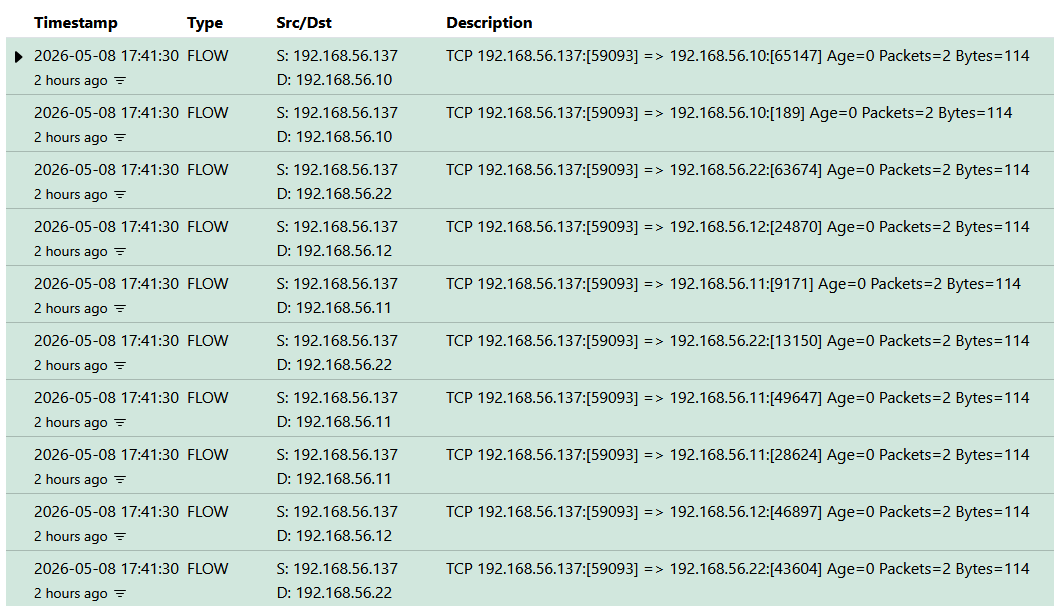
One source IP, the same timestamp, different destination ports across multiple hosts. That’s a port scan. FLOW records don’t generate alerts by themselves, but they give you the raw network evidence to confirm what the alerts are pointing at, which matters when you’re trying to distinguish a real scan from a noisy false positive.
The Alerts tab had 7 hits:
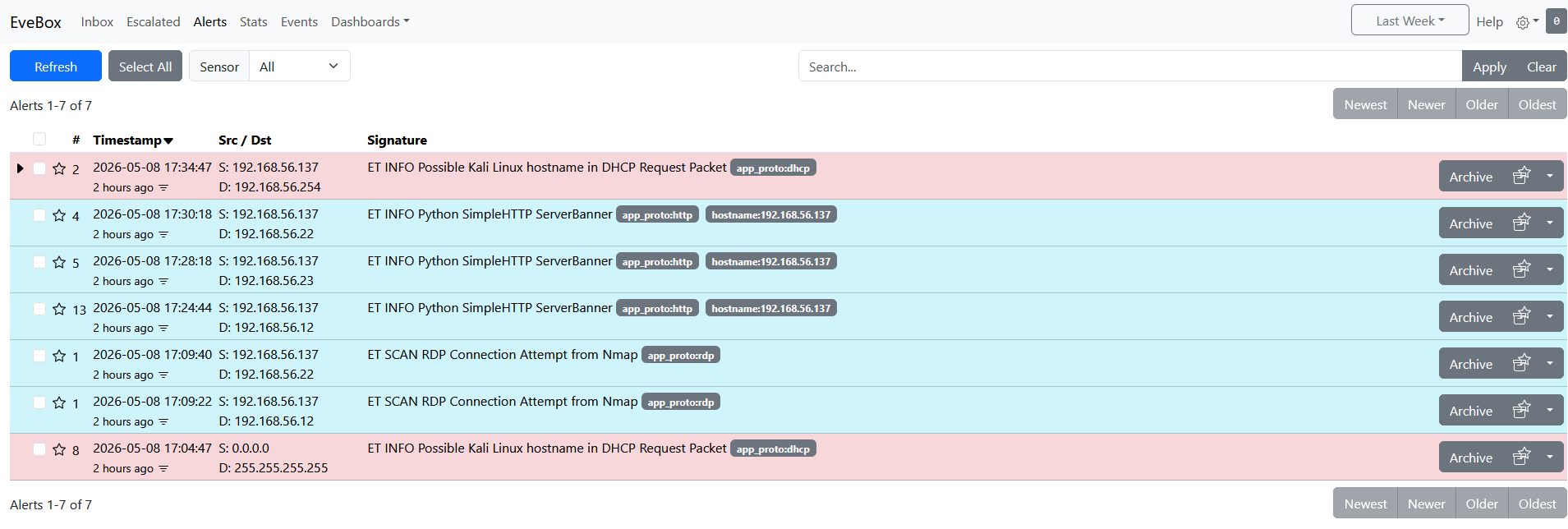
Breaking these down:
-
ET SCAN RDP Connection Attempt from Nmap (2 hits, against
192.168.56.22and192.168.56.12): Suricata matched nmap’s RDP probe signature. This is the only nmap-specific alert in the list. If the attacker skips port3389, this rule never fires. -
ET INFO Python SimpleHTTP ServerBanner (3 hits, against
192.168.56.12,.22, and.23): This is not from nmap. A Python HTTP server was running on the Kali machine at the time and Suricata caught its banner on HTTP connections to the targets. Interesting to see but not part of the scanning detection. -
ET INFO Possible Kali Linux hostname in DHCP Request Packet (2 hits): Suricata fingerprinted the Kali hostname from a DHCP broadcast. Low signal on its own, but combined with the other alerts it’s useful context that a Kali machine is active on this network.
The only alert that is directly tied to the nmap scan is the RDP one. That’s a narrow hook to rely on.
Why Port Scan Detection Is Hard
The nmap scan here is an easy case for defenders. It’s noisy, uses default signatures, doesn’t spoof anything, and literally announces its tool name in the SMB workstation field. A more careful attacker dismantles all of these detections without much effort:
- Change the workstation name:
--script-args smbdomain=ANYNAMEand the Wazuh query returns nothing - Skip port
3389from the scan scope and the only Suricata nmap rule that fired disappears - Build a custom scanner in Scapy with spoofed source IPs and IP-based correlation breaks entirely
- Slow the scan rate below whatever threshold time-based rules are tuned to and the volumetric pattern disappears
Robust port scan detection at scale is more of a network infrastructure problem than a SIEM problem. Smart routers, firewalls, and switches that enforce ingress/egress controls and detect spoofed traffic handle the cases that no signature-based ruleset can reliably catch. For rule-based coverage, aleksibovellan/opnsense-suricata-nmaps has a solid set of Suricata rules written specifically for common nmap scan types. I’ll pull those in for future phases.
Summary
The takeaway from a detection engineering perspective: default configurations catch default attacker behavior. The moment an attacker steps off the beaten path, the coverage gap grows quickly. Layering SIEM, IDS, and network controls is what closes it.
We’ll continue with our enumeration in the next blog as we don’t have quite enough yet to exploit anything and flip back over to detection just like we did here.