Building a SOC From Scratch (Part 5) - Implementing applications
With the theory and planning behind us, it was time to move into implementation. As a newer team with limited hands-on experience, we quickly learned that some earlier decisions needed to be revisited. Time constraints, overlooked requirements, and simple inexperience meant we had to adjust course more than once. That process, while humbling, was also one of the most valuable learning experiences of the project.
The biggest changes from the original design included:
- Dropping Kerberos due to complexity and time limitations
- Introducing an additional open-source credential management solution (
Vaultwarden) - Implementing an SSH certificate authority for administrative and low-privilege access
Overview
The week prior to implementation, we built and deployed every major solution inside a virtualized lab. This allowed us to prepare docker-compose.yml files, configuration files, and supporting scripts ahead of time so that day one would be as smooth as possible.
Those deployment artifacts are not included directly in this post, but they are available in the collaboration repository used by the team: https://github.com/Zero-For683/atlas_industrial
That repository contains compose files and setup scripts for:
WazuhTrytonVaultwarden
While this post doesn’t dive deeply into troubleshooting & setup, some of the more time-consuming challenges included:
- Configuring
Wazuhcertificates to support HTTPS - Creating and connecting a dedicated PostgreSQL database for
Tryton - Standing up and securing
VaultwardenImplementing
Vaultwarden
It quickly became clear that we needed a centralized way to manage credentials. Storing all access in one person’s head—or one shared document—was not realistic or secure. Vaultwarden gave us a way to delegate access cleanly, limit credential exposure, and reduce the blast radius of any single compromise.
To deploy Vaultwarden securely, HTTPS was mandatory. We handled this by introducing a reverse proxy using Caddy. This allowed us to terminate TLS centrally while keeping the backend services simple.
Below is the Caddy configuration used in our environment:
vaultwarden.corp.atlas.com {
  tls internal
  reverse_proxy vaultwarden:80
}

wazuh-dashboard.corp.atlas.com {
  tls internal
  reverse_proxy https://192.168.100.149:8443 {
    transport http {
      tls_insecure_skip_verify
    }
  }
}

tryton.corp.atlas.com {
  tls internal
  reverse_proxy 192.168.100.151:8000
}
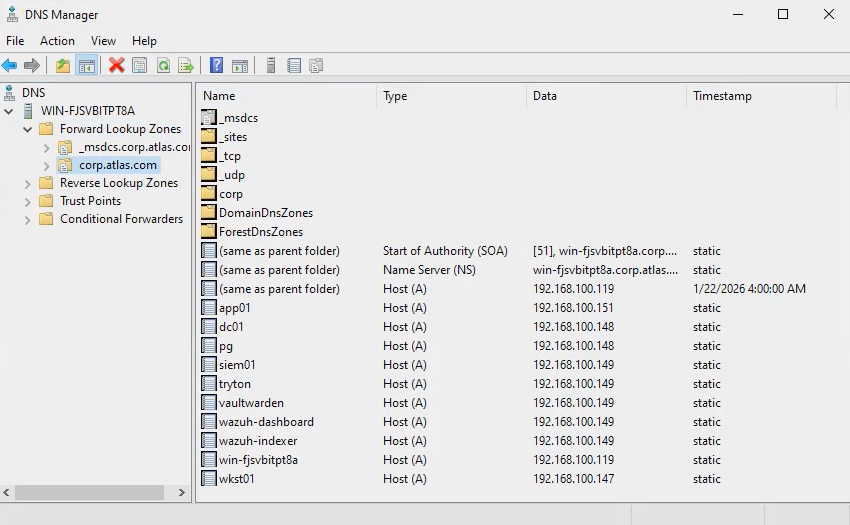
All traffic for *.corp.atlas.com is routed through a single HTTPS-enabled proxy. This simplified DNS significantly—each internal hostname only needed to resolve to the proxy’s IP address, and Caddy handled the rest.
The most challenging part of this setup wasn’t Caddy itself, but DNS. Ensuring that all systems consistently used the Windows Server DNS service required careful configuration and validation across the environment.
Firewalls & SSH Certificate Authorities
With services online, the next priority was enforcing network boundaries. Firewalls were configured to mirror the planned network diagram as closely as possible. The goal was to:
- Lock down Windows 10 to basic workstation functionality
- Allow only required traffic between servers
- Enforce least-privilege at the network layer
This portion was relatively straightforward using Windows Defender Firewall on Windows systems and UFW on Linux hosts.
The SSH certificate authority, however, proved more challenging. While the concept is simple, it was new territory for the team and took additional time to implement correctly.
Traditional SSH keys introduce a few long-term risks:
- Compromised keys are difficult to revoke
- Keys often never expire
- Tracking ownership and usage becomes messy over time
By hosting a centralized SSH certificate authority, we were able to:
- Enforce key expiration
- Control which users can authenticate and where
- Revoke access quickly if a key is compromised
An added benefit is improved identity verification. By configuring known_hosts to trust only CA-signed host keys, we significantly reduce the risk of MITM attacks—even in cases of DNS spoofing or ARP poisoning. In this model, an attacker would need access to the CA private key itself to fully compromise trust.
Finishing Touches
The final cleanup focused on tightening access and removing unsafe defaults.
Default credentials were changed across all services. While docker-compose.yml and .env files can’t be removed, the passwords and secrets they reference were rotated and secured.
Access delegation was also finalized. With a four-person team, unrestricted access would have been both unnecessary and dangerous. Each role was reviewed carefully to ensure:
- No excessive privileges
- No shared credentials
- No forgotten service accounts left with defaults
For example, as the security architect responsible for Wazuh, I retained administrative access to the SIEM systems—but had no direct access to the PostgreSQL database. This process required careful review to avoid overlooked accounts or services.
What’s Next?
Readers familiar with SOC operations may notice something missing: the SIEM itself.
While deploying Wazuh was relatively straightforward, making it useful is where the real work begins. Dashboards, alerts, and detection logic are what turn infrastructure into an actual SOC.
The next post in this series focuses entirely on that process; building detections, visualizations, and alerts that surface real security signals from the noise. The lack of technical setup in this blog was done on purpose, to outline the general principles followed to set everything up. Anyone can follow a guide, or read through documentation to configure an application. The goal of this blog is to showcase the thought processes, consideration, and planning that went into this infrastructure.