GOAD Phase 1 - Recon & Network Enumeration
Getting Oriented
The lab is up. Now comes the part where we pretend we don’t know anything about it.
Throughout this series I’ll be using Orange Cyberdefense’s AD mindmap as a loose reference for what to do at each phase. It covers a huge range of AD attack techniques organized by stage, so I’ll pull from it as needed rather than trying to follow it step by step.
This post covers the recon and enumeration phase: scanning the network, mapping out the domains and DCs, and getting our Kali machine set up to talk Kerberos before any actual attacks start. The defensive analysis comes in the next post.
Scanning the Network
Here’s what the mindmap suggests for initial network scanning:
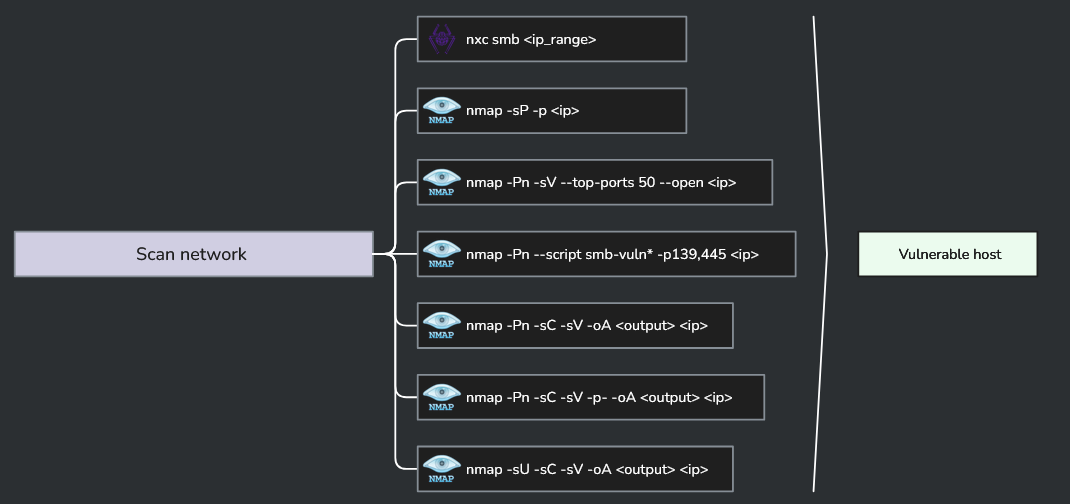
I’ll run the relevant ones. The SMB vulnerability scan (nmap -Pn --script smb-vuln*) I’ll skip for now since that’s more of an exploitation step than recon. UDP scanning with -sU I’ll also defer since it’s slow and we have a pretty clear target already.
SMB Sweep
nxc smb 192.168.56.0/24 | tee smb/nxc_smb_scan.txt
NetExec (nxc) is a Swiss Army knife for Windows network authentication testing and enumeration. Its predecessor, CrackMapExec, did the same job but is no longer maintained. This command does an SMB sweep across the subnet, grabbing hostnames, OS versions, domain info, and signing status from every host that responds.

Five hosts came back. A few things immediately stand out:
| Host | IP | Domain | Signing | SMBv1 |
|---|---|---|---|---|
| KINGSLANDING | 192.168.56.10 | sevenkingdoms.local | Required | No |
| WINTERFELL | 192.168.56.11 | north.sevenkingdoms.local | Required | No |
| MEEREEN | 192.168.56.12 | essos.local | Required | Yes |
| CASTELBLACK | 192.168.56.22 | north.sevenkingdoms.local | Not required | No |
| BRAAVOS | 192.168.56.23 | essos.local | Not required | Yes |
CASTELBLACK and BRAAVOS both have SMB signing disabled. That makes them candidates for NTLM relay attacks later. MEEREEN and BRAAVOS have SMBv1 enabled, which is a legacy protocol Microsoft has been pushing people to disable for years. All worth noting for the exploitation phase.
Also visible: two separate domains, sevenkingdoms.local and essos.local, plus a subdomain north.sevenkingdoms.local. We’ll map this out properly once we’ve done the full port scan.
Host Discovery
nmap 192.168.56.0/24 | tee nmap/nmap_host_discovery.txt
A basic nmap sweep across the subnet. On a local network nmap defaults to ARP ping for host discovery, so this is fast. It found 8 hosts up total – the 5 GOAD VMs plus the host machine and a couple of other devices on the VMware network.
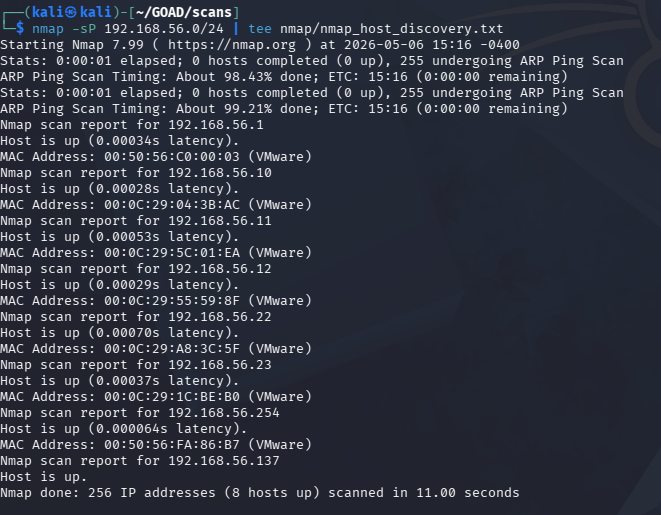
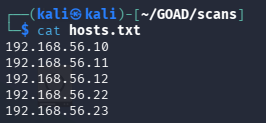
The 5 GOAD VMs are at .10, .11, .12, .22, and .23. Those go into a hosts.txt file to feed into the full scan next.
Full Port Scan
sudo nmap -Pn -sC -sV -p- -oA nmap/nmap_full_network_scan -iL hosts.txt
Breaking down the flags:
-Pnskips host discovery since we already know which hosts are up-sCruns the default NSE scripts (banner grabbing, service enumeration, basic checks)-sVprobes for service versions-p-scans all 65535 ports instead of just the top 1000-oAwrites output in all three nmap formats (normal, XML, grepable)-iL hosts.txtreads the target list from a file

This takes a while. Here’s the full output:
Full nmap output (click to expand)
# Nmap 7.99 scan initiated Wed May  6 15:22:11 2026 as: /usr/lib/nmap/nmap -Pn -sC -sV -p- -oA nmap/nmap_full_network_scan -iL hosts.txt
Nmap scan report for 192.168.56.10
Host is up (0.00026s latency).
Not shown: 65506 closed tcp ports (reset)
PORT      STATE SERVICE       VERSION
53/tcp    open  domain        Simple DNS Plus
80/tcp    open  http          Microsoft IIS httpd 10.0
88/tcp    open  kerberos-sec  Microsoft Windows Kerberos (server time: 2026-05-06 19:22:43Z)
135/tcp   open  msrpc         Microsoft Windows RPC
139/tcp   open  netbios-ssn   Microsoft Windows netbios-ssn
389/tcp   open  ldap          Microsoft Windows Active Directory LDAP (Domain: sevenkingdoms.local)
445/tcp   open  microsoft-ds?
464/tcp   open  kpasswd5?
593/tcp   open  ncacn_http    Microsoft Windows RPC over HTTP 1.0
636/tcp   open  ssl/ldap      Microsoft Windows Active Directory LDAP (Domain: sevenkingdoms.local)
3268/tcp  open  ldap          Microsoft Windows Active Directory LDAP (Domain: sevenkingdoms.local)
3269/tcp  open  ssl/ldap      Microsoft Windows Active Directory LDAP (Domain: sevenkingdoms.local)
3389/tcp  open  ms-wbt-server Microsoft Terminal Services
5985/tcp  open  http          Microsoft HTTPAPI httpd 2.0 (SSDP/UPnP)
5986/tcp  open  ssl/wsmans?
9389/tcp  open  mc-nmf        .NET Message Framing
...
Service Info: Host: KINGSLANDING; OS: Windows; CPE: cpe:/o:microsoft:windows

Nmap scan report for 192.168.56.11
Host is up (0.00068s latency).
PORT      STATE SERVICE       VERSION
53/tcp    open  domain        Simple DNS Plus
88/tcp    open  kerberos-sec  Microsoft Windows Kerberos
389/tcp   open  ldap          Microsoft Windows Active Directory LDAP (Domain: sevenkingdoms.local)
445/tcp   open  microsoft-ds?
636/tcp   open  ssl/ldap      Microsoft Windows Active Directory LDAP (Domain: sevenkingdoms.local)
3268/tcp  open  ldap          Microsoft Windows Active Directory LDAP (Domain: sevenkingdoms.local)
3389/tcp  open  ms-wbt-server Microsoft Terminal Services
5985/tcp  open  http          Microsoft HTTPAPI httpd 2.0
...
Service Info: Host: WINTERFELL; OS: Windows

Nmap scan report for 192.168.56.12
Host is up (0.00055s latency).
PORT      STATE SERVICE       VERSION
53/tcp    open  domain        Simple DNS Plus
88/tcp    open  kerberos-sec  Microsoft Windows Kerberos
389/tcp   open  ldap          Microsoft Windows Active Directory LDAP (Domain: essos.local)
445/tcp   open  microsoft-ds  Windows Server 2016 Standard Evaluation 14393
636/tcp   open  ssl/ldap      Microsoft Windows Active Directory LDAP (Domain: essos.local)
3268/tcp  open  ldap          Microsoft Windows Active Directory LDAP (Domain: essos.local)
3389/tcp  open  ms-wbt-server Microsoft Terminal Services
5985/tcp  open  http          Microsoft HTTPAPI httpd 2.0
...
Service Info: Host: MEEREEN; OS: Windows

Nmap scan report for 192.168.56.22
Host is up (0.00025s latency).
PORT      STATE SERVICE       VERSION
80/tcp    open  http          Microsoft IIS httpd 10.0
135/tcp   open  msrpc         Microsoft Windows RPC
139/tcp   open  netbios-ssn   Microsoft Windows netbios-ssn
445/tcp   open  microsoft-ds?
1433/tcp  open  ms-sql-s      Microsoft SQL Server 2019 15.00.2000.00; RTM
3389/tcp  open  ms-wbt-server Microsoft Terminal Services
5985/tcp  open  http          Microsoft HTTPAPI httpd 2.0
...
Service Info: Host: CASTELBLACK; OS: Windows

Nmap scan report for 192.168.56.23
Host is up (0.00022s latency).
PORT      STATE SERVICE       VERSION
80/tcp    open  http          Microsoft IIS httpd 10.0
135/tcp   open  msrpc         Microsoft Windows RPC
139/tcp   open  netbios-ssn   Microsoft Windows netbios-ssn
445/tcp   open  microsoft-ds  Windows Server 2016 Standard Evaluation 14393
1433/tcp  open  ms-sql-s      Microsoft SQL Server 2019 15.00.2000.00; RTM
3389/tcp  open  ms-wbt-server Microsoft Terminal Services
5985/tcp  open  http          Microsoft HTTPAPI httpd 2.0
...
Service Info: Host: BRAAVOS; OS: Windows

# Nmap done at Wed May  6 15:48:35 2026 -- 5 IP addresses (5 hosts up) scanned in 1584.38 seconds
A few things worth pulling out of that output:
.10(KINGSLANDING) and.11(WINTERFELL) and.12(MEEREEN) all have port88(Kerberos),389/636(LDAP), and53(DNS) open. These are the three domain controllers..22(CASTELBLACK) and.23(BRAAVOS) are member servers. Both are running SQL Server 2019 on port1433, which is a useful attack surface.- WinRM is open (
5985) on all five machines, which matters for lateral movement later.
The domain picture is now clear: two separate AD forests (sevenkingdoms.local and essos.local), with north.sevenkingdoms.local as a child domain under the first forest.
Finding the DC IPs
We already have the DC IPs from the scan, but it’s worth knowing how to confirm them cleanly. The mindmap suggests a few approaches:
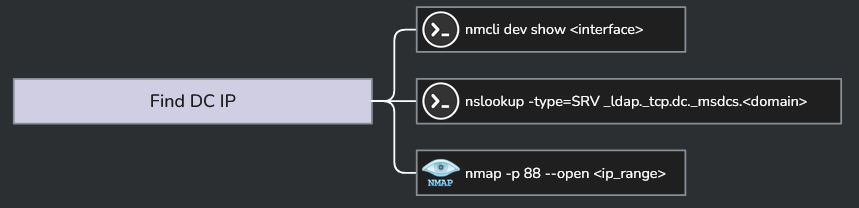
nmcli
nmcli dev show eth0
This shows the network config for our interface, including the gateway and DNS servers being pushed to us. Useful for quickly confirming which IPs are acting as DNS resolvers on the network, since in AD environments DNS is almost always running on the DCs.
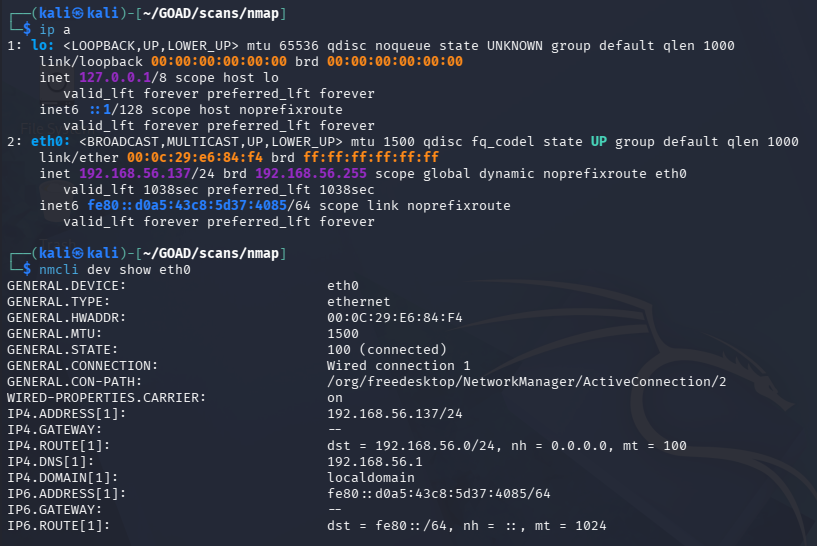
The DNS servers returned are 192.168.56.1 and 192.168.56.254 (VMware network infrastructure), not the GOAD DCs. That’s expected since we’re on the VMware host network, not fully domain-joined. We already know the DC IPs from nmap.
nslookup SRV Records
The cleaner method for DC discovery in a real engagement is querying DNS for the SRV records that Active Directory publishes to advertise its domain controllers:
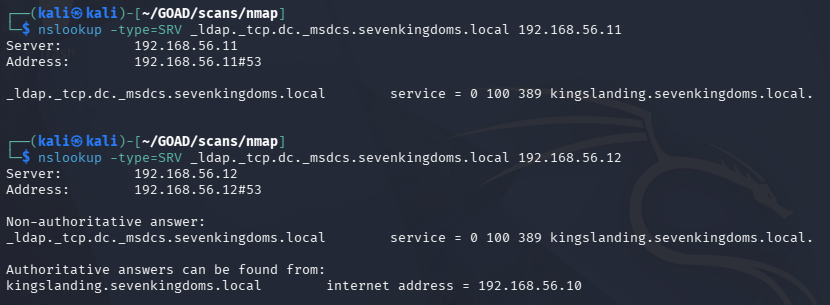
nslookup -type=SRV _ldap._tcp.dc._msdcs.sevenkingdoms.local 192.168.56.10
Breaking that down:
-type=SRVasks for a service record, not an A record_ldap._tcpspecifies we want LDAP over TCPdc._msdcs.<domain>is the specific DNS zone where AD registers its DC service records- The trailing IP tells nslookup which DNS server to query directly
The response names the DC hosting that role for the domain. We run this once per domain, pointing at any DNS server in that forest.

The response (service = 0 100 389 kingslanding.sevenkingdoms.local) confirms kingslanding.sevenkingdoms.local is the DC for sevenkingdoms.local. Running the same query against .11 and .12 returns the same answer since all three are in the same forest and replicate DNS.
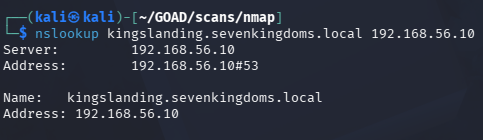
Then a simple A record lookup to confirm the IP:
nslookup kingslanding.sevenkingdoms.local 192.168.56.10
Repeat the SRV query for north.sevenkingdoms.local and essos.local to confirm the other two DCs. After running all three, the full DC map looks like this:
kingslanding.sevenkingdoms.local     -> 192.168.56.10  (DC, sevenkingdoms.local)
winterfell.north.sevenkingdoms.local -> 192.168.56.11  (DC, north.sevenkingdoms.local)
meereen.essos.local                  -> 192.168.56.12  (DC, essos.local)
And the two member servers:
castelblack.north.sevenkingdoms.local -> 192.168.56.22
braavos.essos.local                   -> 192.168.56.23
Setting Up /etc/hosts and Kerberos
With the full picture mapped out, we can set up our Kali machine to resolve hostnames properly and speak Kerberos.
/etc/hosts
# GOAD
192.168.56.10   sevenkingdoms.local kingslanding.sevenkingdoms.local kingslanding
192.168.56.11   north.sevenkingdoms.local winterfell.north.sevenkingdoms.local winterfell
192.168.56.12   essos.local meereen.essos.local meereen
192.168.56.22   castelblack.north.sevenkingdoms.local castelblack
192.168.56.23   braavos.essos.local braavos
The root domain names (sevenkingdoms.local, essos.local) are pinned to their respective DCs at .10 and .12. That’s because those DCs are authoritative for the root of each forest, so DNS queries for the bare domain name need to land there.
Kerberos Client
As a last step we need to setup and configure kerberos so our kali machine can interact with kerberos as a whole (requesting TGTs, service tickets, etc)
The Kerberos client package can be installed with:
sudo apt install krb5-user
Then configure /etc/krb5.conf to map each domain to its KDC. The [domain_realm] section tells the Kerberos client which realm to use when it sees a given DNS suffix:
[libdefaults]
    default_realm = SEVENKINGDOMS.LOCAL
    kdc_timesync = 1
    ccache_type = 4
    forwardable = true
    proxiable = true
    rdns = false
    fcc-mit-ticketflags = true

[realms]
    SEVENKINGDOMS.LOCAL = {
        kdc = kingslanding.sevenkingdoms.local
        admin_server = kingslanding.sevenkingdoms.local
    }
    NORTH.SEVENKINGDOMS.LOCAL = {
        kdc = winterfell.north.sevenkingdoms.local
        admin_server = winterfell.north.sevenkingdoms.local
    }
    ESSOS.LOCAL = {
        kdc = meereen.essos.local
        admin_server = meereen.essos.local
    }

[domain_realm]
    .sevenkingdoms.local = SEVENKINGDOMS.LOCAL
    sevenkingdoms.local = SEVENKINGDOMS.LOCAL
    .north.sevenkingdoms.local = NORTH.SEVENKINGDOMS.LOCAL
    north.sevenkingdoms.local = NORTH.SEVENKINGDOMS.LOCAL
    .essos.local = ESSOS.LOCAL
    essos.local = ESSOS.LOCAL
The default_realm can be set to any of the three, it just determines which KDC gets used when no realm is specified explicitly. forwardable and proxiable let tickets be forwarded or delegated to other services, which matters for some of the lateral movement techniques we’ll be using later.
What We Have So Far
After this phase, the picture looks like this:
- Three domains across two forests, all DCs identified and mapped
- Two member servers running SQL Server, both with SMB signing disabled
- Two hosts with SMBv1 still enabled
- WinRM open across the board
- Kali configured to resolve hostnames and request Kerberos tickets
That’s a solid recon baseline. The next post flips to the defensive side: what this scanning activity looks like in Suricata and Wazuh, what alerts it should (and shouldn’t) trigger, and how to tune detection for it.